
Wisefish Base
Release Date:
What’s New that Needs Your Attention
Introducing Catch Origin:
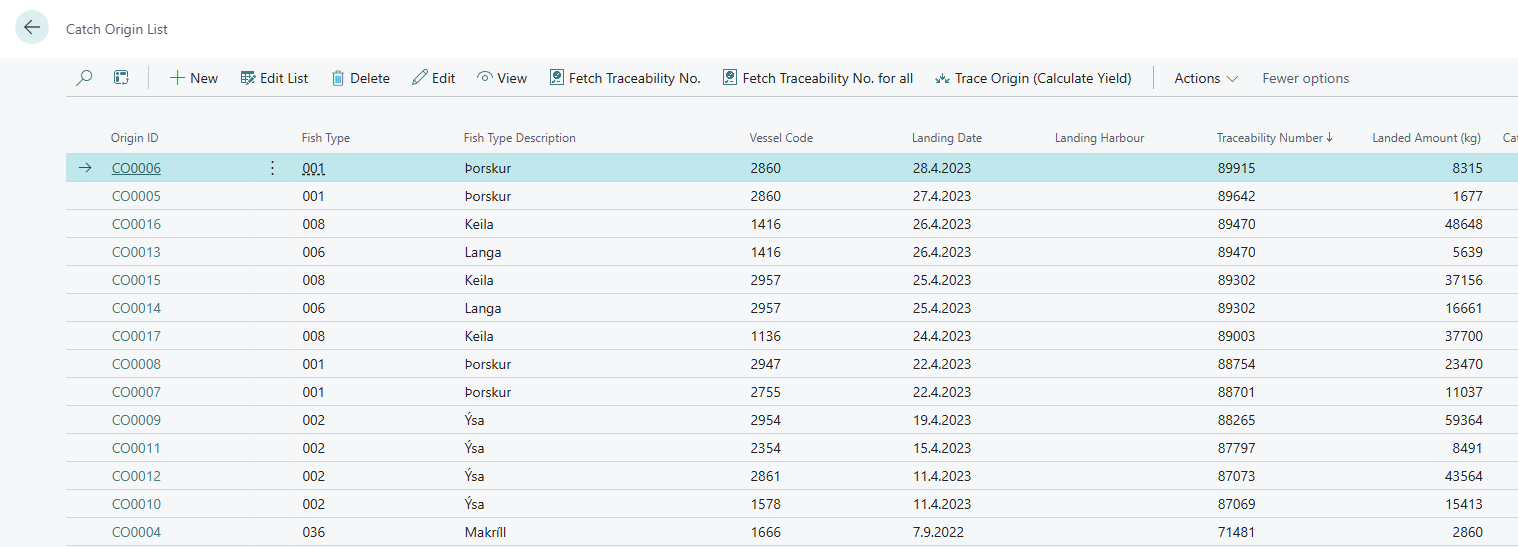
We are introducing a new and fully rebuilt solution for registering where your raw material comes from and following it all the way to the Catch Certificate. It replaces the older Catch Certificate Entries functionality.
Each landing needs to be registered only once in the Catch Origin List. The origins can then be linked to purchase lines individually, by fish type or by copying them to similar lines. Origins follow raw material into production automatically, weighted by consumption.
Reserving Trade Items to a Delivery Agreement automatically adds their catch origins, weights and ratios to the sales lines.
Landing Tracebility Numbers can be fetched directly from Fiskistofa and Catch Certificates can be requested from Delivery Agreements.
Trace Origin can be used to follow a landing through Lots, Production and Sales wich allows for more reliable tracability.
This new functionality is turned on with the Catch Origin Active switch in Wisefish Setup. When it is turned on, existing catch certificate data is converted to Catch Origin records so it is possible to keep working with catch certificates exactly as before.
Enhancements:
-
Purchase to Settle After Sale Worksheet
The Purchase to Settle After Sale Worksheet now has teaching tips that guide you through the worksheet. They explain where the settlement price comes from, how to select lines for invoicing, how to create the purchase invoices and credit memos, and how to handle goods returned by the customer.
Teaching tips have also been added to the Settled Purchase After Sale Entry page, and to the Settle Purchase After field on receipt agreement lines and on the item card. -
Ability to show "Sell-To Customer Name 2" on Delivery Agreements List
In the list of Delivery Agreements it is now possible to show the "Sell-To Customer Name 2" column, using personalization. This was added so it is possible to use this field when having systems that connect with MES (manufacturing execution systems), as "short names" for customers are then needed. -
Your reference field on Sales Invoice (and Proforma)
The Field Your Reference was added to the dataset of "Sales Invoice" and "Proforma Sales Invoice". -
Delivery Agreement sent to invoicing
A call to the variable Sales Document Process that is set in Wisefish Setup has now been added. in order to make the invoicing solution tighter. -
Catch Origin Upgrade
Upgrade code was added to create Catch Origin lines from existing Catch Certificate Entries when Catch Origin is activated. -
UX changes on Lots
UX changes on Lot Card Lots list. Fields and actions re-organized and factbox info added. -
UX improvements in Wisefish Setup
Ux improvements were made to the Wisefish Setup Base and Wisefish Setup Configuration pages and tooltips were updated. -
UX improvements in Trade Item Ledger Entries
Fields on Open Trade Items and Trade Item Ledger Entries have been reordered and some hidden by default. -
MSC handling in lines
A lookup was added in report formatting to check if a DA Lot Cert Prog. entry has been registered.
This allows better control of MSC certificates in sales lines. -
Add filtering by Item Category to report WiFi Production/Consumption (10004601)
The report can now be filtered by Item Category. Several Categories can be added by first selecting one in Item Category Filter, then adding more through the Add Item Category field.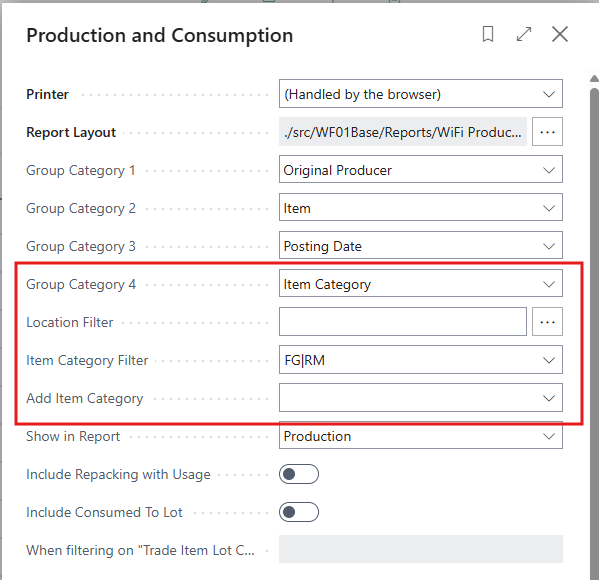
-
Improvement to Trade Item Physical journal
The Pallet No." field has been added to the Journal page (requires personalization) and also as a filter field in the report request page.
-
Zone Overview Page
The option to drill down into lots and other relevant data. The OTI Base Cert. Program was added as a column (requires personalization).
-
Navigation from BC Standard document to WiseFish documents
The Receipt Agreement No. is now shown in a factbox on Purchase Order and Purchase Invoice. When clicked, the RA card is opened.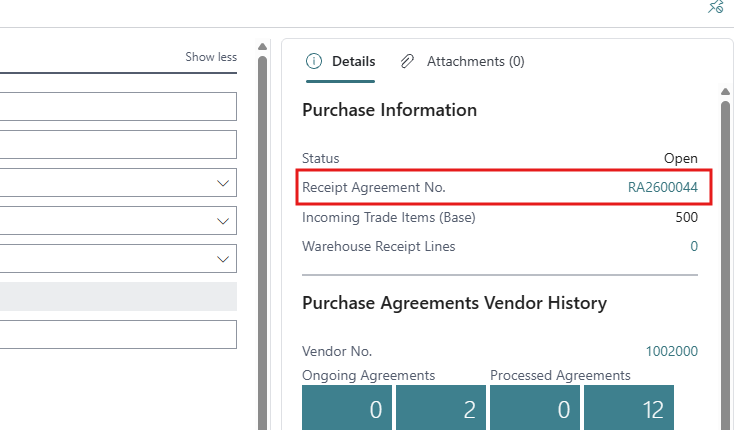
Resolved Issues:
-
Fixes in Lot Contribution Distribution
-
A new field Costs not distributed downstream (and Downstream Flag Set At) was added on the Lot Card, Lot Card Basic and Lot List, plus a Lot List view with the same name. The field is set when value distribution changes a lot's output value and that output has been consumed (Usage or Repacking) into other closed lots.
-
A new page Downstream Lot Value Worksheet, opened from the Lot List (selected lots) or from search (all flagged lots). It shows all closed downstream lots in processing order (level), the value waiting to be redistributed in each lot, an estimate of the value still to arrive from parent lots, and a summary FactBox. Open lots are not included; they get their distribution when they are closed.
-
The Action Run Value Distribution in the worksheet runs value distribution level by level was added.
-
New fields in WiseFish Setup (Item Costing)
Downstream Lot Distribution, Min. Downstream Redistr. Amount, Max. Downstream Levels -
Distribute Contribution no longer re-runs the quantity distribution for closed downstream lots, unless Downstream Lot Distribution = Legacy Cascade.
-
Value distribution no longer posts revaluations for differences below the amount rounding precision.
-
The Raw Material No. Filter in Redistribute Cost for Closed Lots now filters on the lot's Allowed Raw Material, not on the lot code.
-
-
Lot Track/Trace analytic views
Lot Track/Trace From Origin: weights are no longer double counted when an origin lot holds several contribution raw materials (e.g. cod and haddock) and is consumed into a lot with Consumption Distribution per = Lot. Each raw material row now shows only its own share of the consumption. -
Change Status - problem
Not all options are shown when the “Change Status” actions is selected in a Released DA. This has been fixed. Also, the options were syncronized so they are the same also in other Agreeements. -
Delivery Agreement page crashes when WF Setup field active
When the ATP Items by Lots (Sales Agr.) field in Wisefish Setup Configuration was active, the client crashed when trying to open a Delivery Agreement.
Link to Issues:
List of Issues Released November 2026
Release History:
Release Notes Wisefish July Release - 28.1.20260624.99