
This page lists all the fields on MES Connect card.
Some are needed for inbound data handling (MES Transactions), others for outbound data messages. Others are only informational.
Tab: Inbound setup - Data from MES
|
Field |
Description |
|---|---|
|
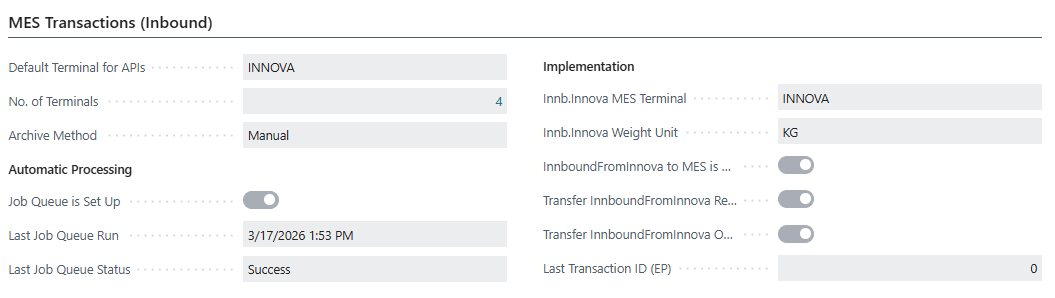
No. of Terminals |
This is just a calculation of how many MES Terminals have been set up. |
|
Default Terminal for APIs |
If there is a terminal that should be set as default, if no |
|
Data Mapping Active |
If this field is checked, the data mapping will be used when exporting data to MES and importing transactions from MES (through APIs). If not checked, the data mapping will be ignored. |
|
Update Lot Period |
If this field is checked, the duration of a lot is expanded automatically, instead of putting the transaction on Error if activity date is outside the period. |
|
Transfer Adjustment to Stock Center |
If this field is checked, adjustment will be posted to the Stock Center currently on the Lot, but after that a new MES transaction is created that will transfer the newly created Trade Item to the given stock center. If not checked (default behaviour), there is an error if a Stock Center is given that does not match the one on the Lot. |
|
Archive Method |
When MES transactions have been processed, they can be archived manually or automatically. This field controls the method used to archive. Manual means that the transactions will be archived when the user clicks the action on the page. Automatic means that transactions will be archived automatically when they are older than a certain period defined in the field "Archive Period". Options:
|
Automatic Processing
This tab has the following fields that are non-editable are are there only for information: |
|
|
Job Queue is Set Up |
Only informational. Indicates whether the Job Queue for handling MES transactions is set up. |
|
Last Job Queue Run |
Only informational. The last time the Job Queue for handling MES transactions was run. |
|
Last Job Queue Status |
Only informational. The last status of the Job Queue for handling MES transactions. Shows if last run was successful or not. |
|
Process Retry Period |
The period during which the job queue will retry processing a transaction that has errors. For example, entering 1D means the job queue will retry until 1 day has passed since the transaction was created. Leave blank to always retry regardless of age. |
Innova Upgrade
Only used when user is currently using the older API for Innova: There is a way to automatically catch the data sent into this endpoint and transfer the data into MES Transactions. See chapter MES Inbound - Upgrading older integration project for documentation about these fields.
|
|
Tab: Outbound Setup - data to MES