
In our earlier MES application (External Production), the data is imported from the MES system into a table called Inbound From Innova. Then data is processed and changed into received items, output, consumption etc. In a similar way as in current MES but with an older processor / posting routine.
This process can be updated to use the new MES processor (posting routine), without changing the way data is imported into the system.
This applies to all projects which currently have integration (e.g. with Innova/Axin, CodeIt) and for when data is sent into BC via the API inboundInnovaEntries
See documentation: EP API - Inbound Entries
Setup
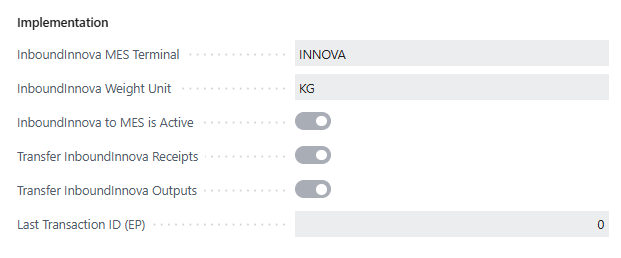
To activate this, use the following fields on the APIs Base Setup, tab MES Inbound Setup:
|
Field |
Description |
|---|---|
|
InboundInnova MES Terminal |
Which MES Terminal is to be used on entries mapped from InboundInnova to MES Transactions |
|
InboundInnova Weight Unit |
This specifies the weight unit of measure that has been read into InboundInnova (Innova/Axin data). |
|
InboundInnova to MES is Active |
To activate that when a transaction is created from the InboundInnova API, the data is copied to the MES transaction tables, if the conditions in the data are met with those listed in the table below. |
|
Transfer InboundInnova Receipts |
To activate the For receipt entries, when a transaction is created from the InboundInnova API, the data is copied to the MES transaction tables. This applies for |
|
Transfer InboundInnova Outputs |
For production output entries, when a transaction is created from the InboundInnova API, the data is copied to the MES transaction tables. This applies for |
|
Last Transaction ID (EP) |
When upgrading from old EP to new MES, it is a good idea to start the MES transactions where the old transactions ended. Specify the last WP Connector PK used in old EP, found in Trade Item ledger Entries. Note: This is only for a clear relation between processed MES Transactions and Trade Item Ledger Entries. |
|
Reading Innova Quantity |
Specifies how the quantity from InboundInnova should be interpreted. 1) Use No. of Trade Items, expect it to be in the TI base unit. 2) Use No. of Trade Items as the quantity, but detect the unit by checking the weight field. 3) Read Quantity and Unit fields. |
|
Use Weight for all entries |
If this field is marked, the Weight value is used for all entries (not only Irregluar Trade Item). |
Data Flow
-
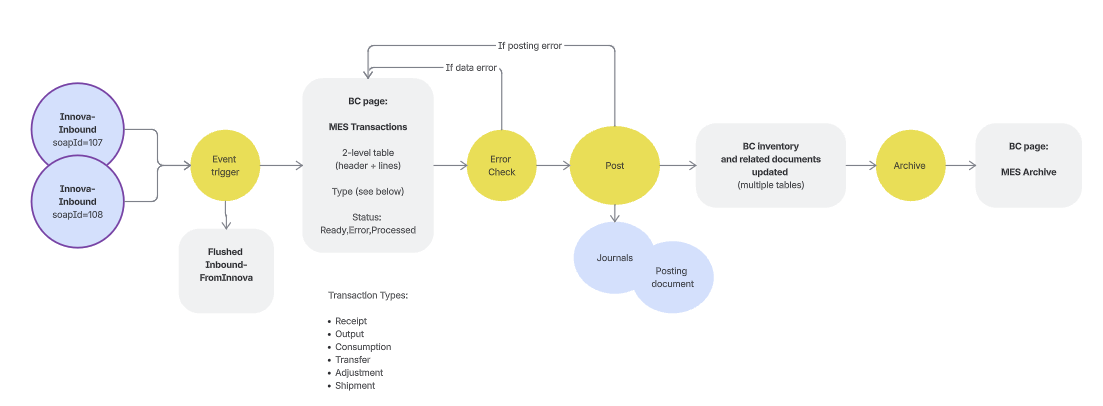
Data is sent into BC with the endpoint
inboundInnovaEntries -
If the mapping is active, the contents of the newly created Inbound From Innova entry is checked.
-
If soapId=107 and “transfer outputs” is active , MES Transaction is created for Output
-
If soapId=108 and “transfer receipts”, MES Transaction is created for Receipt
-
Other soapIds are used just to change status. These entries do not have any items or quantities, then status change is done, but no MES transaction is created.
See all data mapping in the table below: MES Inbound - Upgrading older integration project | Overview of Mapped Entries
-
-
Then Inbound From Innova entry is moved into Flushed Inbound From Innova (because it is not supposed to be processed through the older application, External Production)
-
The new MES Transactions (created in step 2) will be processed through the new MES
Overview of mapped entries
|
Data type |
Conditions checked |
OnInsert event will be triggered, that does the following: |
|---|---|---|
|
Received items |
soapId=108 |
→ the transaction is processed through MES, no processing in old solution |
|
Receipt started |
soapId=300 and ReserveToAgreement-fields are linked to a PO line that exists |
The Purchase Line gets “MES Status” = “In process at MES” |
|
Receipt finished |
soapId=301 and ReserveToAgreement-fields are linked to a PO line that exists |
The Purchase Line gets “MES Status” = “MES Finished” |
|
Produced items |
soapId=107 |
→ the transaction is processed through MES, no processing in old solution |
Field Transfer from EP to MES
|
MES Field |
Inbound from Innova Field |
|
|---|---|---|
|
→ MES Transaction |
|
|
|
"Ext. Reference" |
LineNo |
Format(InboundEntries.LineNo) |
|
"Stock Center Code" |
ProducerID |
|
|
"Activity Date" |
ProductionDate |
DT2Date conversion |
|
"Posting Date" |
(Activity Date) |
Same as Activity Date |
|
"Location Code" |
WarehouseID |
CopyStr(WarehouseID, 1, 10) |
|
"Location Code" |
(Terminal Setting) |
Terminal."Production Location" if WarehouseID empty |
|
Lot |
LotID |
|
|
"Terminal Code" |
(Terminal Setting) |
Terminal.Code |
|
Type |
(Fixed Value) |
Receipt/Output based on SoapID |
|
Stage |
(Terminal Setting) |
Terminal."Receiving Stage" or "Production Stage" |
|
"Document Type" |
(Fixed Value) |
PurchaseOrder (for receipts) |
|
"Document No." |
ReserveToAgreementNo |
For receipts only |
|
→ MES Transaction Line |
|
|
|
"Item No." |
ItemID |
|
|
Quantity |
Quantity |
If Quantity ≠ 0 |
|
"Unit of Measure Code" |
QuantityUnit |
When using Quantity field |
|
Quantity |
masters |
If masters ≠ 0 (outputs only) |
|
"Unit of Measure Code" |
(Item Setting) |
Item."WiFi TI Unit of Measure" when using masters |
|
Weight |
Weight |
If Weight ≠ 0 |
|
Quantity |
Weight |
Used as quantity for weight-based items (receipts) |
|
"Unit of Measure Code" |
(Setup) |
Setup."Innb.Innova Weight Unit" when using weight |
|
"Trade Item Barcode" |
PacketID |
Format(PacketID) |
|
"Pallet Barcode" |
SSCC |
|
|
"Pallet No." |
PalletNo |
|
|
"Pallet Status" |
"Pallet Status" |
|
|
Lot |
LotID |
|
|
"Reserve to Doc. No." |
ReserveToAgreementNo |
For receipts only |
|
"Reserve to Line No." |
ReserveToAgreementLineNo |
For receipts only |
|
"Reserve to Doc. Type" |
(Fixed Value) |
PurchaseOrder (for receipts) |
Key Business Rules:
-
Quantity Logic: If
Quantity≠ 0, use it; ifmasters≠ 0 (outputs), use masters; if both are 0 and item is weight-based (receipts), useWeightas quantity -
Unit of Measure Logic: Depends on which quantity field is used -
QuantityUnit, Item TI Unit, or Setup Weight Unit -
Location Logic: Use
WarehouseIDif provided, otherwise fall back to Terminal's default location -
SoapID determines transaction type: '107' = Output, '108' = Receipt
-
Weight handling: For irregular trade items (outputs), weight is stored separately from quantity