
Overview
The MES production process is about sending data from the MES system into Wisefish to…
-
create production lots
-
post output on the production lot
-
post consumption on the production lots
-
create and update pallets
Output
MES sends in a Transaction
Output transactions is sent from MES into BC via API. It depends on the requirements if they will send in ….
-
1 transaction to create 1 trade item - see documentation:
-
or a bulk transaction which will produce multiple trade items
This endpoint is specific for creating output transactions: API - MES Output Transaction
This is the endpoint for all bulk transactions: API - MES Transactions
The results after the API has been used to send in production output data:
MES Transaction(s) now exist with
-
Type = Output
-
Lines with all the item numbers and quantity produced
-
Status = Ready which means the entry is ready to be posted
The transaction is visible in BC in page MES Transactions
Here is an example of a request that will create one transaction that contains 2 trade items:
POST
.../transactions?$expand=lines

{
    "terminal": "INNOVA",
    "externalReference": "12-31-656",
    "type": "Output",
    "lot": "LOT-03-01",
    "stage": "PRODUCTION",
    "transactionLines": [
        {
            "itemNo": "70064",
            "quantity": 20,
            "unitOfMeasure": "KG",
            "lot": "LOT-03-01"
        },
        {
            "itemNo": "70064",
            "quantity": 20,
            "unitOfMeasure": "KG",
            "lot": "LOT-03-01"
        }
    ]
}
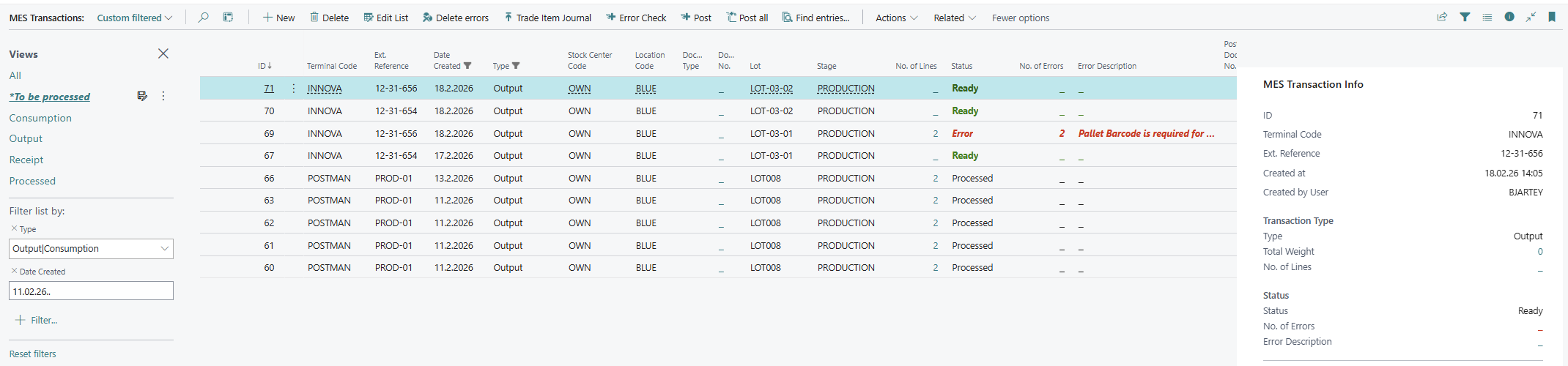
See documentation about the MES transactions page which describes all the columns in the page as well as the most important actions: https://wisefish.atlassian.net/wiki/x/LACWMg
Transaction processed in BC
The transaction is processed by the MES system, usually with a job queue, but can also be done manually with a button on the page.
After the posting of a transaction with Type = Output the following entries have been created in BC:
-
Production Lot has been created (if it did not already exist) and if the Terminal has the checkmark that tells that the lot comes from the MES
-
Pallet has been created (if it did not already exist) - and if Terminal is set up in that way
-
Item Ledger Entries have been created for the trade produced trade item(s)
-
Open Trade Item has been created
-
Trade Item Ledger Entries as well
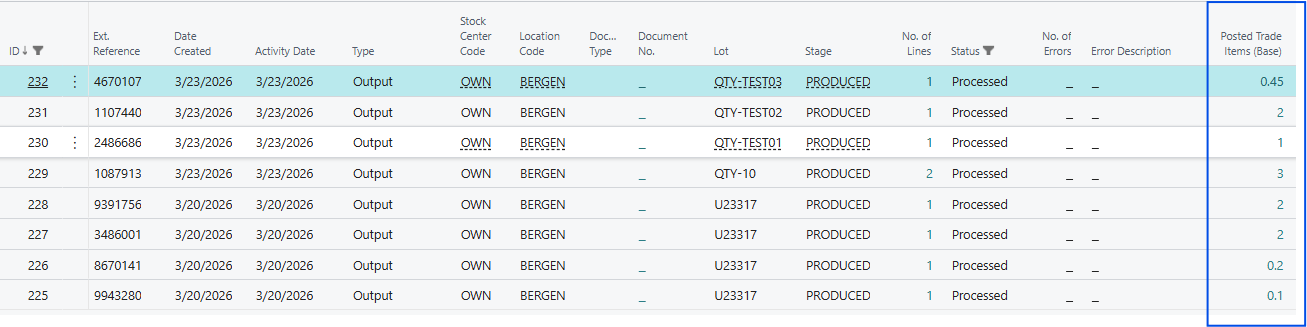
The MES Transaction has been updated so now it has:
-
Status = Processed
-
Posted Trade Items (Base) => This creates a direct link from the transaction to the Trade Item Ledger Entries. By clicking here, user can view the created trade items.
Quantity and Weight fields
How do the Quantity and Weight fields work?
-
Which fields are mandatory?
-
Which values go into which fields in the Trade Item that is going to be created?
-
What about irregluar items?
-
What about raw material versus products?
The chapters here below, try to answer these questions…
Error Handling
Error handling of output transactions:
-
If Quantity is given the Unit of Measure Code may not be blank
-
If Weight is given the Weight Unit of Measure Code may not be blank

Processing = posting of the output
There are only the following variations for a transaction line that is ready to be posted. If none of these applies, the line will stop on error in the pre-processing phase and the output will not be posted:
|
Transaction Line has |
How it will be posted… |
Example In the examples below, the trade item is set up like this:
|
|---|---|---|
|
Quantity Unit of Measure Code |
One Trade Item (one entry) will be created with This Quantity is mapped into
The Weight of the Trade Item will be set automatically by the posting method, in the same way as if the trade item would be created with a Trade Item Output Journal. The unit of the Quantity does not need to be either the base unit of the item or the trade item base unit. See example below where a transaction line with Quantity = 10 LB is posted: |
An example could be like this, if Quantityis
Then the trade items created will be in BOX.
|
|
Weight Weight Unit of Measure Code |
Since there is no unit given for the output, except the weight, the unit of the posted created item will also be weight
|
|
|
Both of the above |
This is particularly used for “Irregular” trade items, which do not have a fixed weight per trade item. TODO… |
|
Example:
The outcome when a transaction line with Quantity = 10 LB is posted, for the same trade item as above:
|
|
Value field |
|
|
Unit field |
|---|---|---|---|---|
|
The figure that was posted goes into Trade Items. |
Trade Items |
10 |
LB |
|
|
This is calculated into the base trade item unit. |
Trade Items (Base) |
0.4535923 |
BOX |
TI (Base) UoM Code |
|
Quantity is the base unit of the item. |
Quantity |
4.536 |
KG |
Unit of Measure Code |
|
|
Quantity (Base) |
4.536 |
KG |
Base Unit of Measure Code |
|
Weight, if Wisefish is in KG. |
Weight (Actual) |
4.536 |
|
Unit of the weight is in the Wisefish Base setup card. |
Consumption
MES sends in a Transaction
In a similar way as the output, consumption transactions is sent from MES into BC via API. As before, these can be bulk transaction or just transactions with a single trade item consumption.
The endpoint is specific for creating output transactions: TODO
The results after the API has been used to send in production output data:
MES Transaction(s) now exist with
-
Type = Consumption
-
Lot = the production lot
-
Lines with all the items and quantity to be consumed. The lot to be consumed is not the same as the production lot to post on. The relation to which item to consume can be different:
-
To refer to a specific Trade Item with its primary key, use fields Trade Item Stage + Trade Item Line No.
-
To refer to a specific Trade Item with its barcode, use fields Trade Item Barcode
-
To refer to a specific Trade Item lot, use fields Trade Item Stage + Lot to Consume. Then the system will use the first trade item available within this Stage and Lot.
-
To refer to a specific standard item (an Item with Trade Item Type = blank) lot, only Item No. is needed, and perhaps a Lot to Consume, if item is lot tracked.
-
-
Status = Ready which means the entry is ready to be posted
This transaction is visible in BC in page MES Transactions
POST
.../transactions?$expand=lines

{
    "terminal": "INNOVA",
    "externalReference": "012345",
    "type": "Consumption",
    "lot": "LOT-03-01",
    "stage": "PRODUCTION",
    "transactionLines": [
        {
            "itemNo": "100",
            "quantity": 20,
            "unitOfMeasure": "KG",
            "consumedlot": "PURCH-A01",
            "tradeItemStage": "LANDED"
        },
        {
            "itemNo": "100",
            "quantity": 18,
            "unitOfMeasure": "KG",
            "consumedlot": "PURCH-A01",
            "tradeItemStage": "LANDED"
        }
    ]
}
Transaction processed in BC
As other MES transactions, these are processed either manually or with a job queue
Note: Consumed Trade Items don’t go out of BC inventory until the production lot has been closed.
After a successful process, the following data changes have been done:
When the consumed item is a Trade Item:
-
Open Trade Item has changed Status because it is not available anymore.
-
Trade Item Ledger Entries have been updated as well.
-
If a trade item is entirely used, it disappears from the Open Trade Item
-
If it is partly used, it is split, the remaining will stay in Open Trade Item.
-
The MES Transaction has been updated so now it has:
-
Status = Processed
-
Posting Document No. has not been updated, because nothing has been changed in the Item Ledger.
Lot closed
After all consumption and output has been posted, the production lot is closed in Wisefish in the same way as for other work processes.
-
Production Lot has been closed.
-
Item Ledger Entries have been created for the consumption.
-
Value Entries updated for cost changes (see Wisefish manuals)
-
Open Trade Item entries for the consumed items have been removed
-
Trade Item Ledger Entries are updated