
Overview
The correct setup is a prerequisite for the factoring module to work. Below is a flowchart of the process:

Standard Processes
Steps one through six are standard Business Central and Wisefish processes. Note that if Wisefish is not in use, the third step is skipped. Also note that either steps four or five are used depending on actual setup (not both).
Factoring Processes
Step seven is created automatically. See chapter Create a File for The Factoring Company.
Step eight can be either manual (see above) or automatic. See chapter Sending a File to the Factoring Company.
Uppfært:
Overview
Factoring means that the credit institution or the bank purchase your company's accounts receivable, thus taking over the responsibility for the invoices being paid. In practice, this means that your company will get 80-90% of accounts receivable right away, freeing up capital and increasing liquidity. The remaining 10-20% is paid when the customer has paid the invoice in full to the bank, minus the bank's fees and interest.
The first step towards factoring for a business is to enter into a factoring agreement with your credit institution or bank.
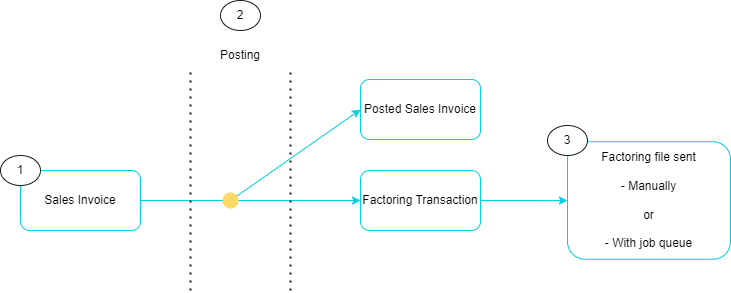
Simple Process Flow
-
The Factoring process starts in sales documents both in Wisefish and Business Central. The process of creating and posting sales documents is the same as with any other sales documents in the system, with the only difference being the Payment Method Code. The Payment Method Code is the key indicator whether the sales document will be used for Factoring or not. Instruction on how to use the Payment Method Code in Sales Documents is demonstrated in the following chapters.
-
Upon posting a Sales Invoice (or Sales Credit Memo), the system follows its regular procedure of posting the invoice while simultaneously generating a new factoring transaction.
-
Next step would be to handle the factoring transaction. There are two ways of sending the files to the bank / credit institution.
-
Manually creating the factoring files - When this method is used, the factoring files are created and downloaded in a folder to then be uploaded to the Factoring website.
-
Using Job Queue Entries (Only available for DNB)
-