
Wisefish Base
Release Date: 03/03/2026
New Features:
No new features in this release
Enhancements:
-
TI inbound lot code in RA lines
When the “TI Inbound Lot Code” field is changed in the item line of a Receipt Agreement and related entries exist in the trade item inbound line table, the system will ask whether it should update related entries. -
Simplified Air Freight Flow – Bypass Trip Requirement
New flags "DA w/AWB: Excl. Sched. Trip Mandat. Check" (Delivery Agreement) and "SSA w/AWB: Excl. Sched. Trip Mandat. Check" (Storage Shipment Agreement) have been introduced to the "WF Logistics Setup". With this, it is possible to exclude the mandatory check for a scheduled trip in a release, when the corresponding agreement has Shipping Reference Type = AWB (airway bill) and Shipping Ref. No. is assigned.
Furthermore, a set of teaching tips has been introduced to the “WF Logistics Setup” page, for enhanced user experience purposes. -
Allow reassigning DA with reserved TIs to a new trip
A new action “Re-Alloc. between Sched. Trips“ has been introduced to the pages: Delivery Agreement, Delivery Agreement Line Overview, and Storage Shipment Agreement. -
Option to filter on original lot in Storage Shipment and Delivery Agreements for Worksheet
A new field “Original Lot Filter” has been introduced into the “Warehouse Picking Pallet Worksheet - Bulk-Picking / Freestyle Reservation“ page. When specified, it will put a constraint on the confirmation method, similar to the “Lot Code Filter” field.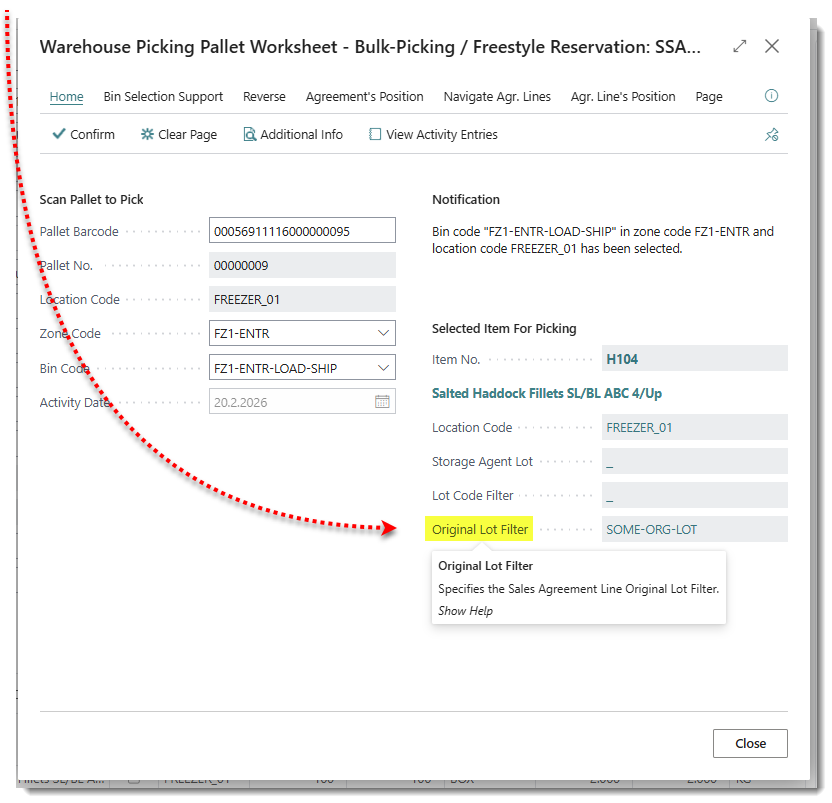
-
Add "No of Pieces" to inbound from Innova
The ability to receive "Number of Pieces" from Innova, and store them in "Flushed Inbound From Innova was added.
Resolved Issues:
-
Custom layout not working: R10005330 and R10005402
The printing procedure for custom layouts of reports was updated. -
Correct action to print packing list from Sales Invoice and Posted Sales Invoice
When a Sales Invoice is created from a Delivery Agreement, the packing list set in Report Selection for Wisefish Packing list should be printed. When no Delivery Agreement is not found - the Report “WiFi Packing List Unposted” should be printed. -
Stop allowing users to make 2 purchase orders (and 2 invoices) for single Receipt Agreeement
It is no longer possible to use the "Release" action to change the status of a Receipt Agreement from "Posted" to "Released". The only way now to get back to the "Open" status is to have the "User Profile" field "Reopen RA in Posting" set to TRUE. -
Field “Quota Item” not accessible on item card
Three fields have been moved to the Item tab in the Item Card - Quota Item, Quota Item Fishing Area, and Quota Item Location. These fields are not visible by default. -
Posting of BOM journal giving error
When checking validity of Trade Item Consumption Journal Line, a better error message if a Trade Items has not been selected into the line has been added. -
Not possible to post SE/BC journal
When a Lot is to be distributed to "Lot" (and not "Stage within Lot"), there will no longer be an error if the user filled out the field "Consumed to Lot" in the consumption journal. -
In some cases, units are not displayed in report - Order Confirmation Report 10005330
When lines were not reserved in the Delivery Agreeement, the Units were missing in the Report. This has been fixed.
Link to Issues:
List of Issues Released 27.1.20260303.80
Release History:
Release Notes Wisefish 27.1.20260211.79