Units of Measure Setup is where is is defined how an item is counted, weighed and packed. On one page the item's base unit is set, its weight, how many base units go into a trade item, and how many trade items fit on a pallet.
Wisefish uses this setup to convert between quantity and weight in trade item journals, agreements, pallets and reports.
The four units
|
Unit |
What it is |
Example |
|---|---|---|
|
Base unit of measure |
The smallest unit the item is counted in. Quantities on documents and ledger entries are in this unit. |
KG, BAG |
|
Weight unit of measure |
The unit the item is weighed in. Only units marked as a unit of weight can be chosen. |
KG, LB |
|
Trade item unit of measure |
The packed unit you sell and put on pallets. It can be a weight unit only when it is also the base unit, as for raw materials. |
BOX, CASE,
|
|
Pallet unit of measure |
A full pallet of trade items. It can't be a weight unit, and it must differ from the other three units. Usually left empty for raw materials. |
PALLET |
Every item with a WiseFish Type (Raw Material, WIP or Product) needs a base, weight and trade item unit. Raw materials are handled in bulk containers, such as tubs, on their way into production. So for a raw material, the base, weight and trade item unit are usually all the same weight unit, for example KG, and a separate trade item unit is rarely relevant.
The setup links them in a chain: base unit → weight per base unit → base units per trade item → trade items per pallet.
Opening the page
-
Open the Item Card of the item.
-
Choose Trade Item > Units of Measure Setup.
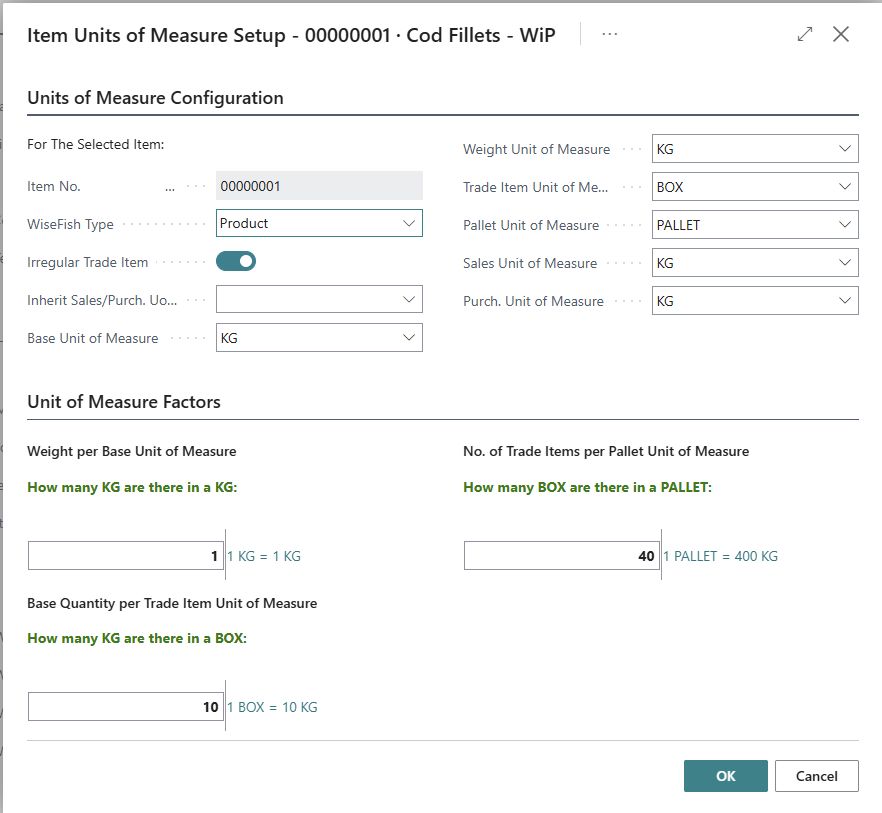
Available fields
|
Field |
Description |
|---|---|
|
Item No. |
The item you are setting up. Read-only. |
|
WiseFish Type |
Raw Material, WIP or Product. The type decides which units are needed, for example in the WF Item Worksheet check. |
|
Irregular Trade Item |
Turn this on when each trade item has its own weight, such as boxes of fresh fish. See Regular and irregular trade items below. |
|
Inherit Sales/Purch. UoM from |
Fills the sales and purchase unit from the base, weight or trade item unit. See Sales and purchase units below. |
|
Base Unit of Measure |
The smallest unit the item is counted in. Required. |
|
Weight Unit of Measure |
The unit the item is weighed in, usually KG or LB. The lookup shows only weight units. Required. |
|
Trade Item Unit of Measure |
The packed unit you sell and put on pallets. Required for every item with a WiseFish Type. It can be the weight unit only when it is also the base unit, which is the usual setup for raw materials (KG/ Lb). |
|
Pallet Unit of Measure |
The unit for a full pallet. Required only when you enter a number of trade items per pallet. Usually left empty for raw materials. |
|
Sales Unit of Measure |
The unit used on sales documents for the item. |
|
Purch. Unit of Measure |
The unit used on purchase documents for the item. |
Unit of Measure Factors
The lower part of the page has three groups. Each asks a question with the unit codes you chose, and shows the result as a text next to the number:
|
Group |
Question on the page |
Text shown (example) |
|---|---|---|
|
Weight per Base Unit of Measure |
How many KG are there in a BAG: |
2.5 → 1 BAG = 2.5 KG |
|
Base Quantity per Trade Item Unit of Measure |
How many BAG are there in a BOX: |
4 → 1 BOX = 10 KG |
|
No. of Trade Items per Pallet Unit of Measure |
How many BOX are there in a PALLET: |
80 → 1 PALLET = 800 KG |
-
Enter the weight per base unit with up to 5 decimals. The texts show the weights as entered, without rounding noise.
-
When the weight unit isn't the base weight unit set in Wisefish Setup (Kg or Lb), the text also shows the weight in the base weight unit, for example 1 BOX = 165 LB (74.84 Kg).
-
When the base unit is also the weight unit, the weight per base unit is 1 and is filled in for you. The same applies to base units per trade item when the base unit is also the trade item unit.
-
The base, weight and trade item units can't be changed once the item has item ledger entries.
-
The pallet unit must differ from the base, weight and trade item units.
-
The trade item unit can be the weight unit only when it is also the base unit; otherwise you get the message that it must not be the same as the weight unit.
-
A weight unit must be marked as a unit of weight on the Units of Measure page (Kg, Lb or Other).
-
Irregular Trade Item needs a weight unit as the base unit, and it can't be turned on when the item's Dispose Excess Qty. of Pallet is Write-Down.
Regular and irregular trade items
|
|
Regular trade item (fixed weight) |
Irregular trade item (variable weight) |
|---|---|---|
|
Example |
A box of 4 bags, each bag 2.5 KG |
A box of fresh fish, around 20 KG |
|
Base unit |
The bag (BAG) |
The kilo (KG) |
|
Trade item unit |
The box: 4 BAG = 10 KG, always |
The box: about 20 KG, but each box has its own weight (19.8 KG, 20.3 KG, …) |
|
Irregular Trade Item |
Off |
On |
|
Posting a full pallet |
80 boxes, all the same, so one trade item entry for 80 boxes (800 KG) is enough. |
Each box is an individual, so a pallet of 40 boxes has one trade item per box (40 trade items), typically serialized, each with its own weight. |
For an irregular item, the base unit must be a weight unit, for example KG, and the sales and purchase units are set to the base unit. Turning Irregular Trade Item off again sets them to the trade item unit.
Sales and purchase units
Inherit Sales/Purch. UoM from isn't stored on the item. It works when you change a unit on the page. Choose the option first, then change the matching unit field.
|
Option |
When it is applied |
Result |
|---|---|---|
|
Base Unit of Measure |
When you change the base unit |
Sales and purchase unit = base unit |
|
Weight Unit of Measure |
When you change the weight unit |
Sales and purchase unit = weight unit |
|
Trade Item Unit of Measure |
When you change the trade item unit (not for irregular items) |
Sales and purchase unit = trade item unit |
Seeing the setup on the Item Card
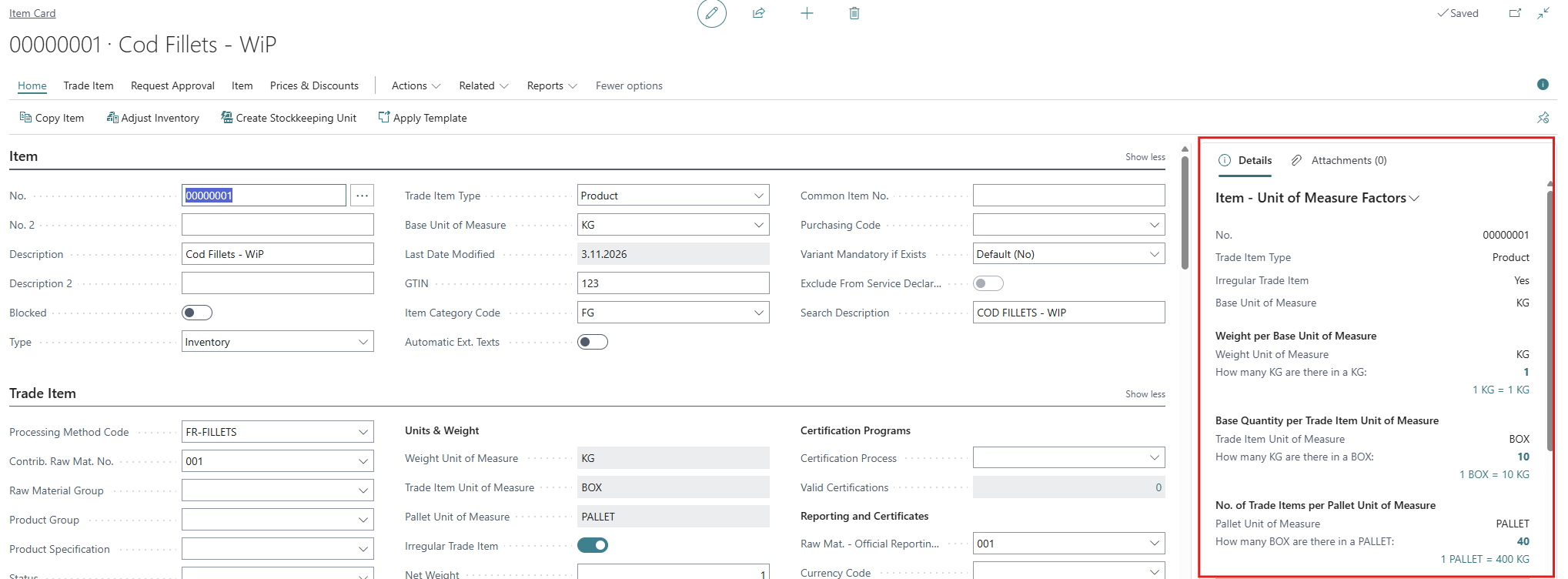
The FactBox Item - Unit of Measure Factors on the Item Card, the Item List and the item lookup shows the same three lines as the setup page (for example 1 BAG = 2.5 KG, 1 BOX = 10 KG, 1 PALLET = 800 KG), so you can check an item's units without opening the page. Its action Setup Units of Measure opens the setup page.
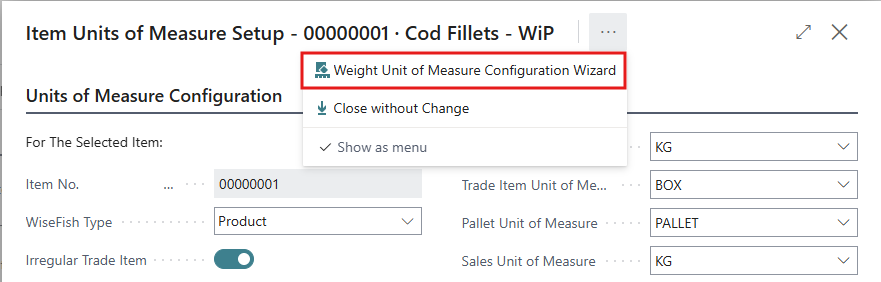
Weight Unit of Measure Configuration Wizard
The action Weight Unit of Measure Configuration Wizard on the setup page adds a second weight unit to the item, for example LB for an item that is weighed in KG, with the right conversion to the base unit.
-
It is available for WIP and product items whose base, weight and trade item units are already saved. For a new item, choose OK first and open the page again.
-
Choose the new weight unit. It must be different from the item's weight unit and have a weight conversion to the base weight unit (Kg or Lb in Wisefish Setup).
-
The wizard shows the weight per base unit, per trade item and per pallet in the new unit and in the base weight unit (BWU). You can adjust any of them; the others are recalculated.
-
Choose Create/Update Weight Unit of Measure. The item unit of measure is created, or updated if it exists, and you get a confirmation.