The harvest planning functionality provides a two-tier system: blanket harvest plans for strategic forecasting and daily harvest plans for operational execution.
Blanket Harvest Plans
Blanket harvest plans represent overall harvest forecasts covering an extended period (weeks or months). These strategic plans are then distributed into individual daily harvest plans for specific execution dates.

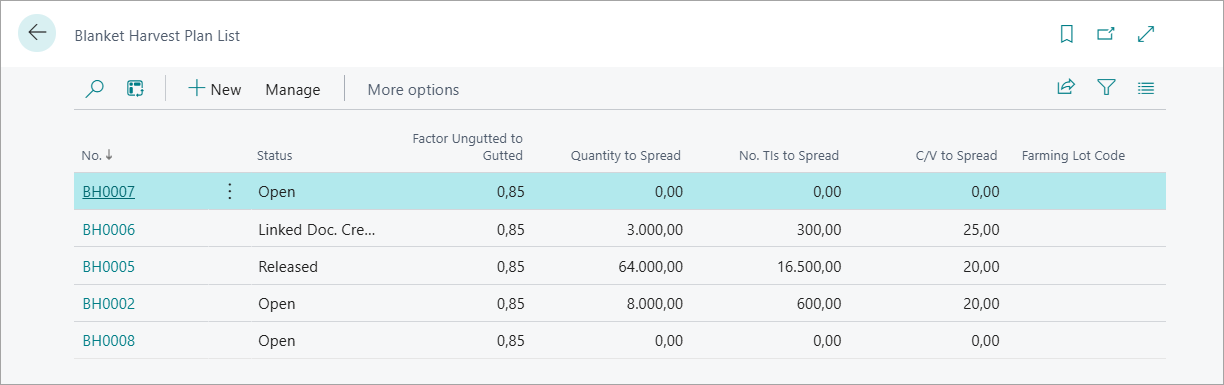
Creating a Blanket Harvest Plan:
To create a Blanket Harvest plan follow the following steps:
-
Navigate to Blanket Harvest Plans from the role center.
-
Create a new plan and specify the harvest plan number.
-
Enter a descriptive name for the forecast period.
-
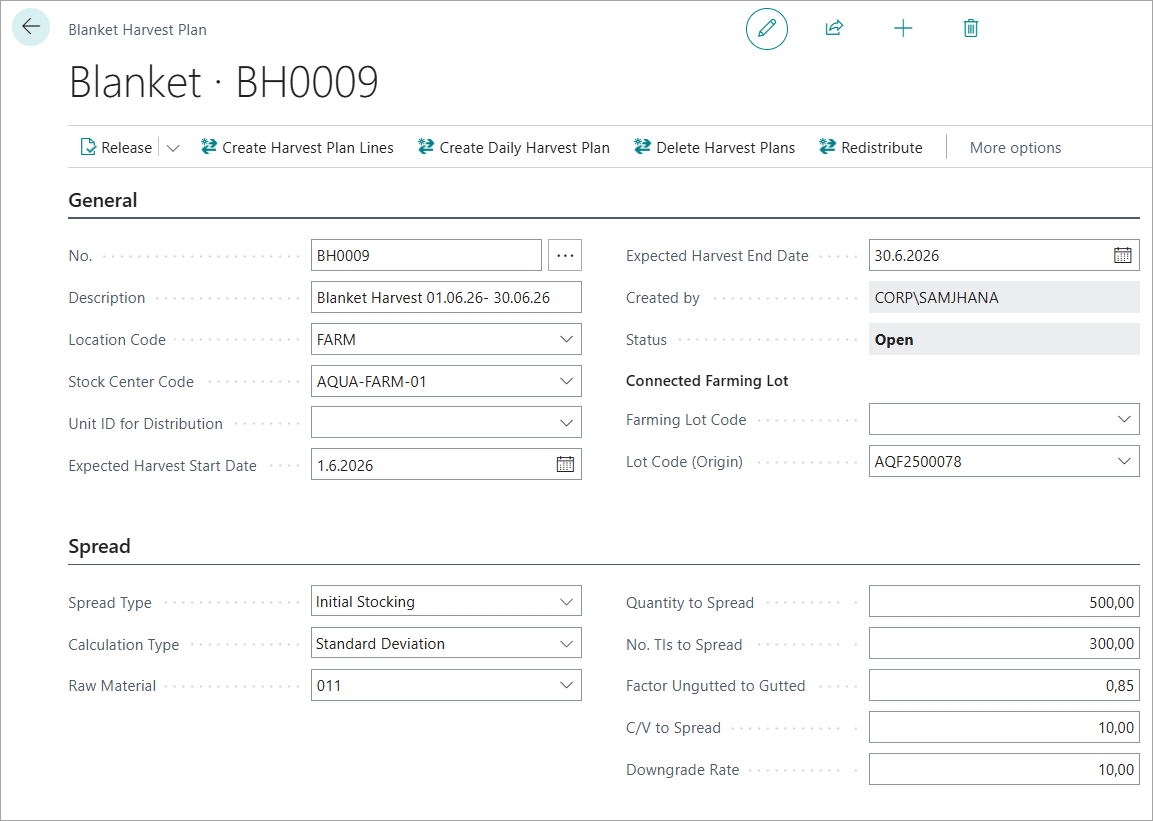
Set the Expected Harvest Start Date and End Date to define the planning period.
-
Specify Location Code and Stock Center Code for harvest operations.
-
Connect to a Farming Lot (optional) for traceability to production.
Setting Spread Parameters:
The spread parameters define how the harvest will be distributed across size grades and quality levels:
The Spread parameters differs based upon the Calculation Types selected. Some extra fields are displayed or hidden based upon which calculation types are selected.
-
Spread Type: Tells the system which fish measurement data to use when splitting the total harvest quantity into size and quality grade lines for e.g. use Initial Stocking (from when the lot was first stocked)
-
Calculation Type: The method used to calculate how much fish falls into each grade. See the Calculation Types table below.
-
Raw Material No: The species being harvested (e.g., Atlantic Salmon). Mandatory before creating plan lines.
Calculation Types:
When you change Calculation Type, the relevant parameter fields appear automatically. You do not need to fill in fields that are hidden.
|
Calculation Type |
Extra fields required |
Best used when |
|---|---|---|
|
Manual |
None — enter quantities directly on lines |
You know the exact grade split from your own estimate |
|
Posted Production Lot |
Prod. Lot Used For Distribution · Quantity to Spread · No. TIs to Spread · Factor Ungutted to Gutted |
A similar lot was recently harvested and you want to reuse its grade pattern |
|
Reforecast Unit Distribution |
Unit ID Used for Distribution · Quantity to Spread · No. TIs to Spread · Factor Ungutted to Gutted |
You have detailed per-cage/pen historical data available |
|
Standard Deviation |
Quantity to Spread · No. TIs to Spread · Factor Ungutted to Gutted · C/V to Spread · Downgrade Rate |
You only have aggregate lot data and want a statistical model
|
Calculation Parameter Descriptions:
-
Quantity to Spread: Total live weight (kg) to distribute across all grade lines for the whole harvest period.
-
No. TIs to Spread: Total number of fish to distribute across all grade lines.
-
Factor Ungutted to Gutted : Conversion factor from whole fish to gutted weight, e.g., 0.87 means 87% of live weight becomes product weight. Typically 0.80–0.90 depending on species.
-
Prod. Lot Used For Distribution: The previously posted production lot to copy grade percentages from. Only shown for Posted Production Lot type.
-
Unit ID Used for Distribution: The cage or pen ID to read historical unit data from. Only shown for Reforecast Unit Distribution type.
-
C/V to Spread: Coefficient of Variation — how variable the fish sizes are. Low value (0.15) = uniform sizing. High value (0.30) = more spread. Only shown for Standard Deviation type.
-
Downgrade Rate: Percentage of fish expected to fall below premium grade (damage, disease marks, etc.). E.g., 10 = 10% downgrade. Only shown for Standard Deviation type.
Generating Blanket Harvest Plan Lines:
When all the mandatory parameters are entered you can click on Create Harvest Plan Lines to automatically create Blanket Harvest Plan lines. The lines shows the breakdown of the forecast by Size and Quality grades. Lines can also be created by user manually when the Calculation Type selected is Manual.
The lines displays the following details:
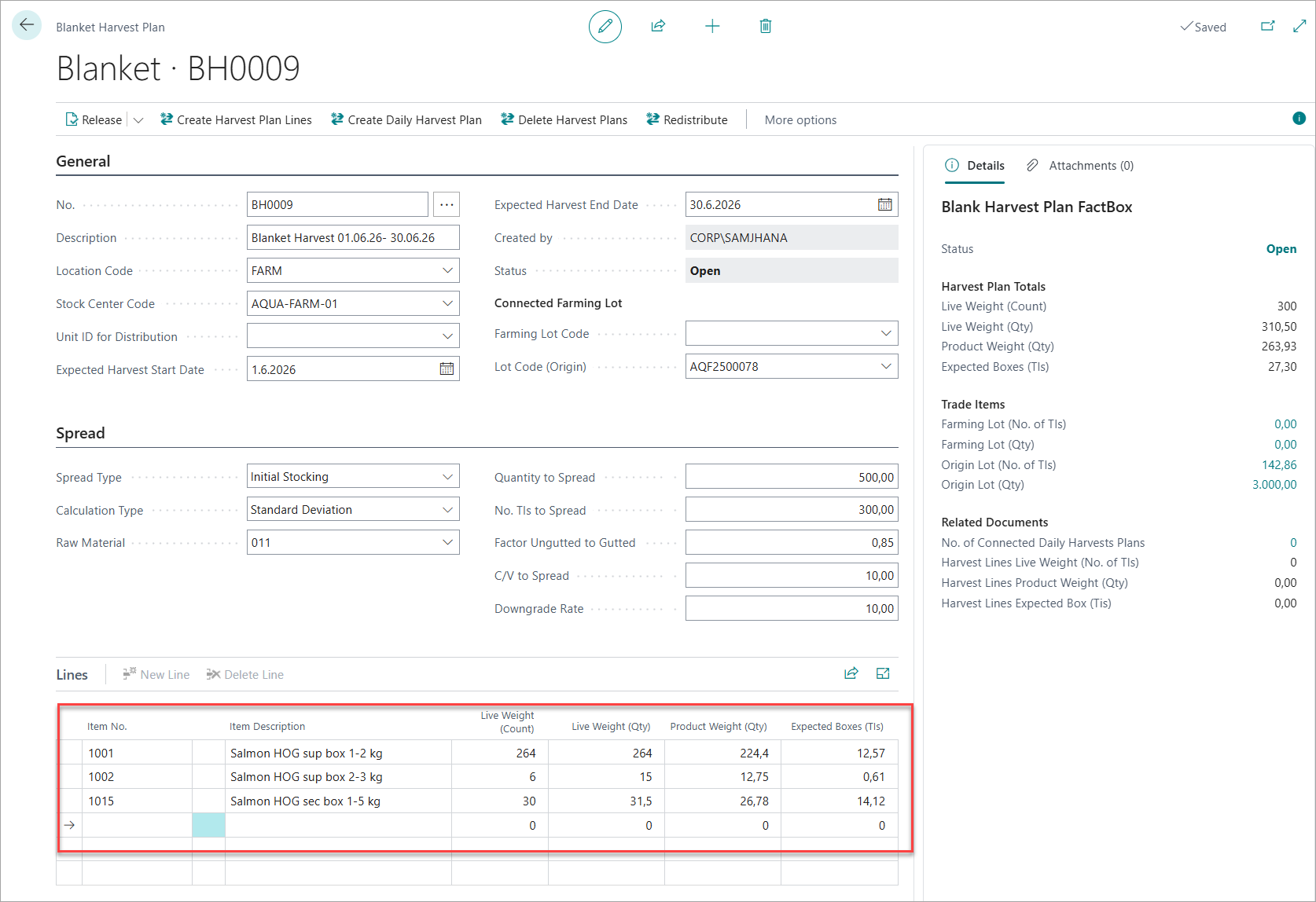
Harvest Plan Line Details
|
Column |
What it shows |
|---|---|
|
Item No. |
The finished product item (e.g., "Salmon 4-5kg Superior"). Mapped automatically from raw material + size/quality grade. |
|
Item Description |
The product name — easier to read than the item number. |
|
Live Weight (Count) |
Number of fish for this grade. |
|
Live Weight (Qty) |
Total weight of whole fish for this grade (kg). |
|
Product Weight (Qty) |
Expected gutted weight after processing (kg) — colour-coded against ordered quantities. |
|
Expected Boxes (TIs) |
Expected number of boxes/packages for this grade. |
-
You can review and adjust lines as needed while the plan status is Open.
Managing Plan Status:
You can change the status of Blanket Harvest Plan to “Release”.
-
Open: Plan is editable and lines can be modified.
-
Released: Plan is locked and ready for distribution to daily plans. You must release the Blanket harvest Plan before creating a Daily Harvest Plan.
Actions in Blanket Harvest Plan
Followings are the actions that can be performed from the Blanket Harvest Plan card.
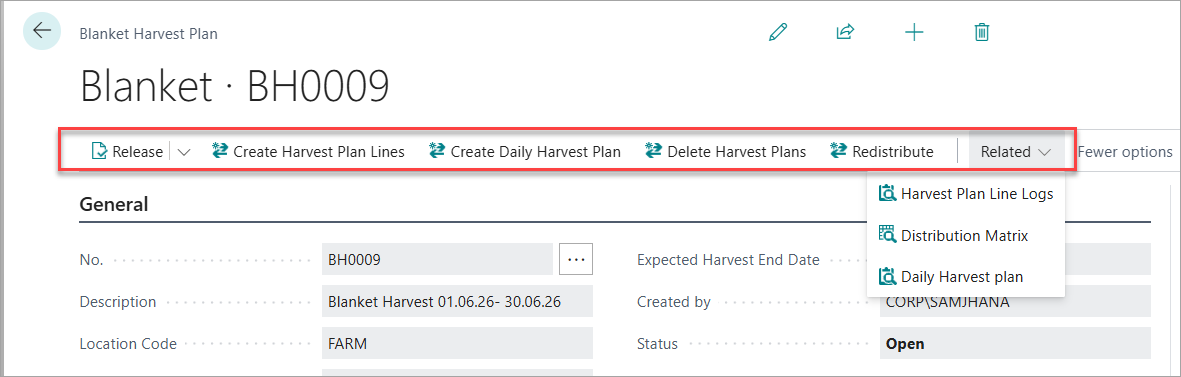
|
Action |
Available when |
What it does |
|---|---|---|
|
Create Harvest Plan Lines |
Open |
Reads your spread settings and automatically generates the grade breakdown lines. If lines already exist, it asks if you want to overwrite them. |
|
Create Daily Harvest Plan |
Released |
Generates individual daily harvest plan documents — one for each planned harvest date within the start/end date range. Each daily plan inherits the blanket's lot, location, species, and spread settings. |
|
Delete Harvest Plans |
Any status |
Deletes all daily harvest plans created from this blanket. Only deletes plans that have not yet been released or posted. |
|
Redistribute |
Any status |
Updates already-created daily plans to match any changes you have made to the blanket plan lines. |
-
Navigation Actions
|
Action |
What it opens |
|---|---|
|
Harvest Plan Line Logs |
A log of all previous versions of the plan lines. Shows the history of changes made each time Create Harvest Plan Lines was run. Useful for audit purposes. |
|
Distribution Matrix |
A visual grid showing the size × quality grade distribution percentages. Only available when Calculation Type = Standard Deviation, after plan lines have been created. |
|
Daily Harvest Plan |
Opens the list of daily harvest plans that were created from this blanket. |
Factbox Panel
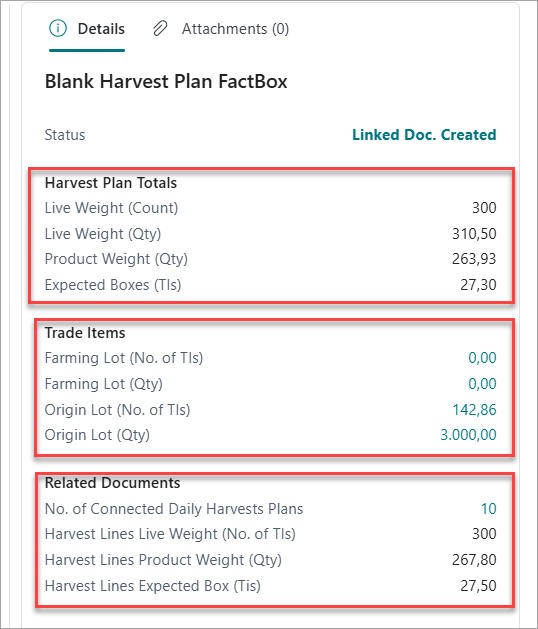
The factbox appears on the right side of the Blanket Harvest Plan page and gives a live at-a-glance summary without having to open any sub-pages. It contains three sections:
-
Harvest Plan Totals — Aggregated totals across all plan lines for the full blanket period: fish count, live weight, product weight, and expected boxes. Also shows the current plan status.
-
Trade Items — Live inventory from the connected farming and origin lots. Use this to confirm the lot has enough fish to cover the forecast before releasing.
-
Related Documents — Shows how many daily harvest plans have been created from this blanket and the total quantities distributed to them. Compare against Harvest Plan Totals to verify the full forecast has been allocated.