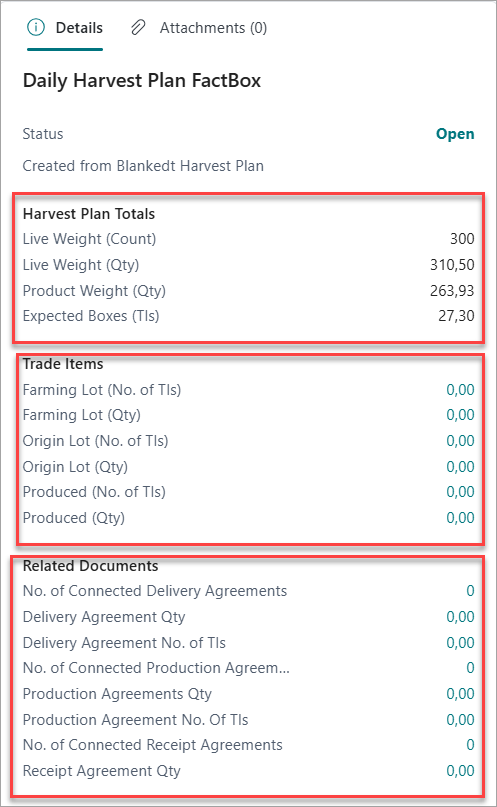
Daily harvest plans represent operational execution for specific harvest dates. These plans can be created from blanket plans or as standalone documents.
Creating Daily Harvest Plans:
Daily plans are typically created automatically from blanket plans, but can also be created manually.
-
Create from Blanket Harvest Plan
-
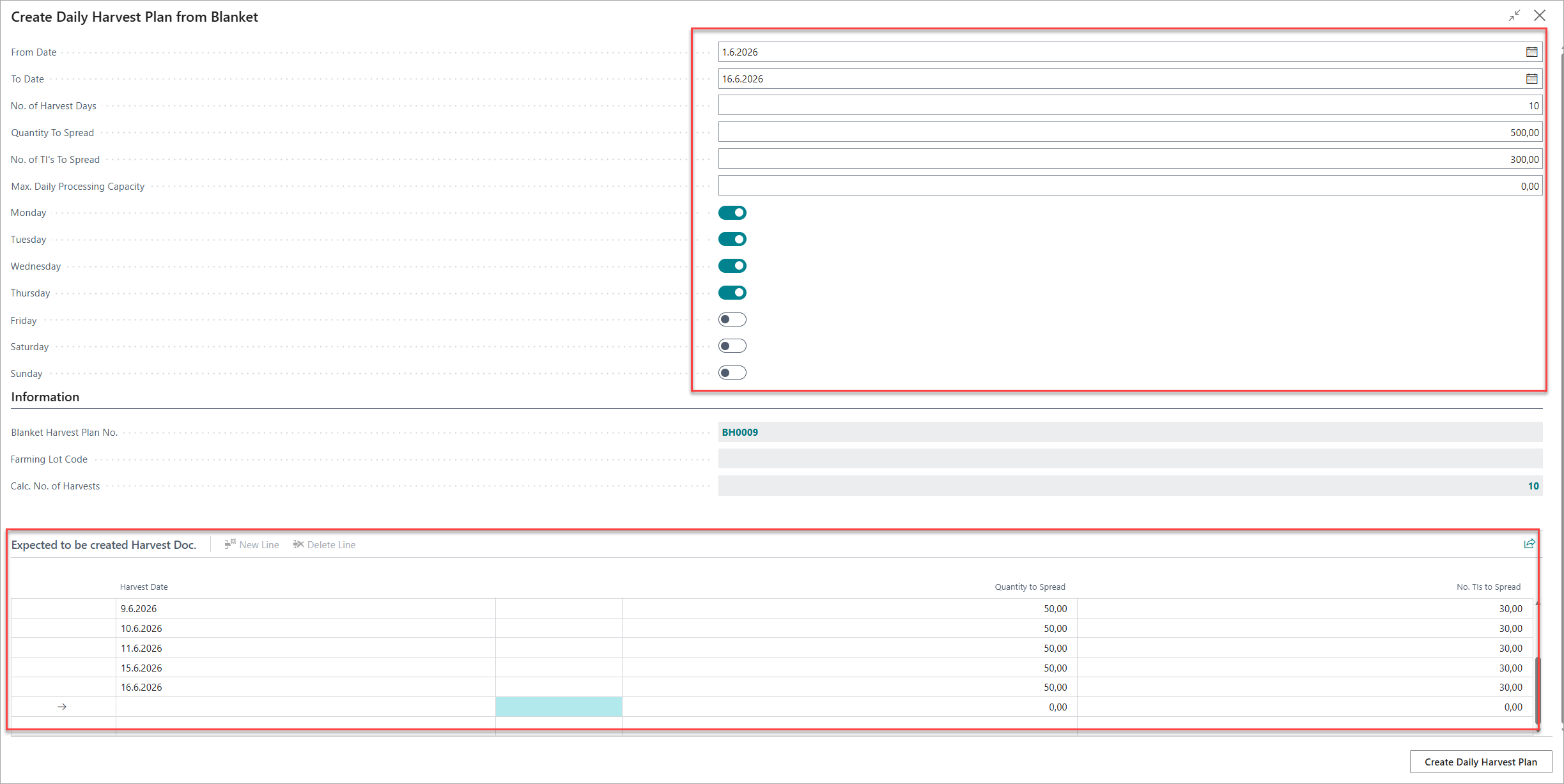
To create automatically from the Blanket Harvest Plan, click on Create Daily Harvest Plan. The following pop up is displayed. Some of the values like Date, Quantity, Trade Items are auto filled from the Blanket Harvest Plan.
-
Select the Harvest days.
-
You will see the Expected to be created Harvest Doc automatically created.
-
Create on Daily Harvest Plan button.
-
The Daily Harvest Plans are created and displayed in the Blanket Harvest Plan factbox in the Related Document section.
-
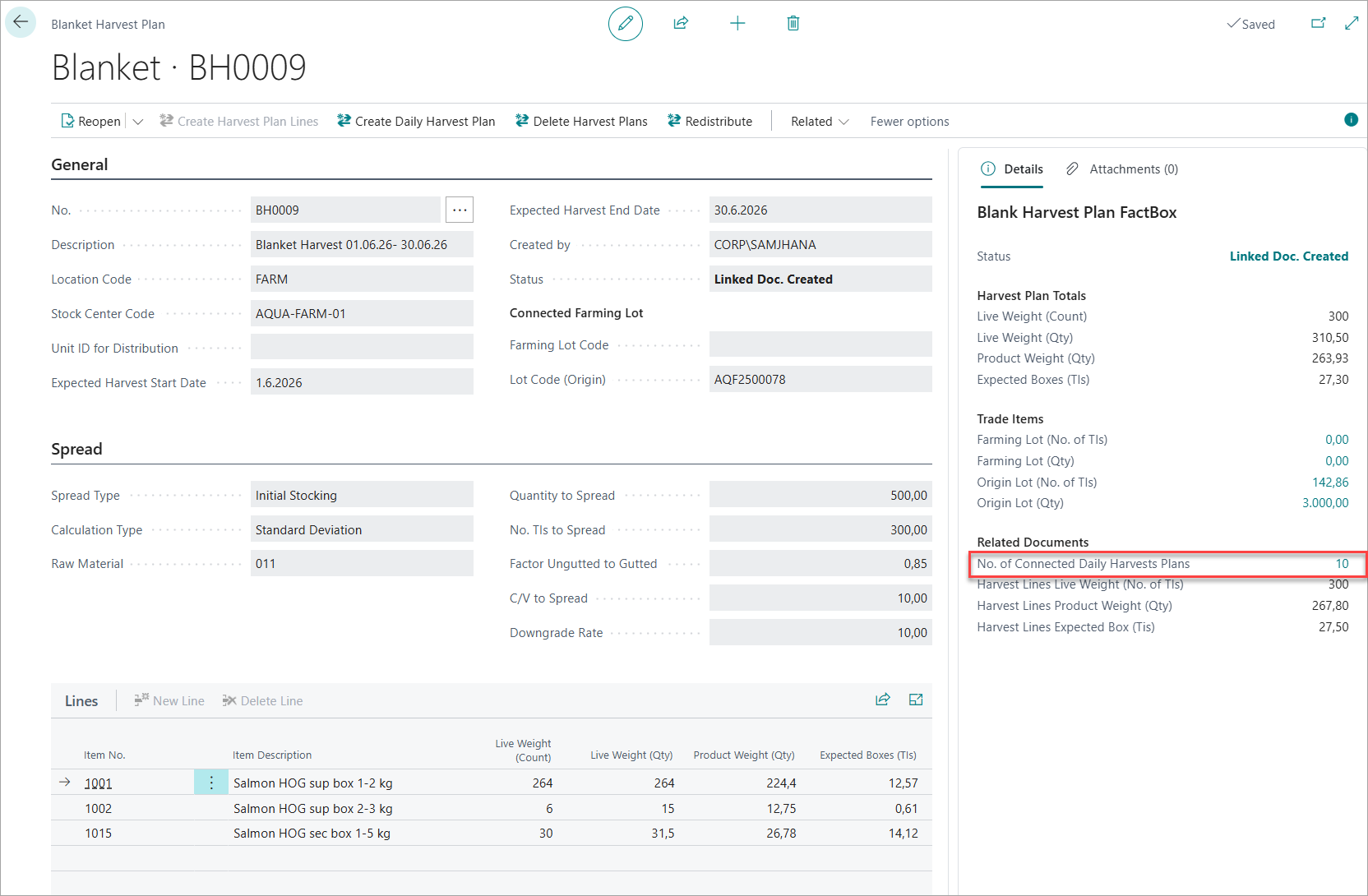
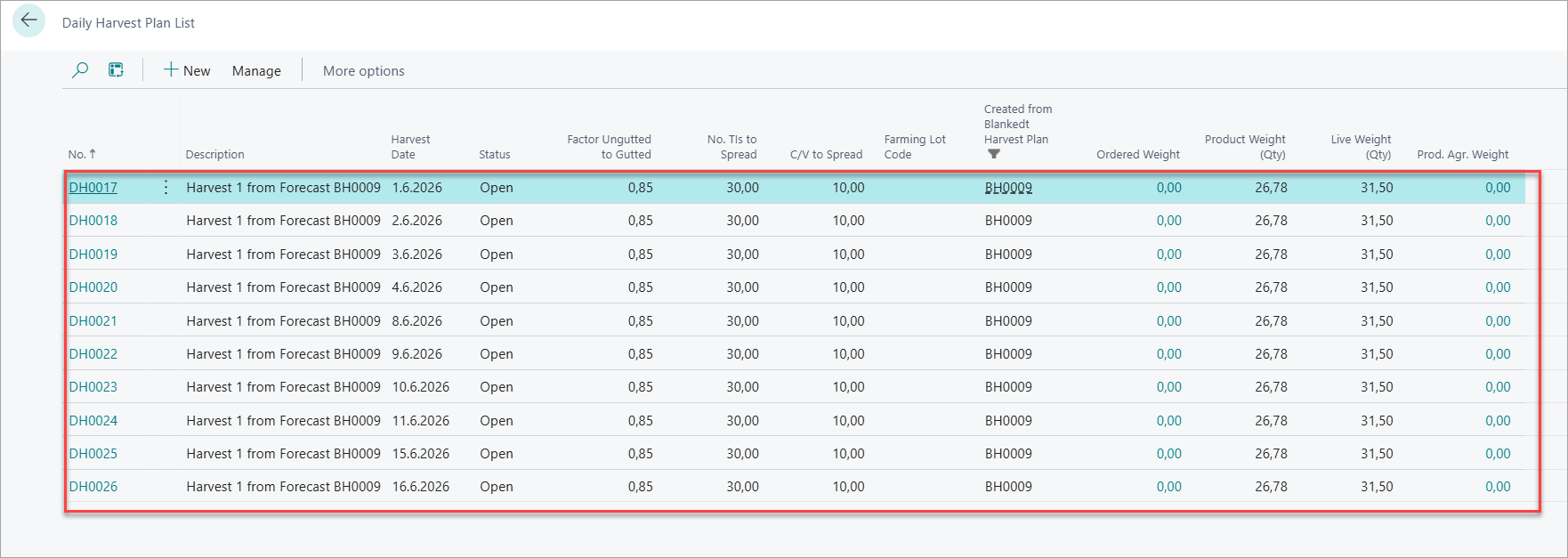
You can view the list of Daily Harvest Created by clicking on count as in above picture. The Daily Harvest Plan list page is displayed as follows:
-
Creating Daily Harvest Plan Manually
-
Navigate to Daily Harvest Plans from Role Center.
-
Click on New to manually create a Daily Harvest Plan.
-
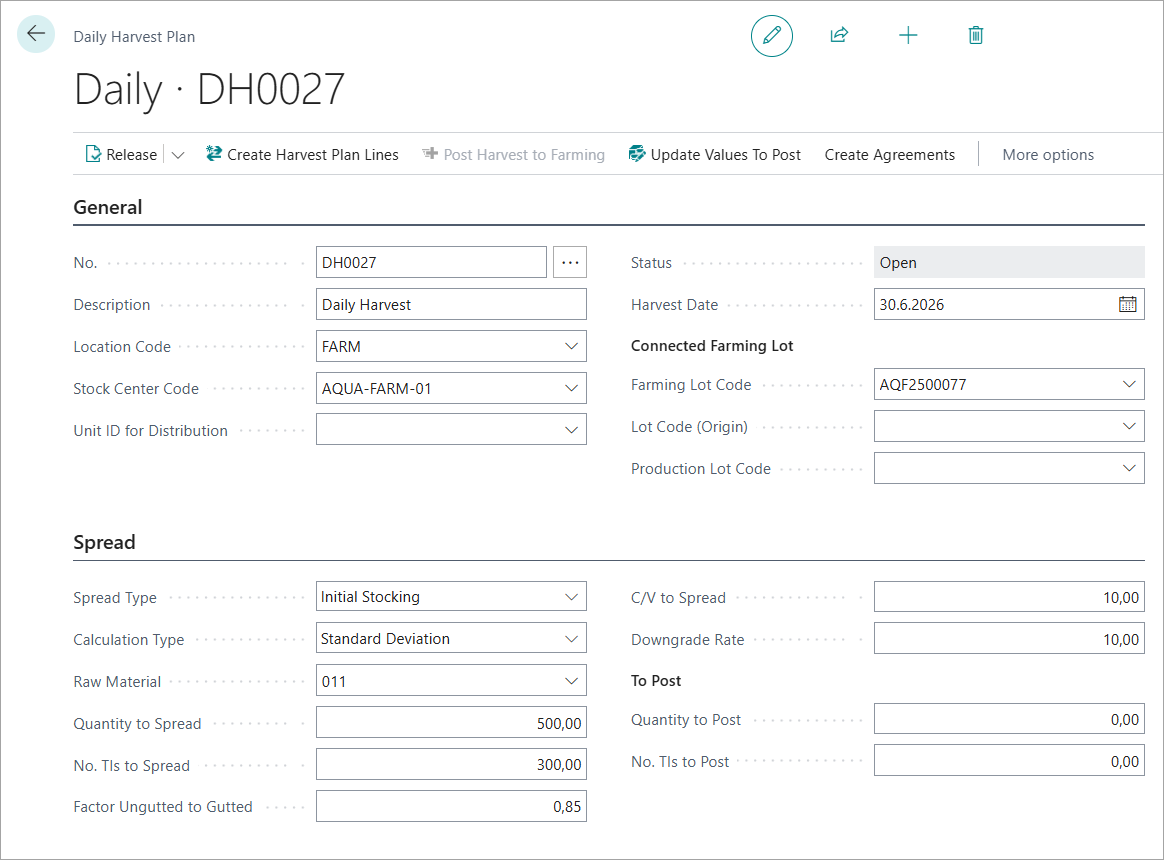
Specify the harvest plan Number.
-
Enter a Description.
-
Set the Harvest Date.
-
Specify Location Code and Stock Center Code for harvest operations.
-
Specify the Unit Id used for Distribution.
-
Connect to a required Lot.
-
-
Spreading Parameters
Same as in Blanket Harvest Plan Blanket Harvest Plan | Setting Spread Parameters: except it has to extra fields in To Post section.
These fields show what will actually be sent to the farming system when you click Post Harvest to Farming. Run Update Values To Post to refresh them after changing lines.
-
Quantity to Post : Shows the calculated quantity that will be posted to the farming worksheet when you post harvest to farming. Updated by Update Values To Post action.
-
No of TIs to Post : Shows the calculated number of fish that will be posted to the farming worksheet. Updated by Update Values To Post action based on plan lines.
Calculation Types is same as in Blanket Harvest Plan Blanket Harvest Plan | Calculation Types: .
The Calculation Parameter Description is also same as in Blanket Harvest Plan Blanket Harvest Plan | Calculation Parameter Descriptions: .
Generating Daily Harvest Plan Lines:
When all the mandatory parameters are entered you can click on Create Harvest Plan Lines to automatically create Daily Harvest Plan lines. The lines shows the breakdown of the forecast by Size and Quality grades. Lines can also be created by user manually when the Calculation Type selected is Manual.
The lines displays the following details:
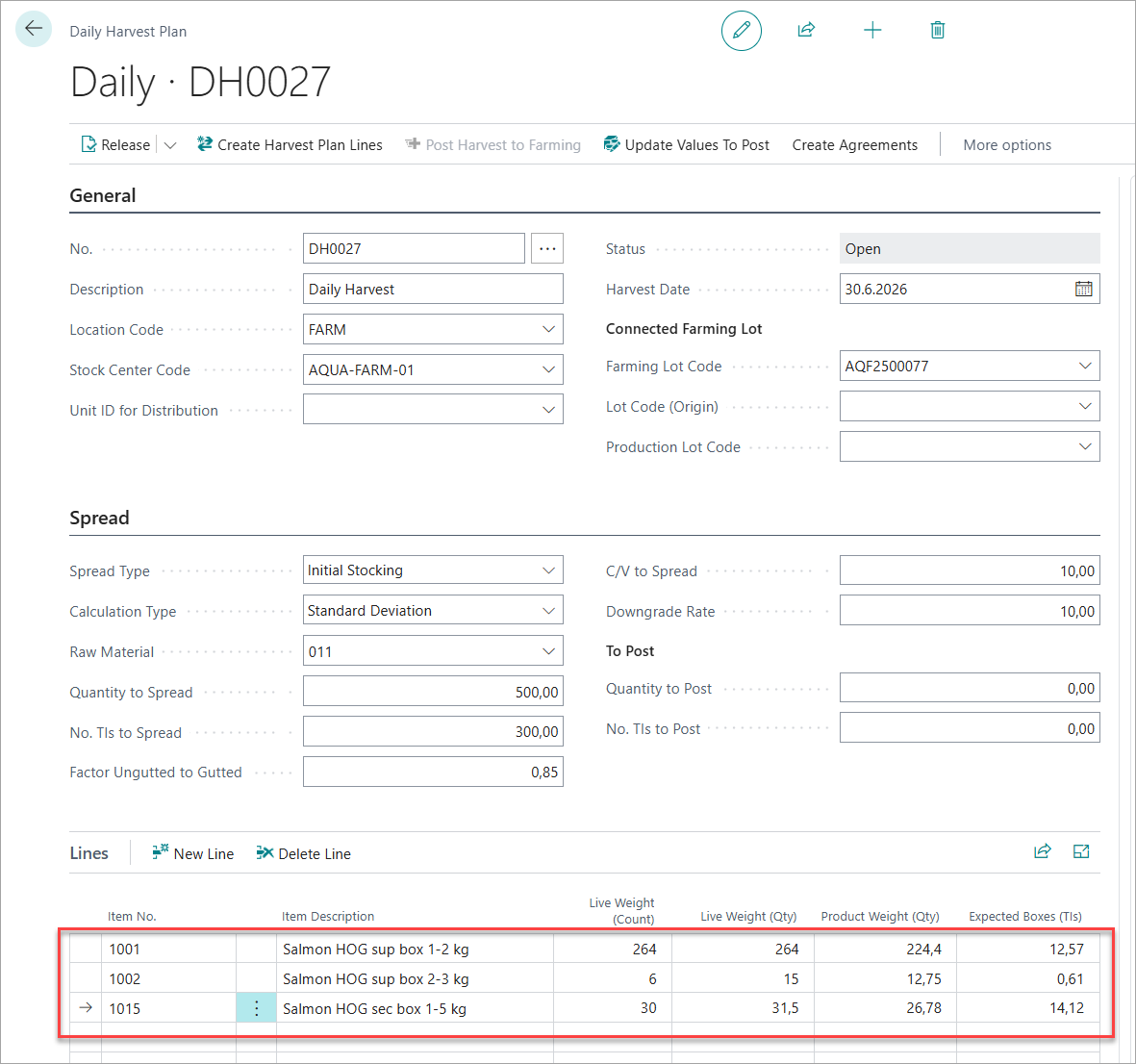
Daily Harvest Plan Line details are same as in Blanket Harvest Plan Lines Blanket Harvest Plan | Harvest Plan Line Details .
Managing Plan Status
Release: Locks the daily plan. Required before you can post to farming or create any agreements.
Reopen: Unlocks the plan for editing. Reopening after a farming posting does not reverse the posting.
Actions on Daily Harvest Plan
Followings are the actions that can be performed from the Daily Harvest Plan card.
|
Action |
Available when |
What it does |
|---|---|---|
|
Create Harvest Plan Lines |
Open |
Generates grade breakdown lines from the spread parameters (same logic as blanket plan). |
|
Update Values To Post |
Open |
Recalculates Quantity to Post and No. TIs to Post from the current plan lines. Run this after editing lines before releasing. |
|
Post Harvest to Farming |
Released, not yet posted |
The key posting action. Creates entries in the Farming Worksheet, reducing live fish inventory in the farming lot. Can only be done once per plan. |
Post Harvest to Farming — can only be done once
Once the harvest has been posted to the farming lot, this action becomes unavailable. If you posted incorrect quantities, you will need to reverse the farming entry using the Farming Reversal Worksheet and then create a corrected daily plan.
Create Agreement Actions
Available once the plan is Released or Posted. You can create multiple agreement types from the same daily plan.
|
Action |
What it creates |
|---|---|
|
Create Production Agreement |
A production agreement documenting the quantities and grades for processing the harvested fish. Links the harvest plan to production scheduling. |
|
Create Delivery Agreement |
A customer delivery agreement . Commits the forecasted quantities to a customer delivery. |
|
Create Internal Sales |
An internal delivery agreement for transfers between departments or sites within the same company. |
|
Create Receipt Agreement |
A receipt/purchase agreement for fish received from an external supplier or another entity. |
💡 Tip – Multiple agreements from one plan
You can create more than one agreement type from a single daily plan. For example, you may create both a Production Agreement(for processing) and a Delivery Agreement (for the customer) from the same plan.
Navigation Actions
|
Action |
What it opens |
|---|---|
|
Harvest Plan Line Logs |
History log of all previous plan line versions — useful for comparing changes over time. |
|
Distribution Matrix |
Visual size × quality grade grid. Only available when Calculation Type = Standard Deviation, after lines have been created. |
|
Production Agreements |
List of all production agreements linked to this daily plan. |
|
Delivery Agreements |
List of all delivery agreements linked to this daily plan. |
Factbox Panel
The factbox appears on the right side of the Daily Harvest Plan page and provides a live at-a-glance summary without navigating away. It contains four sections:
-
Status & origin — Shows the current plan status and which blanket plan this daily plan was generated from (blank if created manually).
-
Harvest Plan Totals — Aggregated totals for this harvest date: fish count, live weight, product weight, and expected boxes.
-
Trade Items — Live inventory from the farming and origin lots, plus a Produced figure that updates as harvest postings are made. Use Produced vs. Harvest Plan Totals to track execution progress in real time.
-
Related Documents — Counts and committed quantities for all agreements linked to this plan — Delivery Agreements, Production Agreements, and Receipt Agreements. Use this to confirm the full harvest has been allocated to downstream processes.