
For a vessel that is not a own one (or one that doesn’t land straight to stock), landing doesn’t create a sales agreement, but it feeds a purchase document instead.
The Fishing Setup field Land FT for External Vessel decides what happens automatically when such a trip lands:
-
Invoice creates a Purchase Invoice
-
Order creates a Purchase Order
-
Ask prompts you to choose one (or neither) at the time of landing
-
Land just lands the trip without creating anything.
If it is necessary to create the purchase document later, or the setup was Land/Ask, the Purchase Order and Purchase Invoice actions are also available directly on the Landed Fishing Trip page for the selected trip.
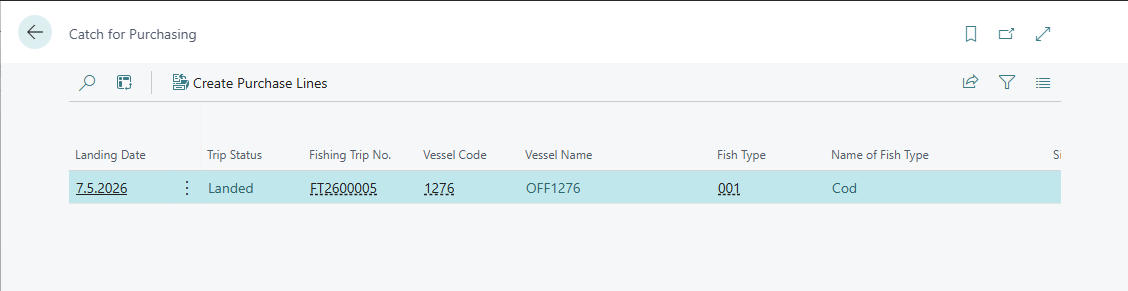
The Catch for Purchasing page can be used for catch that wasn’t picked up automatically, for example, adding another trip’s catch to a purchase document that’s already open. It is a worklist of all raw material lines, across every landed trip, that haven’t yet been assigned to a purchase document (own-vessel catch never appears here, since that never goes through purchasing).
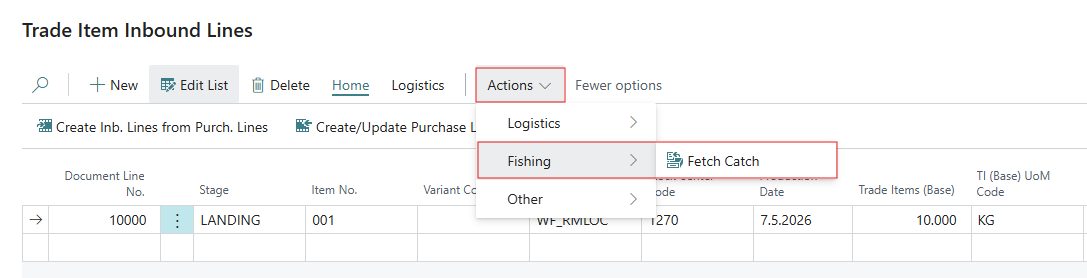
It can be opened from inside an open Purchase Order or Invoice. On the Trade Item Inbound Lines part of that document, click Fetch Catch.
Select one or more lines which can come from different trips or vessels, and click Create Purchase Lines. This adds a purchase line for each selection.