
It is possible to customize the user profile card by roles e.g., different business roles, by department or any other type of categorization. This can be done with using different User Profiles.
To learn more about WiseFish User Profiles click here.
In the User Profile Card, the Logistics settings can be edited. Fill in the fields and place a checkmark where applicable. Note that the setup can differ between companies.
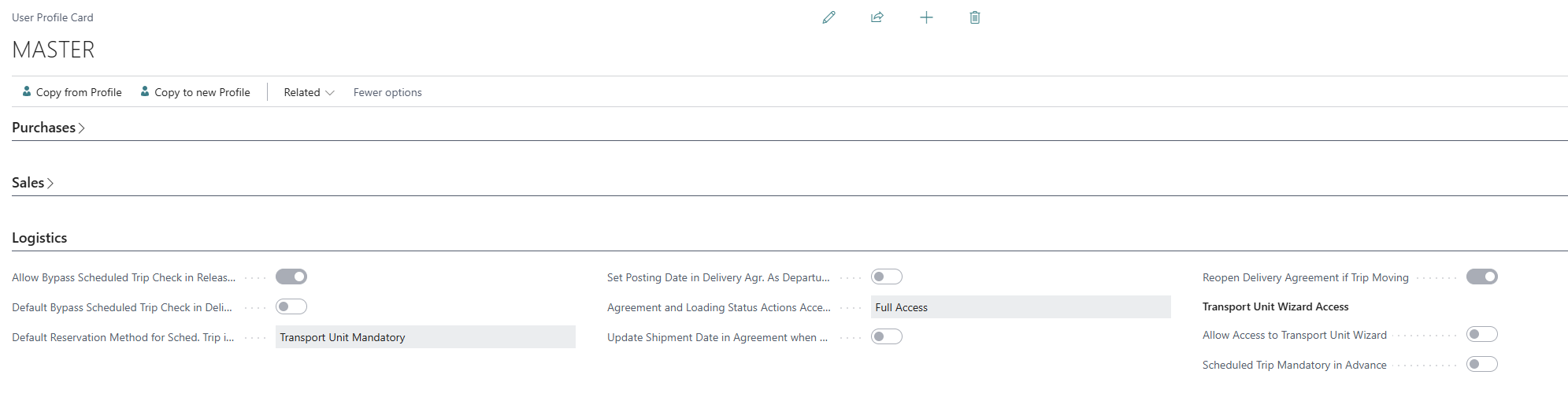
Logistics tab fields
-
Allow Bypass Scheduled Trip Check in Releasing of a Delivery Agreement lets this user release a Delivery Agreement without a scheduled trip assigned. Only relevant when "Scheduled Trip Mandatory in Releasing of a Delivery Agreement" is active in the Logistics Setup.
-
Default Bypass Scheduled Trip Check in Delivery Agreement sets the default value for the bypass above; only usable once "Allow Bypass..." is checked.
-
Default Reservation Method for Sched. Trip in Del. Agreem. selects the default reservation method suggested on new Delivery Agreements. The available options are Transport Unit Mandatory, Allow Without Transport Unit, or Allow Without Transp. Unit and Preserve Sched. Trip Info.
-
Set Posting Date in Delivery Agr. As Departure Date When Assigning Sched. Trip, when checked, assigning a scheduled trip to an agreement also sets the agreement's posting date to the trip's departure date.
-
Agreement and Loading Status Actions Accessibility (Agr. Overv.) controls what this user can do on the Scheduled Trip - Agreements Overview page. Options are Full Access, No Access, Agreement Status Actions, or Loading Status Action.
-
Update Shipment Date in Agreement when Scheduled Trip has been assigned keeps the agreement's shipment date in sync with its assigned trip.
-
Reopen Delivery Agreement if Trip Moving allows this user to reopen a Delivery Agreement even while its scheduled trip's status is "Moving."
Transport Unit Wizard Access
This sub-section only appears if Restrict Access to TU Wizard is enabled in the Logistics Setup. This setting controls which users can use the Designated Transport Unit Wizard at all.
-
Allow Access to Transport Unit Wizard grants this user access to the wizard.
-
Scheduled Trip Mandatory in Advance requires a scheduled trip to already exist before this user can use the wizard.