
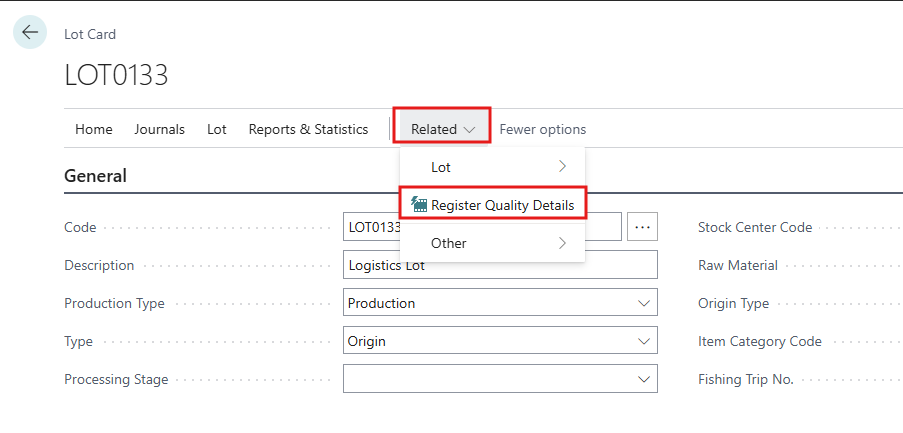
To access and create a Quality inspection to the Lot, open the Lot Card and go to -> Related → Register Quality Details.
Laboratory results are recorded per lot. They give the quality values on Meal Mixing and Reservation.
Register a Quality Sample
-
Open the lot card. You can also click a lot code in the Meal Mixing and Reservation FactBox Lots with no Quality Samples.
-
Choose Related → Register Quality Details. The Lot Quality Details list opens for that lot.
-
Create a new line. No. is numbered automatically per lot.
-
Enter the Date the sample was taken.
-
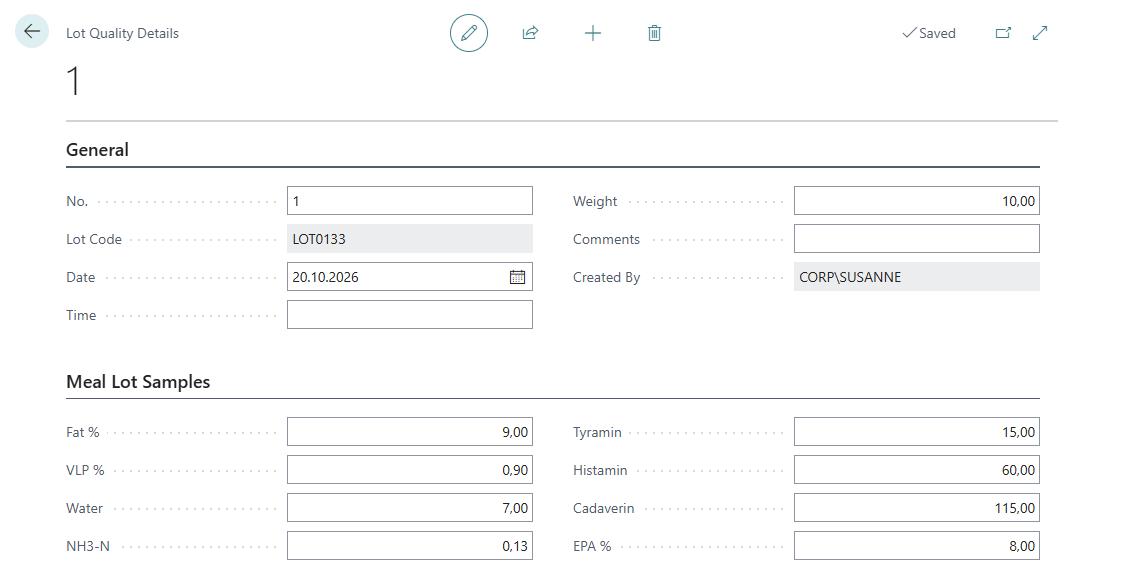
Enter the results in the list, or choose View to use the card, which also has Time, Weight and Comments. Enter the Time when a lot gets more than one sample on the same date.
Which sample is used
A lot can have many samples. The newest one is always used, meaning the sample with the latest Date. The order in which samples were registered does not matter.
To correct a result, edit the sample, or register a new sample with a later date. A new or changed sample updates every silo and zone that holds the lot the next time the page is opened or refreshed.
Quality Parameters
|
Field |
Description |
|---|---|
|
Protein |
Protein percentage |
|
Fat % |
Fat percentage |
|
Water |
Water / moisture percentage |
|
Salt % |
Salt percentage |
|
VLP % |
VLP percentage |
|
NH3-N |
Ammonia nitrogen |
|
Sour |
Sour value |
|
TVN |
Total volatile nitrogen |
|
Cadaverin, Histamin, Putrecin, Tyramin |
Biogenic amines |
|
EPA %, DHA % |
Omega-3 fatty acids |
|
FFA % |
Free fatty acids |
|
WSP % |
Water soluble protein |
|
SA % |
SA percentage |
|
TVN-Raw Material % |
TVN of the raw material (TVN-Process) |
|
Location Code, Weight, Comments |
Extra information about the sample |
None of these fields is mandatory, but a value should be added at least for Protein, Fat %, Water, Salt % and Cadaverin. These are shown on the mixing page by default.
View Quality Samples
Search for Lot Quality Details to see all samples. Filter by Lot Code, Date or Created By. The view Sorted By Date shows the newest first.