
The Consumption Worksheet – Based on Output posts raw material usage for production lots that already have output posted, but no consumption. It is for companies without consumption data from a MES/ Innova, where usage is estimated from output and yield, for example monthly.
Consumption Worksheet or Output Worksheet? The Consumption Worksheet is used when output is already posted, for example from Innova/MES or from the Output Worksheet with posting set to Output Only.
If output is registered in the Output Worksheet with Output Worksheet Posting = Complete, the consumption is already posted, so don't run this worksheet for the same lots.
For each output lot and production day, the worksheet:
-
Creates the raw material (harvest item) in inventory with a positive adjustment, in a new origin lot.
-
Consumes it into the output lot, or the output lot's stage, at the unit cost you enter.
-
Re-distributes the lot cost so the output carries the raw material cost.
The Consumption Worksheet can be accessed from the Role Center.

Consumption Worksheet
To use the worksheet, some Setup is required (see also Farming Setup )
|
Where |
Field |
Description |
|---|---|---|
|
Farming Setup - Consumption Worksheet |
Default Stage for Positive Adjustment |
Stage for the raw material trade item that the positive adjustment creates. Filled in on lines created by Select Output Lots. |
|
Farming Raw Mat. Setup |
Harvesting Item No. |
The raw material item that is consumed. It's found from the output items Contributing Raw Material. |
|
Lot Card |
Harvesting Item No.,
|
If filled in on the lot, these are used first. |
|
WiseFish Setup / Item card |
Default Item Tracking Lot Nos. / Lot Nos. |
Number series for the origin lot that is created automatically. |
Consumption Worksheet - Based on Output
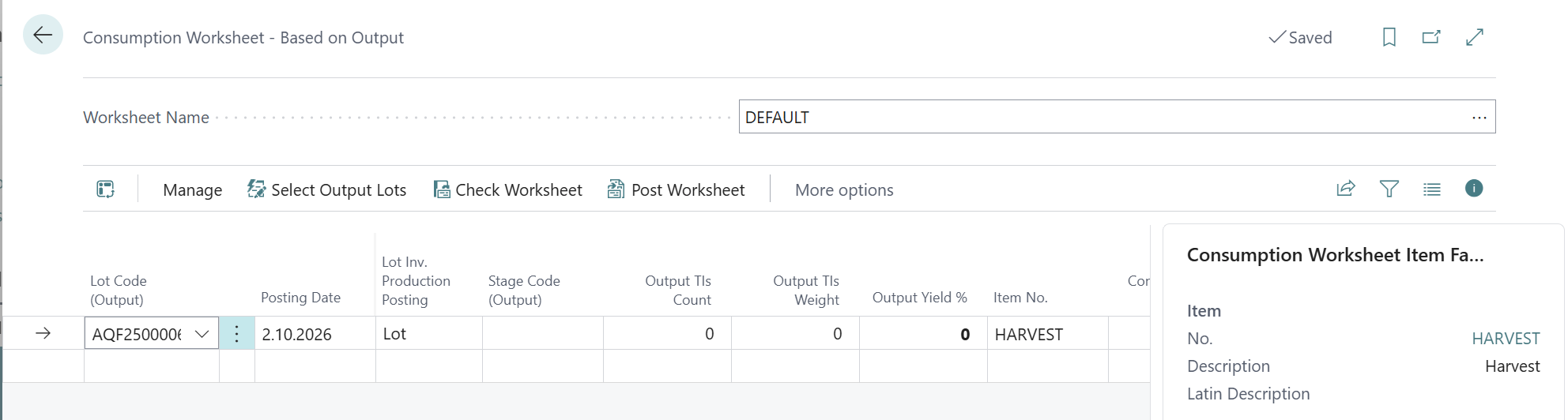
Select output lots
Run Select Output Lots. The list shows lots that have a Production Type and aren't Completed. Lots with no consumption posted yet are highlighted. Select one or more lots and choose OK.
The worksheet creates one line per lot and production day (per stage, if the lot posts by Stage within Lot).
Each line gets:
-
Posting Date (same as production date), Stock Center and Location from the output
-
Item No., which is the harvest item
-
Output TIs Pieces / Output TIs Weight from the posted output
-
Output Yield % from the lot
-
TI Stage Code (Origin), the default stage
From this page you can also run Close Lots for Cost Adjmt. on the selected lots.
Review the lines
|
Field |
Description |
|---|---|
|
Lot Code (Output) / Stage Code (Output) |
Where the consumption is posted. Stage is required when the lot posts by Stage within Lot. |
|
Output TIs Pieces / Weight |
Posted output for that lot, day, stock center and location (read-only). |
|
Output Yield % |
Used to calculate the raw material quantity from the output weight: output weight × 100 / yield %. |
|
Consumed TIs Weight |
Consumption already posted for the same lot, date and item. Check this so it will not be posted twice |
|
No. of Trade Items, Quantity |
Raw material to post. Required, and can't be negative. |
|
Unit Cost |
Cost per unit of raw material in local currency. |
|
Lot Code (Origin) |
Origin lot for the raw material. Created automatically if left blank. |
|
TI Stage Code / TI Line No. (Origin) |
Filled in after the positive adjustment is posted. When an existing open trade item here is entered, no positive adjustment is posted and that trade item is consumed instead. |
|
Status / Error Message |
Registration, Verified, Processed, or Error with the reason. |
Check and post
-
Run Check Worksheet. The check includes:
-
allowed posting dates
-
output lot (and stage) is not closed
-
stock center matches the lot
-
lot date boundaries
-
posting setup
-
enough quantity on an existing origin trade item
-
-
Run Post Worksheet.
For each verified line, the positive adjustment and then the consumption are posted. Posted lines are moved to Archived Consumption Worksheet Lines. -
The affected output lots are re-distributed automatically. If a re-distribution fails, a notification names the lot.