
Wisefish has two analytic views for tracing production lots through the processing chain:
-
Lot Track/Trace to Origin: starts from a lot (for example finished products) and traces back to the raw material it was made of, and to the origin lots it came from.
-
Lot Track/Trace from Origin: starts from an origin lot (for example a landing or a receipt) and traces forward to every lot its raw material went into.
Both views are created on demand from the trade item ledger. They show the result as a tree, with one level per processing step, and the share of the weight at each step.
Where to find them
|
Where |
Action |
|---|---|
|
Production role center, Analytic Views |
Lot Track/Trace to Origin View and Lot Track/Trace from Origin View |
|
Production role center |
Trace To Origin |
|
Sales & Export role center |
Lot Track/Trace Origin View |
|
Delivery Agreement, and its lines |
Lot Track/Trace Origin - Analytic View: traces the trade items on the agreement (or the selected line) back to origin. The view is created straight away. |
The views can also be found with Tell me (Alt+Q).
How lots are linked
A trade item is consumed into one lot. Its ledger entry records the lot it came from and the lot (and stage) it was consumed into. The views follow these links from lot to lot.
Inside a lot, two settings on the Lot Card decide how finely the lot is split:
|
Lot setting |
Effect on the trace |
|---|---|
|
Consumption Distribution per = Contribution Raw Material |
The lot is split by contribution raw material (the field Contrib. Raw Mat. No. on the item). Products only trace back to inputs with the same contribution raw material: cod fillets trace to cod, never to haddock processed in the same lot. This is the default for lots created from inbound documents. |
|
Consumption Distribution per = Lot |
All raw material in the lot is shared by all products in the lot. |
|
BC Inv. Production Posting = Stage within Lot |
Each processing stage is traced as its own sub-lot. See Lot Stages and Lot Products. |
Weights are based on Weight (Recorded) in the base weight unit (BWU). Credited trade items are left out, and consumption only counts trade items closed as Usage or Repacking.
Lot Track/Trace to Origin
Use this view to answer the question “What is this lot made of, and where did it come from?”
-
Open Lot Track/Trace to Origin - Analytic View.
-
Choose Create Lot Origin Analysis. The Lot Analytic View Prerequisites page opens.
-
Select the lots to trace from, using any of the filters below, and choose Create View for Lot Analysis.
|
Prerequisite |
Description |
|---|---|
|
Lot Group Code Filter |
Only lots in these lot groups. |
|
Stock Center Filter |
Only lots in these stock centers. |
|
Lot Code Filter |
Only these lots. |
|
Apply Lot Starting Date Filter, Period Length, From Date / To Date |
Only lots with a starting date in the period. Use Previous / Next to move between periods. |
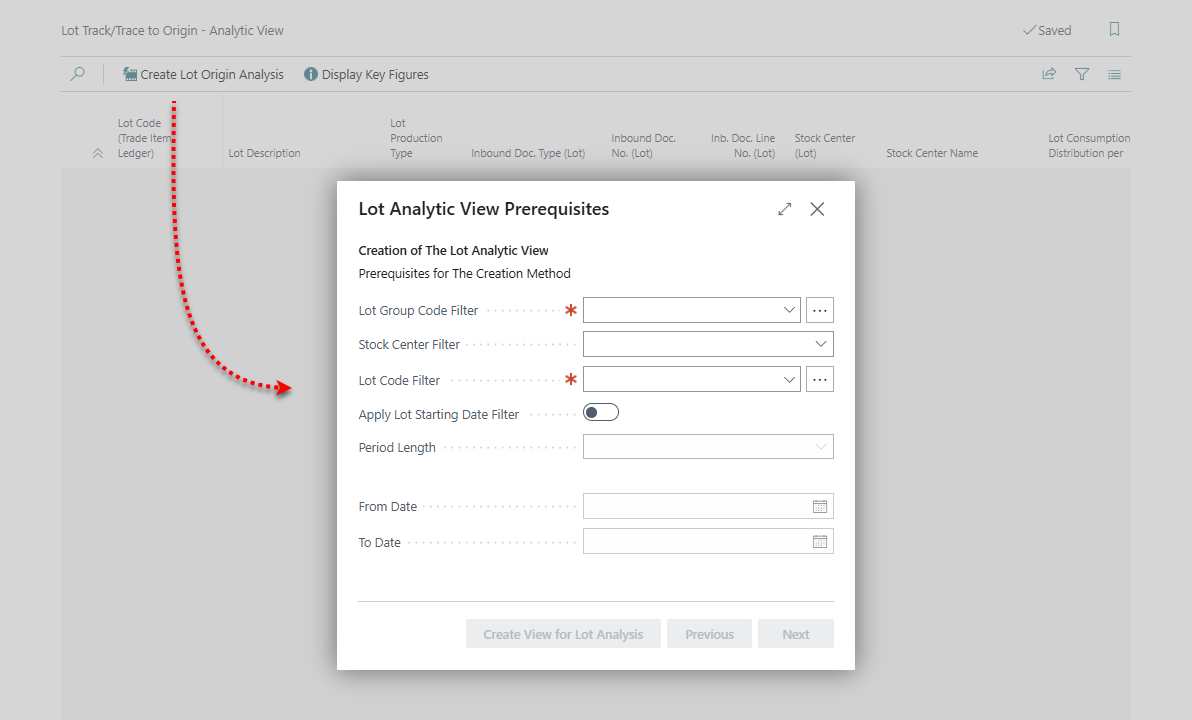
The top level of the view shows the selected lots. Each level below shows the lots that were consumed into the line above, down to the origin lots (Ground Level).
|
Field |
Description |
|---|---|
|
Lot Code (Trade Item Ledger), Lot Stage Code, Contrib. Raw Mat. No. |
The lot, stage and contribution raw material this line represents (stage and raw material only when the lot settings above split the lot). |
|
Inbound Doc. Type / No. / Line No. (Lot) |
The document the lot was created from, for example the receipt agreement or fishing trip of an origin lot. |
|
Consumed to Lot Code / Consumed to Stage Code |
The lot (and stage) the trade items on this line were consumed into. |
|
Output Net Weight (BWU) |
The weight of the trade items on this line. |
|
Total Lot Output Net Weight (BWU) / Portion of Output % |
The total output of the lot, and this line's share of it. |
|
Portion of Total % |
This line's share of everything that was consumed into the line above (on the top level: of the selected lots). |
|
Consumption Net Weight (BWU), Total Lot Consumed Net Weight (BWU) / Portion of Consumption % |
What was consumed into this lot (for this stage and raw material), the lot's total consumption, and the share. |
|
Composite Portion % |
This line's share of the lots on the top level. It is the Portion of Total % multiplied down through every level above. |
|
Ground Level |
Nothing was consumed into this lot: it is an origin of the traced lots. |
Actions
|
Action |
Description |
|---|---|
|
Create Lot Origin Analysis |
Opens the prerequisites and creates the view. |
|
Display Key Figures |
Lists the origin lots (Ground Level) with their total Composite Portion %, largest first: how much of the traced lots comes from each origin lot. |
Lot Track/Trace from Origin
Use this view to answer the question “Where did this landing or receipt end up?”
-
Open Lot Track/Trace From Origin - Analytic View.
-
Choose Create View for Lot Analysis. The Lot Analytic View Prerequisites page opens.
-
Select the origin lots and the options below, and choose Create Lot Analysis View.
Origin lots are lots created from an inbound document: receipt agreements, fishing trips, purchase and sales documents, and storage receipt agreements.
|
Prerequisite |
Description |
|---|---|
|
Stock Center Filter, Lot Code Filter |
Only these stock centers or origin lots. |
|
Receipt Agreement Filter / Fishing Trip No. Filter |
Only origin lots created from these receipt agreements or fishing trips. If both are filled in, the fishing trip filter is used. |
|
Vessel Filter (Source Lot) |
Only origin lots from these vessels. |
|
Apply Level Depth Limitation / Level Depth Limitation |
Stop the trace after this number of levels. Recommended on large companies, as a full trace can take a long time. |
|
Deduct Lot Consumed WIP Net Weight From Total On The Ground Level |
On the last level, WIP consumed into the lot is deducted from the lot's total output and consumption, so the yield only covers the raw material. |
|
Categorize Raw Material and WIPs with Processing Method, Raw Material (Processing Method), WIPs (Processing Method) |
Tell raw material and WIP apart by the item's Processing Method Code instead of its WF item type. |
|
Apply Lot Starting Date Filter, Period Length, From Date / To Date |
Only origin lots with a starting date in the period. |
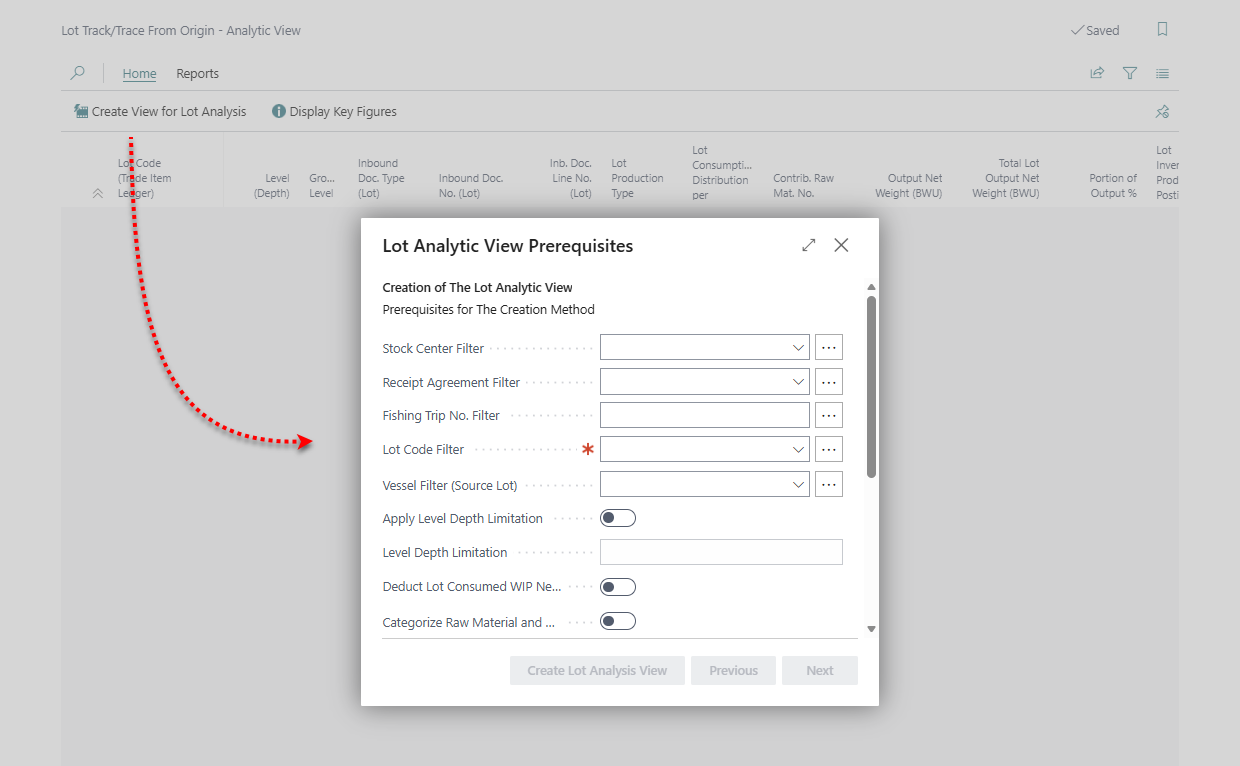
The top level of the view shows the origin lots, split by contribution raw material where the lot is distributed per contribution raw material. Each level below shows the lots the line above was consumed into (Level (Depth)), down to the last lots in the chain (Ground Level). Source Lot Code shows the origin lot on every line.
|
Field |
Description |
|---|---|
|
Consumed From Lot Code, Consumed From Contrib. Raw Mat. No., Consumed From Lot Stage Code |
The line on the level above that this lot consumed from. |
|
Output Net Weight (BWU), Total Lot Output Net Weight (BWU) / Portion of Output % |
The output of this line, the lot's total output, and the share. An indication of how pure the origin is within the lot. |
|
Consumption Net Weight (BWU), Total Lot Consumed Net Weight (BWU) / Portion of Consumption % |
What this lot consumed from the line above, the lot's total consumption, and the share. |
|
Yield % Total Weight Output vs. Consumed |
The lot's total output divided by its total consumption. Used for the weighted average yield in the key figures. |
|
Total Lot Consumed Raw Mat. / WIP / Products Net Weight (BWU) |
The lot's consumption split by raw material, WIP and products. |
|
Portion of Consumed Origin %, Portion of Consumed Source Origin %, Calc. Consumed Net Weight (BWU) of Source Origin (hidden by default) |
How much of the line above was consumed by this lot, and how much of the origin lot that adds up to through the whole chain, as a percentage and as a weight. |
Actions
|
Action |
Description |
|---|---|
|
Create View for Lot Analysis |
Opens the prerequisites and creates the view. |
|
Display Key Figures |
Lists the origin lots with their Weighted Average Yield %: the yield of the last lots in the chain, weighted by how much each one consumed. |
Reading the weights
-
A lot distributed per Lot appears once under each raw material branch above it, each time with the lot's full weights. Only the percentages are split per branch. Don't add up absolute weights across branches.
-
The views are calculated when they're created and aren't stored. Create the view again to see new postings.
-
Use filters (lot code, period, depth limitation) on large companies: a trace over many lots can take several minutes.