
A contribution cost type describes a kind of production cost that isn’t posted through BOMs or item charges, for example wages, packaging or cleaning. Cost types are used on Distribution Cost Documents to spread these costs over production lots, and in the Production Contribution Analysis to show them per lot.
Set up one cost type for each kind of cost you want to distribute and follow up separately.
Opening the list
Open Contribution Cost Type List. In the Production & MES Wisefish role it’s under Production Setup, and in the Production Manager Wisefish role under Setup. It is also possible to search for it. Choose New or Card to work on a single cost type.
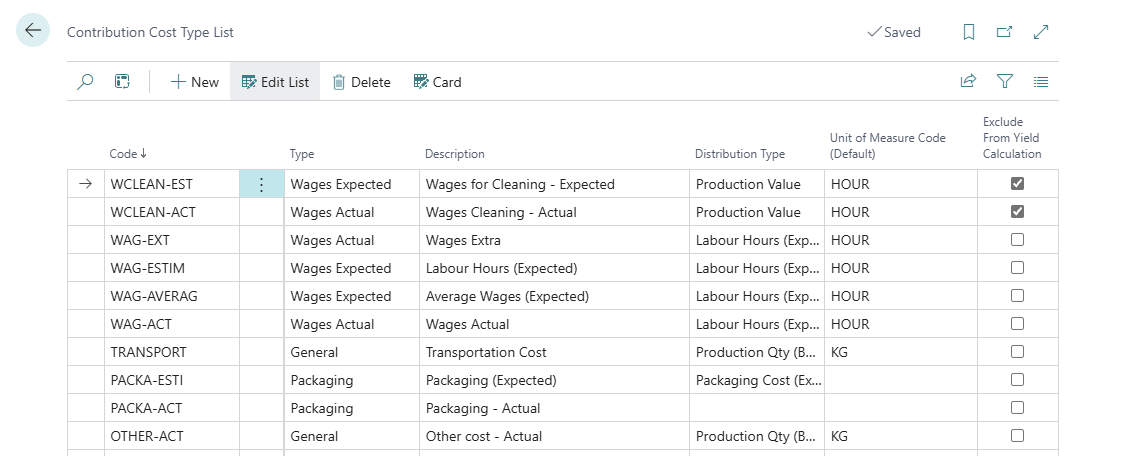
Fields
|
Field |
Description |
|---|---|
|
Code |
A unique code for the cost type, for example WAGES or PACK. |
|
Description |
The name of the cost type. Copied to the Distribution Cost Document when the cost type is selected. |
|
Type |
The kind of cost: General, Wages Actual, Wages Expected or Packaging. Must be filled in, otherwise the cost type can’t be used on a Distribution Cost Document. The type decides where the cost appears in the contribution analysis. |
|
Distribution Type |
How the cost is split between the lots on a Distribution Cost Document (see the next table). |
|
Unit of Measure Code (Default) |
The unit the cost is measured in, for example HOUR for wages. Suggested on the Distribution Cost Document. |
|
Unit Cost (Default) / Currency Code (Default) |
The default cost per unit, and its currency. Suggested on the Distribution Cost Document. |
|
Use as Default Unit Cost Suggestion |
Makes this cost type’s unit cost and currency the default for all cost types of the same Type. See Default unit cost below. |
|
Exclude From Yield Calculation |
If selected, costs of this type aren’t counted in the quantity and yield figures of the contribution analysis. Use this for costs that shouldn’t affect the yield, for example a fixed monthly cost. |
Default unit cost
When a cost type is selected on a Distribution Cost Document, the document gets its Type, Description, Distribution Type, Unit of Measure and Exclude From Yield Calculation from the cost type.
The Unit Cost and Currency Code are suggested as follows:
-
If a cost type of the same Type has Use as Default Unit Cost Suggestion selected, its unit cost and currency are used.
-
Otherwise, the cost type’s own Unit Cost (Default) and Currency Code (Default) are used.
This means you can keep one cost rate for a whole cost type, for example the average hourly wage, on one cost type, and the other cost types of the same type will use it.
The suggested values can be changed on each Distribution Cost Document.
Estimated wages in the contribution analysis
The Production Contribution Analysis can estimate the wages of a lot before the actual wages are known:
-
Estimated labour hours = produced quantity ÷ Output (Qty/Hour) on the item card
-
Estimated wages = estimated labour hours × the unit cost of the cost type with Type = Wages Expected and Use as Default Unit Cost Suggestion selected
To use this, set up one Wages Expected cost type with the average hourly wage as Unit Cost (Default), and select Use as Default Unit Cost Suggestion.
The analysis also estimates packaging and miscellaneous costs from Packaging Cost (LCY/BWU) and Misc. Cost (LCY/BWU) on the item card.
Example setup
|
Code |
Description |
Type |
Distribution Type |
Unit of Measure |
Unit Cost |
Default Suggestion |
|---|---|---|---|---|---|---|
|
WAGES-EXP |
Expected wages |
Wages Expected |
Labour Hours (Expected) |
HOUR |
45.00 |
✔ |
|
WAGES |
Actual wages |
Wages Actual |
Labour Hours (Expected) |
HOUR |
|
|
|
PACK |
Packaging |
Packaging |
Packaging Cost (Expected) |
KG |
|
|
|
CLEAN |
Cleaning |
General |
Production Qty (BWU) |
HOUR |
|
|