
Consume raw material into the lot
Post the raw material trade items into the production lot with the Trade Item Consumption Journal - Consumed to TI Lot = the production lot, and for a lot posted per stage, Consumed to Stage = the stage. Production agreements and WisePeripherals post the same consumption.
The consumption is not posted to BC yet. It waits until the lot is distributed.
WiseFish stops a consumption that would close a loop between lots (lot A into B, B into C, C back into A), because such a loop can never be distributed.
Lot Stages Distribution - Split consumption over stages
For a lot posted per stage, one raw material trade item is often used in several stages.
-
In the Trade Item Consumption Journal, enter the lines for the lot with Consumed to Stage = blank.
-
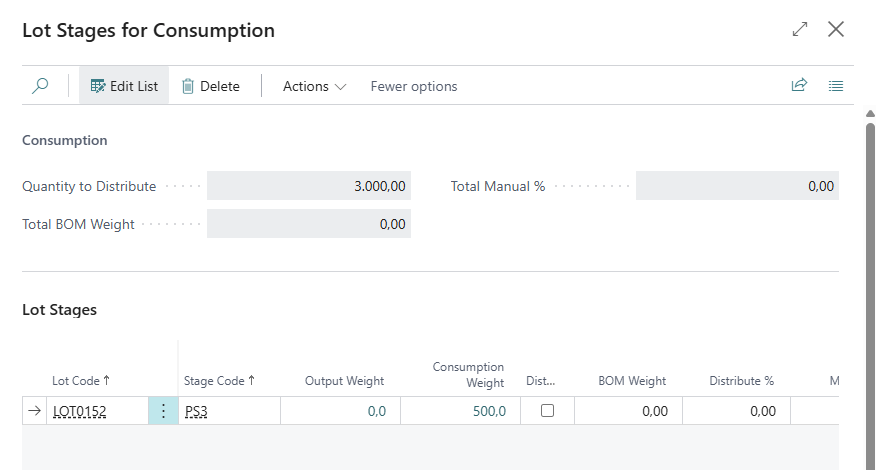
Choose Lot Stages Distribution. The page Lot Stages for Consumption opens with one line per stage of the lot.
-
Choose which stages get raw material (Distribute). By default, these are the stages with no consumption yet.
-
Either enter a Manual % per stage, or leave all Manual % at 0 to split by BOM Weight.
-
Choose Suggest Distribution. The Suggested Quantity of each stage is filled in, in whole units, and always adds up to the quantity to distribute.
-
Correct the suggestions if needed, and choose Confirm Distribution. The journal lines are replaced by one line per stage, with Consumed to Stage filled in.
-
Post the journal.
Post output
Post the output of the lot as usual. The first output of a product creates its Lot Product line.
If BOM Postings for Trade Items = Automatic, the BOM components of the product are posted out of stock with the output, against the same Lot Product. With Manual, they need to be posted before the lot is closed.
Distribute Contribution for one lot
-
Open the Lot Card of the production lot.
-
Choose Distribute Contribution.
-
Choose the option
Close Lot and Distribute Contribution, so the lot is distributed and closed.
Distribute and keep Lot open when the lot should be distributed and stay open, for example to check the result while production goes on. Distribute it again when more consumption or output is posted.
or Cancel.
WiseFish then posts the consumption to BC (quantity distribution), runs Adjust Cost, and revalues the output (value distribution).
The lot with posted consumption cannot be closed just by setting Posting Status to Completed (Closed). WiseFish asks to run Distribute Contribution, so that all consumption is accounted for.
If the lot has several Lot Stages but BC Inv. Production Posting is not Stage within Lot, WiseFish asks before it goes on.
A single stage of a lot posted per stage can be closed on its own. On Lot Stages, set the stage's Posting Status to Closed. Only that stage is distributed, followed by the value distribution of the lot.
Close many lots: Close Lots for Cost Adjustments
On the Lot List (or the production lot list), choose Close Lots for Cost Adjustments.
|
Option |
Meaning |
|---|---|
|
Ending Date to |
Lots that ended on or before this date. Only lots with an Ending Date before today are taken. |
|
Starting Date from |
Lots that started on or after this date. |
|
Stock Center Filter, Raw Material No. Filter, Processing Stage Filter |
Limit the lots. The raw material filter is on the lot's Allowed Raw Material. |
|
Keep Lots Open |
Distribute, but leave the lots open (not for Close without Production lots). |
Each open lot in the filter is closed and distributed. At the end, a notification shows: Lots for distribution: x. Lots with Quantity Distribution errors: y. Lots with Value Distribution errors: z.
If the quantity distribution of a lot fails, the lot is set back to Open and the errors are listed on a page at the end. If the value distribution fails, the lot's Revaluation is set to Failed (see Comments).
The batch job can run from the job queue.
Redistribute cost for closed lots
On the Lot List, choose Redistribute Cost for Closed Lots. It runs the whole distribution again for closed production lots in the filters (To Date, From Date, Stock Center Filter, Raw Material No. Filter on Allowed Raw Material, Processing Stage Filter). It can be used when costs have changed after lots were closed. A message lists the lots that were redistributed.
Redistribution after a purchase invoice
When the purchase invoice or credit memo for raw material is posted after the lots that consumed it are closed, the cost difference must reach the products.
-
Distr. Purch. Value to Output with Job Queue = No means that WiseFish redistributes those closed production lots when the document is posted.
-
When = Yes the document is marked To Be Distributed, and the job queue does it later.
Downstream lots: Downstream Lot Value Worksheet
A product of one lot is often consumed into another lot (for example, fillets into a lot that makes portions). If the first lot is distributed again after the second lot is closed, the second lot's input gets a new cost from BC Adjust Cost, but its output does not.
With Downstream Lot Distribution = Mark Only
-
The value distribution marks the first lot Costs not distributed downstream when it changed the lot's output value and that output has been consumed into closed lots. Lots that are still open are left alone; they get the value when they are distributed.
-
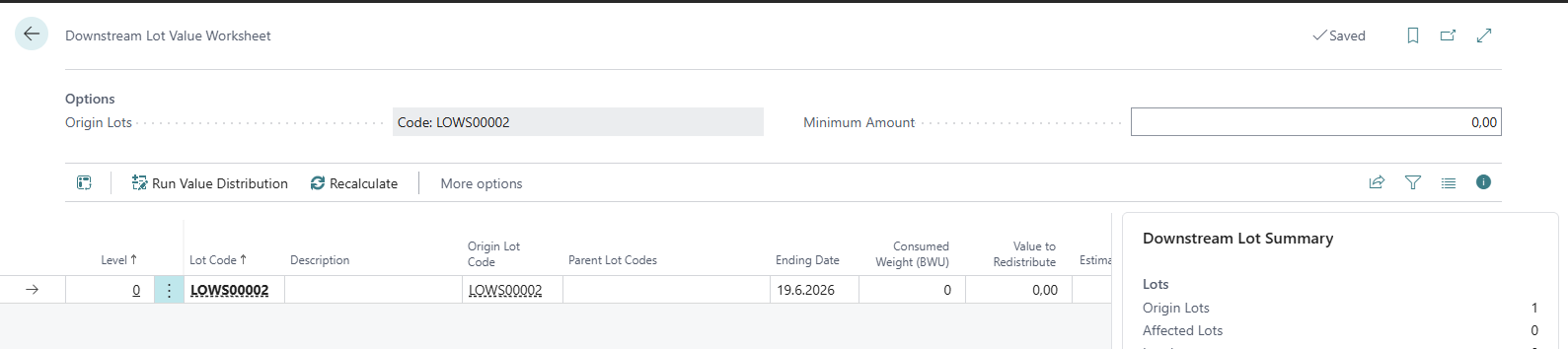
On the Lot List, choose Downstream Lot Value Worksheet. It lists the marked lots (Origin, level 0) and every closed lot below them, level by level.
-
Check the columns:
|
Column |
Meaning |
|---|---|
|
Level |
The longest consumption path from an origin lot. Lots are distributed level by level. |
|
Parent Lot Codes |
The lots in the worksheet this lot consumed from. |
|
Consumed Weight (BWU) / Output Weight (BWU) |
What the lot took from its parents, and what it put out. |
|
Value to Redistribute |
Value already in the lot but not on its output. |
|
Estimated Value |
An estimate, by weight, of the value that will still reach the lot when its parents are distributed. |
|
Below Minimum |
The two values together are below the Minimum Amount. |
|
Include |
Whether Run Value Distribution runs the lot. |
|
Status |
Origin, Pending, Distributed, Skipped (Below Minimum), Skipped (Parent Not Distributed), Not Applicable, Failed, Cycle, Level Limit. |
-
Choose Run Value Distribution. Each included Pending lot is revalued after all its parents, with the value read again just before it. Lots below the Minimum Amount are skipped.
-
Afterwards the mark is cleared on lots whose downstream lots are all done.
Other actions: Recalculate, Clear Downstream Flag (when decided that the downstream lots need nothing), Lot Card.
With Legacy Cascade, the quantity distribution of a lot also runs again for every closed lot below it, as WiseFish did before. The worksheet is then not needed.
How the Distribution Calculates
Quantity distribution
For each stage (the whole lot, if posted per Lot):
-
The output of each product is turned into BWU.
-
Each raw material is shared over the products in proportion to their output weight
per Contribution Raw Material: only over the products made of that raw material
per Lot: over all products. -
Each share is rounded down to a whole unit of the raw material, and the last product gets the rest, so the total always adds up.
-
The consumption is posted to BC against each Lot Product.
Example (per Lot): 100 of cod and 50 of haddock into a lot with three products of 10 each. Each product gets 50 in all: 33 or 34 of cod and 16 or 17 of haddock. All 100 of cod and all 50 of haddock are used.
Distributing again. When more output is posted after a distribution (Distribute and keep Lot open), the next distribution moves consumption between the products. Consumption already posted to a product whose share has dropped is credited and posted to the others.
Example: 100 of raw material at 10.00; 100 of A out; distributed and kept open, so A has consumed 100 (1,000.00). Then 100 of B is output and the lot is distributed again: A and B have consumed 50 each, and each carries 500.00.
Stage within Lot: each stage is distributed on its own. Output of one stage that is consumed into the next stage of the same lot is handled in stage order.
Value distribution: Weight Based
The lot's cost is split over the products by output weight.
Example: 100 of raw material at 10.00 (1,000.00); 60 of A and 40 of B out. A gets 600.00 and B 400.00.
Products in packs are valued by their weight, so a 2-kg pack weighs twice as much as 1 kg of the same value.
Value distribution: Value Based
The lot's cost is split in proportion to output weight × the product's Unit Cost Ratio in Base Weight Unit on Lot Products.
Example: 2,000 of raw material at 7.50 (15,000.00); 1,000 of A at a cost price of 18.00 and 1,000 of B at 2.00. A gets 15,000 × 18,000 / 20,000 = 13,500.00 and B 1,500.00.
Where the unit cost ratio comes from, in this order:
-
A value already on the Lot Product line (entered by hand, or by Fetch Unit Cost).
-
The latest Lot Product Cost Price of the product (blank size grade) with Valid from Date on or before the lot's Starting Date.
-
The latest Lot Product Cost Price of the product's Contrib. Raw Mat. No. and RM Size Grade.
-
The product's Unit Cost on the item card.
If a product still has no unit cost ratio, the value distribution stops and the lot's Revaluation is set to Failed (see Comments).
Which costs are split: Lot Value Redistribution
The lot's cost is everything posted against its Lot Products: Raw Material, BOM components, other consumption, and item charges on the output.
Example: raw material 728.00; A and B of equal weight; BOM components 10.00 on A and 200.00 on B.
|
Lot Value Redistribution |
A |
B |
|---|---|---|
|
blank (all costs split by weight: 938.00 / 2) |
469.00 |
469.00 |
|
Only redistribute RM Costs (raw material 364.00 each, BOM stays) |
374.00 |
564.00 |
Rules that keep the total right
-
Every remainder on the largest entry. Each output entry is revalued to its share, rounded to the cent. The largest output entry of each stage then gets whatever is left, so the products carry exactly the lot's cost. Running the distribution again posts nothing.
Example: 1,000.00 over outputs of 10, 10 and 40 gives 166.67, 166.67 and 666.66.
-
Credited output. Output that is credited after posting is counted, so the remaining output carries the full value. Example: output of 100 and 20, then the 20 credited: the 100 carries 1,000.00.
-
A product with nothing posted (for example, its output was undone) is skipped. It does not stop the other products from being revalued.
-
Stage within Lot: a stage is revalued before the stages that consume its output, so they get the new value. Example: 100 of raw material at 10.00 into stage 1, 100 of an intermediate product out, consumed into stage 2, and 100 of the product out of stage 2: both carry 1,000.00.
-
Raw material in other units: raw material taken in by another unit (for example tonnes) is counted in BWU. Distributing again does not make the value grow.
Locked products
A Lot Product with Locked for Value Distribution keeps its value. The other products of its stage share the stage's cost without it.
-
Products with Standard costing are locked automatically.
-
Lock/Unlock Selected Stage on Lot Products locks or unlocks all products of the stage.
Example: 20,000.00 of raw material, 10,000.00 into each of two stages. Stage 1 makes a Standard cost product (6,000.00, locked); stage 2 gets exactly its own 10,000.00.
The Lot Products page
Open Lot Products from the Lot Card or the Lot List. One line per product (and stage).
|
Field |
Meaning |
|---|---|
|
Posting No. |
The order the product's consumption and output are posted against. |
|
Status |
Distribute Consumption, Redistribute Consumption, Posted. |
|
Unit Cost Ratio in Base Weight Unit (Redistribution) |
Used by Value Based. |
BOM Weight and the Lot Stages suggestion
On Lot Stages for Consumption, the BOM Weight of a stage is the raw material its products need by their BOMs: for each product, its output in the stage × the quantity of each raw material (trade item) component. Packaging and other standard items do not count.
The BOM is the product's Assembly BOM. If it has none, it is the BOM of BOM System to Use. The BC Production BOM or the WiseFish BOM of the lot's Production Type, in its active version on the work date.
Examples: 100 of a product with 1.25 of raw material and 2 of packaging per unit: BOM Weight 125. With 0.8 of raw material in its Production BOM: 80.
Suggest Distribution splits the quantity in proportion to Manual % (if any is entered) or BOM Weight. Each stage is rounded to a whole unit, and the difference goes on the stage with the largest suggestion.
Example: BOM Weights 200, 300 and 400; 100 to distribute: 22, 33 and 45.
BOM components posted with the output
With BOM Postings for Trade Items = Automatic, the components are posted with the output, in proportion to the output quantity (50 of a product with 0.2 per unit: 10).
-
BOM System to Use chooses the BOM. With Assembly BOM, only the Assembly BOM is posted, even if the item also has a Production BOM, and the other way round.
-
The location of a component is the location on the BOM line (Production BOM and WiseFish BOM), otherwise the stock center's BOM Component Location Code. If Location Mandatory is set in Inventory Setup and neither is filled in, the output cannot be posted.
-
A BOM No. on the output journal line is used instead of the item's default BOM (Production BOM and WiseFish BOM).
Close without Production
For a lot whose raw material was used without making products (for example, it was spoiled), set BC Inv. Production Posting to Close without Production and run Distribute Contribution. The consumption is posted out of inventory and the lot is closed, with no revaluation. A message warns that the lot cannot be reopened, and output can no longer be posted to it.