
A production lot takes in raw material and puts out products. Lot Contribution Distribution decides how much of the raw material each product has used, and what each product is worth. It runs in two steps:
-
Quantity distribution. The raw material consumed into the lot is posted to BC inventory as consumption of the lot's products, in proportion to their output.
-
Value distribution. The output of the products is revalued so that, together, the products carry the full cost of the lot: raw material, BOM components and other costs posted to the lot.
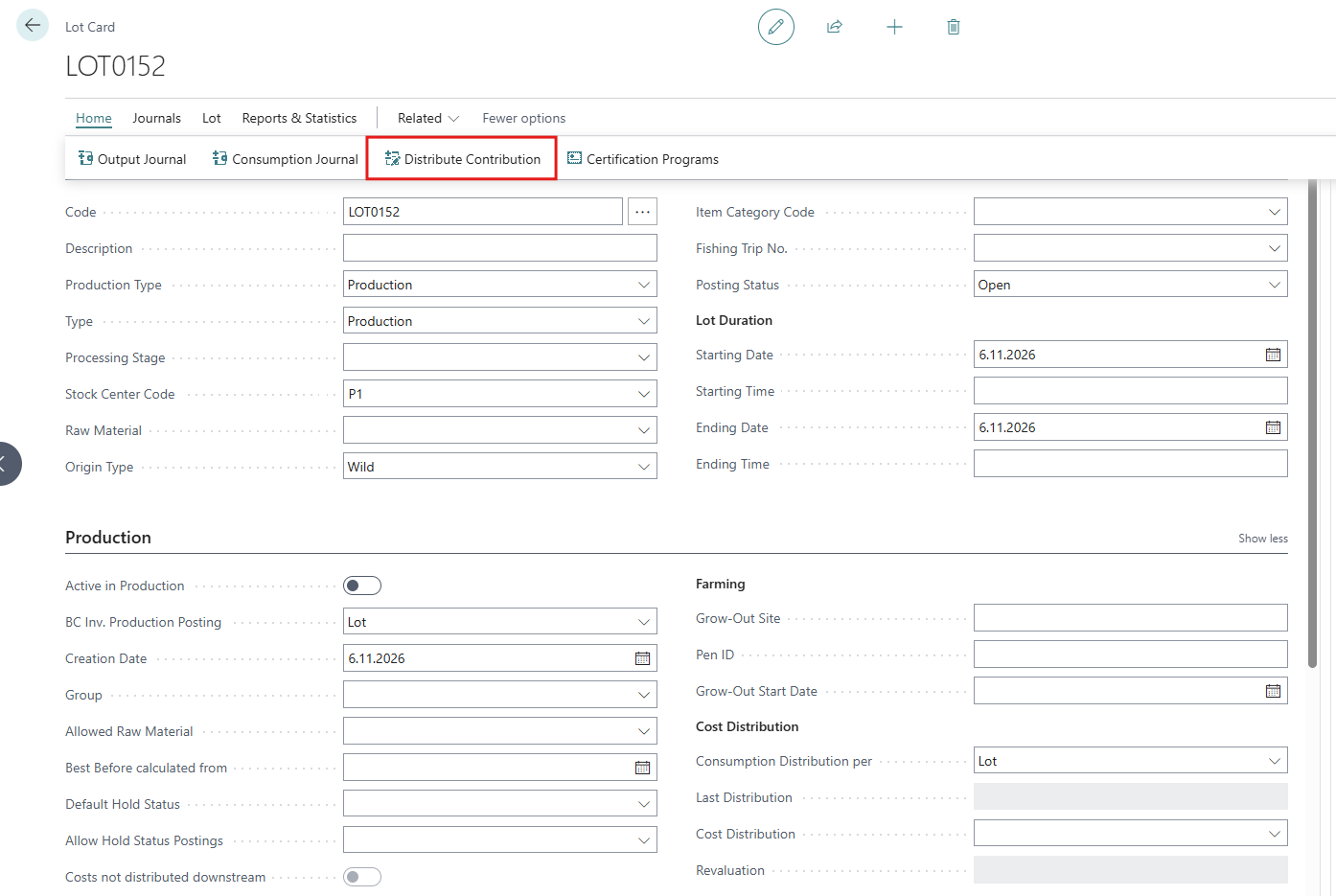
You run both steps with one action, Distribute Contribution, usually when the lot is finished. The same calculation also runs from two batch jobs and, for lots further down the chain, from the Downstream Lot Value Worksheet.
Until a lot is distributed, its consumption exists only in WiseFish (as trade items consumed into the lot). Its output is in BC inventory at the item's unit cost. After distribution, BC inventory and the product costs are right.
Terms used
|
Term |
Meaning |
|---|---|
|
Production lot |
A WiseFish lot with a Production Type (Production, Contracting, Repacking or Relabeling). A lot with a blank Production Type holds raw material and is never distributed. |
|
Trade item (TI) |
A physical stock unit in WiseFish with item, lot, quantity and location. Raw material is consumed into a lot as trade items, and output is posted as trade items. |
|
Stage |
A processing stage. All output is posted at a stage, and consumption can be posted to a stage (Consumed to Stage). |
|
Lot Product |
One line per product made in the lot (and per stage, if the lot is posted per stage). Each Lot Product has a hidden Posting No., which is the order its consumption and output are posted against in BC. |
|
BWU |
Base Weight Unit (kg or lb), set in WiseFish Setup. All distribution is calculated in BWU. |
|
Contribution raw material |
The raw material a product is made of (set in the item field Contrib. Raw Mat. No.) |
|
Downstream lot |
A closed lot that has consumed output of another lot, directly or through other lots. |
|
LQD / LVD |
Lot Quantity Distribution and Lot Value Distribution. |
The process at a glance
-
Create the production lot and set how it is posted (BC Inv. Production Posting).
-
Consume raw material into the lot, with Lot Stages Distribution if the lot has several stages.
-
Post output. BOM components can be posted with it automatically.
-
Run Distribute Contribution, or close many lots at once.
-
If costs change after the lot is closed, redistribute.
Setup and Configuration
-
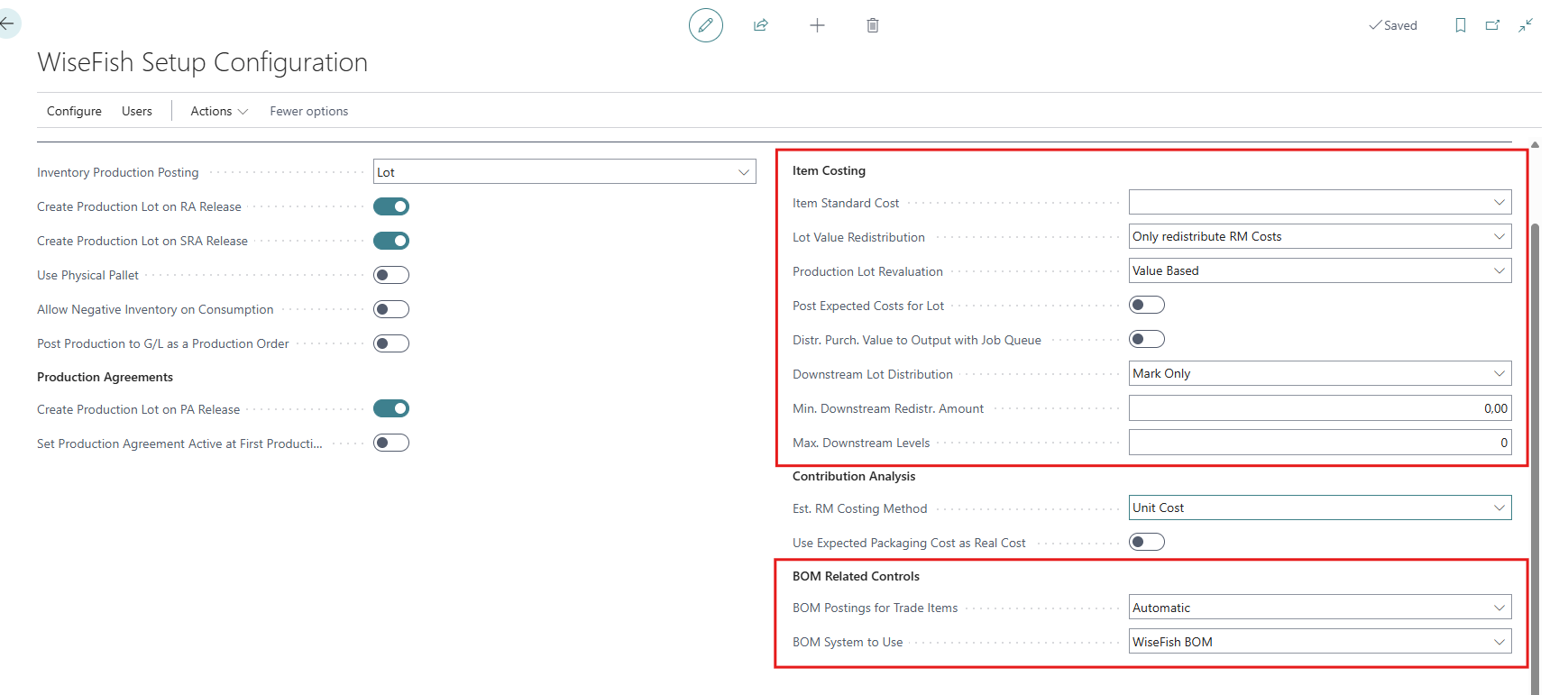
In Wisefish Setup Configuration - Production - Item Costing
|
Field |
Options |
What it does |
|---|---|---|
|
Production Lot Revaluation |
No, Weight Based, Value Based |
How the value distribution splits the lot's cost over the products. No means no value distribution, unless the stock center says otherwise. |
|
Lot Value Redistribution |
blank, Only redistribute RM Costs |
Blank - all the lot's costs are split over the products.
|
|
Distr. Purch. Value to Output with Job Queue |
Yes/No |
No - posting a purchase invoice or credit memo for raw material redistributes the closed lots that used it at once.
|
|
Downstream Lot Distribution |
Mark Only, Legacy Cascade |
What happens to closed lots that consumed this lot's output. Mark Only is recommended. |
|
Min. Downstream Redistr. Amount |
amount (LCY) |
The default minimum amount on the Downstream Lot Value Worksheet. |
|
Max. Downstream Levels |
number |
How many levels the worksheet searches. 0 = no limit. |
-
In Wisefish Setup Configuration - Production - BOM Related Controls
|
Field |
Options |
What it does |
|---|---|---|
|
BOM Postings for Trade Items |
Automatic, Manual |
Automatic: BOM components (packaging, ingredients) are posted out of stock when output is posted. Manual: you post them yourself before the lot is closed. |
|
BOM System to Use |
Assembly BOM, BC Production BOM, WiseFish BOM |
Which BOM is posted with the output, and which BOM gives the BOM Weight of a lot stage. |
-
In the Stock Center Card, the following fields need to be set
- Production Lot Revaluation: (Default, Weight Based, Value Based). Default uses the setting in WiseFish Setup. Any other value overrides it for the lots of this stock center.
- Stock Center Type: lots of a 3rd Party Producer Stock Center are not revalued. Their Revaluation is set to Not Applicable.
- BOM Component Location Code: the location BOM components are taken from (see Lot Distribution Contribution - How it works | BOM components posted with the output ). -
On the Item Cards, these fields need to be set
|
Field |
What it does |
|---|---|
|
Trade Item Type |
Raw Material, WIP or Product. Only trade items take part in the distribution. |
|
Contrib. Raw Mat. No. |
The raw material the product is made of. Needed on every product when the lot distributes per Contribution Raw Material. Set it on the raw material item itself as well. |
|
RM Size Grade |
The size grade of the raw material the product is made of. Used to find the raw material's cost price. |
|
Exclude from Contribution |
For by-products. The product gets no consumption and no value. |
|
Weight Unit of Measure |
Every trade item needs a weight unit, so that quantities can be turned into BWU. |
|
Unit Cost |
Output is posted at this cost before distribution. It is also the last fall-back for Value Based. |
|
Costing Method |
A product with Standard costing is locked for value distribution. |
-
The Lot Card
|
Field |
Options |
What it does |
|---|---|---|
|
Production Type |
blank, Production, Contracting, Repacking, Relabeling |
Blank: not a production lot; it is only closed, never distributed. The type also chooses which BOM of the item is used. |
|
BC Inv. Production Posting |
blank, Lot, Stage within Lot, Close without Production |
Lot: the whole lot is distributed as one.
|
|
Consumption Distribution per |
Contribution Raw Material, Lot |
Contribution Raw Material: each raw material goes only to the products made of it (item Contrib. Raw Mat. No.).
|
|
Allowed Raw Material |
item |
The raw material allowed in the lot, if not all are allowed. The batch jobs can filter on it. |
|
Posting Status |
Open, Completed (Closed) |
Set by the distribution. |
|
Cost Distribution |
blank, Distribute, Distributed |
Shows whether the value distribution must run, or has run. |
|
Revaluation |
blank, Failed, Not Applicable |
Set when the value distribution fails (the reason is in the lot's comments), or does not apply. |
|
Last Distribution |
date and time |
When the lot was last distributed. |
|
Costs not distributed downstream |
Yes/No |
Set when the lot's output value changed after the output was consumed into closed lots. |
Rules on the lot:
-
BC Inv. Production Posting cannot be changed once consumption or output has been posted to BC for the lot.
-
Changing Consumption Distribution per to Lot after the lot has been distributed asks for confirmation, and it cannot be changed back unless all consumption is credited.
-
Close without Production cannot be chosen once output has been posted, and the lot cannot be reopened afterwards.
-
Lot Product Cost Prices
For Value Based revaluation, the expected value of each product per BWU in Lot Product Cost needs to be entered.
Price (Item No., Size Grade Code, Valid from Date and Cost Price in Base Weight Unit). The price used is the latest one whose Valid from Date is on or before the lot's Starting Date.