
In WiseFish, item charges have been extended to meet requirements in the seafood industry, including the option to work with estimated additional costs on agreements.
Item charges
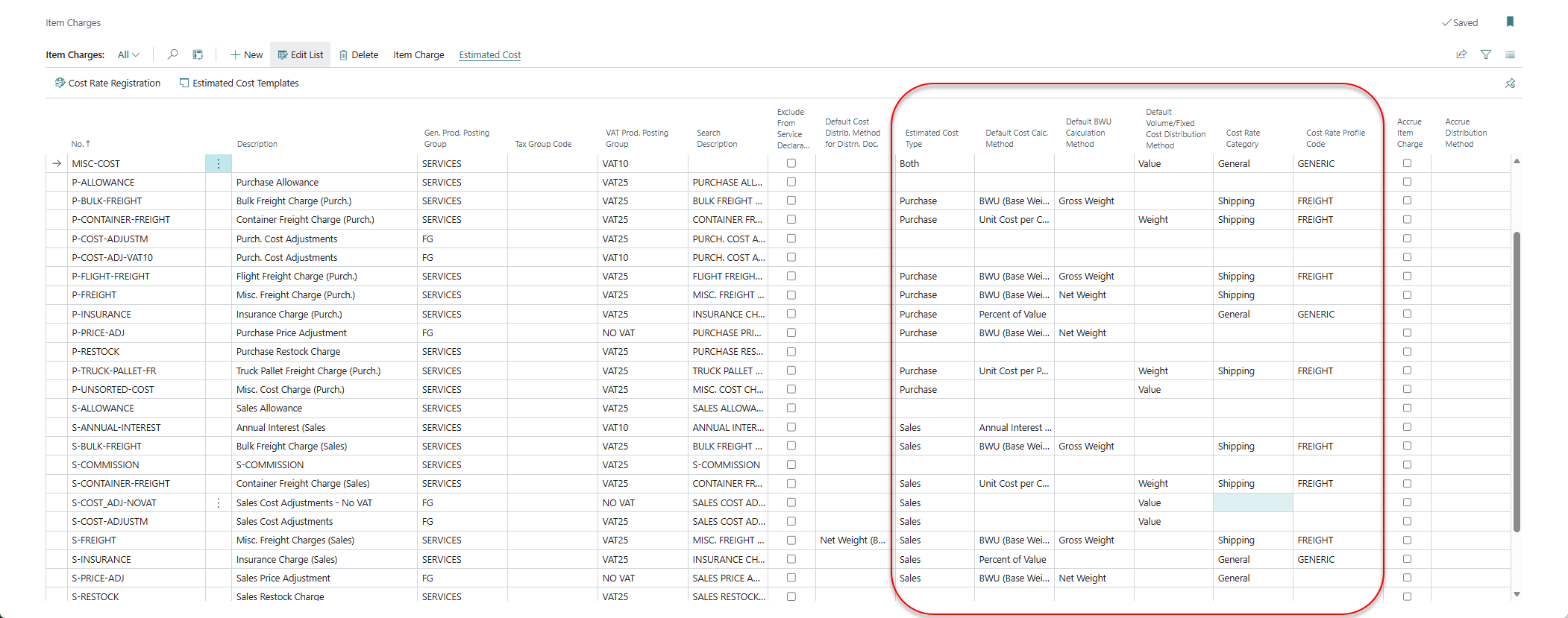
To add estimated additional costs to agreements, set up the following fields for each additional cost on the Item Charges page:
-
Use item charge numbers to distinguish between the different kinds of item charges. The Item Charge is given a number and a description.
-
Then the Estimated Cost Type is recorded: Sales, Purchase or Both. It decides where the item charge can be used: on sales agreements, on purchase agreements, or on both. Choose Both when the same charge, for example freight, is used on both sales and purchase agreements. An item charge set to Both appears in both the Sales Related and the Purchase Related item charge lists.
-
Set up the Default Cost Calculation Method. It is copied to the cost line when the item charge is added to an agreement:
-
Empty: a cost amount that does not depend on the quantity or value in an agreement. It is shown as Fixed Cost on the agreement.
-
Percent of Value: calculates the cost as a percentage of the value in an agreement.
-
BWU (Base Weight Unit): calculates the cost from the quantity in an agreement. When selected, specify in Default BWU Calculation Method whether the net or gross weight is used. BWU is kg or lb, as set up in WiseFish Setup.
-
Unit Cost per Pallet: calculates the cost from the number of pallets in an agreement.
-
Unit Cost per Container: calculates the cost from the number of containers in an agreement.
-
Annual Interest % of Value: a yearly interest rate on the agreement value. The cost is the agreement value × the rate × the number of interest days ÷ 365. The number of days can be calculated from the payment terms due date, or entered on the agreement cost line.
For a fixed cost, pallet or container cost, set Default Volume/Fixed Cost Distribution Method to decide how the cost is distributed across the agreement lines: by Weight or by Value.
-
-
Optionally, set the Cost Rate Category (General or Shipping) and the Cost Rate Profile Code to use registered cost rates. See Using Cost Rates.
ℹ️ Note that the Sales & Receivables Setup and Purchases & Payables Setup must be configured so shipments/receipts are automatically created when you post an invoice.
Additional setup: cost rates or templates
To minimize manual entry, you can set up cost rates, templates, or both. Both are available on the Item Charges page under Estimated Cost.
-
Cost rates: register dated rates for an item charge, much like a price list. There are general cost rates (for example percentages or a cost per pallet) and shipping cost rates (freight rates for a route and shipping agent). A cost rate profile decides which rates are offered on an agreement, based on for example the shipping agent, location and currency. Open them with Estimated Cost > Cost Rate Registration. See instructions: Using Cost Rates

-
Estimated additional cost templates: a reusable set of item charges with default calculation methods and rates, for a customer or a vendor. A template can be limited to, for example, a ship-to code, shipment method or country/region. Open the list with Estimated Cost > Estimated Cost Templates. See instructions: Using Estimated Additional Cost Templates
