
Cost rates are registered rates for an item charge, for example a freight rate per tonne from a shipping agent, or an insurance percentage. When you add the item charge to an agreement's estimated additional costs, you can select one of the registered rates instead of typing the rate yourself. The cost calculation method, currency and rate are then copied to the cost line.
Concepts
-
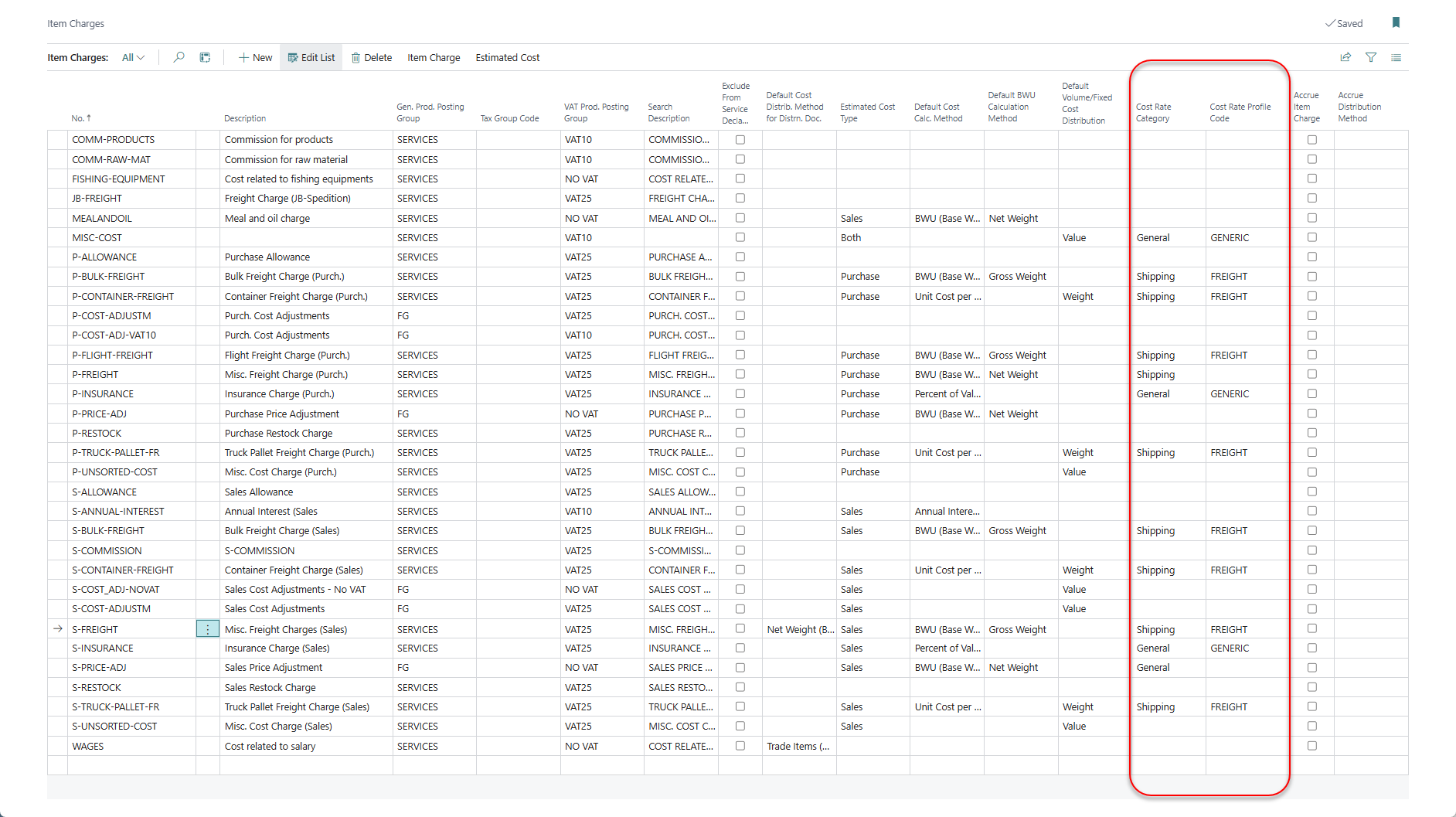
Cost Rate Category on the item charge decides which kind of rate the item charge uses:
-
General: for example percentages for insurance or commission, or a cost per pallet for handling.
-
Shipping: freight rates for a route, from a shipping agent.
-
-
Cost Rate Profile Code on the item charge links it to a cost rate profile. The profile decides which rates are offered on an agreement, and which columns are shown when you register rates.
Set up a cost rate profile
Search for WF Cost Rate Profile List. A profile has a code, a description and a set of filters. Turn on the filters that should narrow the rates offered on an agreement:
|
Filter |
When it is on |
|---|---|
|
Date Filter Method |
Compares the rate date with the agreement's shipment date (sales) or receipt date (purchase); on blanket agreements, the first shipment or receipt date. From Date of Shipment/Receipt offers rates dated on or after that date, and To Date of Shipment/Receipt offers rates dated on or before it. Leave it blank to ignore the rate date. |
|
Expiration Date Filter Active |
Rates that expired before the agreement's shipment or receipt date are not offered. Rates without an expiration date are always offered. |
|
Currency Filter Active |
Only rates in the agreement's currency are offered. |
|
Location Filter Active |
Only rates for the agreement's location are offered, if the agreement has a location. |
|
Shipping Agent Filter Active |
Only rates from the agreement's shipping agent are offered, if the agreement has one. |
|
Shipping Facility Filter Active |
Only rates for the agreement's shipping facility are offered, if the agreement has one. |
|
Shipment Method Filter Active |
Only rates for the agreement's shipment method are offered, if the agreement has one. |
|
Discharge Place Filter Active |
Shipping cost rates only. Only rates for the agreement's place of discharge are offered, if the agreement has one. |

Assign the profile to the item charge in the Cost Rate Profile Code field on the Item Charges page.
Register cost rates
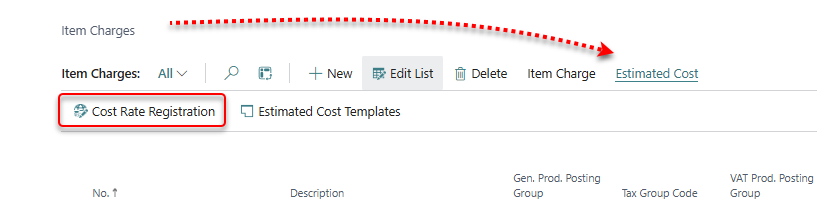
On the Item Charges page, select the item charge and choose Estimated Cost > Cost Rate Registration. The page opens for that item charge, with the newest rates first. Depending on the item charge's Cost Rate Category, it is the general or the shipping cost rate registration. Only the columns used by the item charge's cost rate profile are shown.
You can also maintain the rates of all item charges in one list: search for WF General Cost Rates or WF Shipping Cost Rates.
General cost rates
-
Date: the date of the rate. New rates get the work date. Optionally enter an Expiration Date.
-
Cost Calculation Method decides which rate field you can fill in:
-
blank: Unit Cost (General), a single amount. On the agreement it becomes the unit cost with a cost quantity of 1.
-
Percent of Value: a percentage of the agreement value.
-
BWU (Base Weight Unit): Unit Cost per BWU, or per tonne. The two are calculated from each other. BWU is kg or lb, as set up in WiseFish Setup.
-
Unit Cost per Pallet or Unit Cost per Container.
-
Annual Interest % of Value: a yearly interest rate. On the agreement, the cost is the agreement value × the rate × the number of interest days ÷ 365.
-
-
Currency Code: the currency of the rate. It is copied to the agreement cost line.
-
Use Comments to record, for example, the terms of the quote behind the rate.
Shipping cost rates
Shipping cost rates have the same date, currency and comment fields, and also:
-
Shipping Agent Code and Quote Ref. from Shipping Agent, so you can trace the rate back to the quote.
-
The route: Departure Place, Destination Place and, if used, Discharge Place. Selecting a place fills in its country/region. When an agreement has a place of loading or a place of delivery, only rates for that route are offered.
-
Cost Calculation Method: blank (Unit Cost (General)), BWU, Unit Cost per Pallet or Unit Cost per Container.
Use a cost rate on an agreement
-
Open the agreement and choose Estimated Additional Sales/Purchase Cost.
-
Add or select a line with the item charge.
-
Choose Select Cost Rate. The registered rates for the item charge are shown, filtered by the cost rate profile.
-
Select a rate. Its cost calculation method, currency and rate are copied to the line, and the estimated costs are recalculated.
The selected rate is shown in the cost rate FactBox. Use Edit Cost Rate to open the rate.
A cost rate that is used on an agreement cannot be deleted.