
A warehouse can process storage items for their owner, for example fillet, pack or repack them, and be paid for the work without ever owning the goods. In Wisefish this is done by consuming the storage items into a Contracting lot at a stock center of type External or 3rd Party Producer.
When to use it
|
The owner wants… |
Use |
|---|---|
|
the goods back as they were received |
Storage Shipment Agreement |
|
the goods processed before they leave the warehouse |
Consumption into a Contracting lot (this page) |
Setup
Stock Center Card
|
Field |
Value |
|---|---|
|
Stock Center Type |
External or 3rd Party Producer |
|
Customer Code |
The owner of the goods. Required for Storage |
Lot Card
|
Field |
Value |
|---|---|
|
Stock Center Code |
The owner's stock center |
|
Production Type |
Contracting |
Rules for consuming storage items
-
Storage items can only be consumed into a lot with Production Type = Contracting.
-
The stock center on the consumption journal line must have a Stock Center Type other than blank.
-
A Contracting lot at such a stock center accepts only storage items. The company's own trade items cannot be consumed into it.
Process
The process is very similar to Production, only that Storage Items are used. See also Producing.
-
Receive the goods.
Create a Storage Receipt Agreement for the owner's stock center.
Enter the owner's reference in Storage Agent Lot on the line, create the trade item inbound lines, then Release and Post Storage Receipt.
The trade items are created with Creation Type = Storage. -
Create the Contracting lot.
Create a lot for the owner's stock center with Production Type = Contracting. -
Consume the storage items.
Open the Trade Item Consumption Journal and run Select Storage Trade Items.
Enter the Contracting lot in Consumed to TI Lot, select the trade items and click Reserve.
Close the page and Post the journal.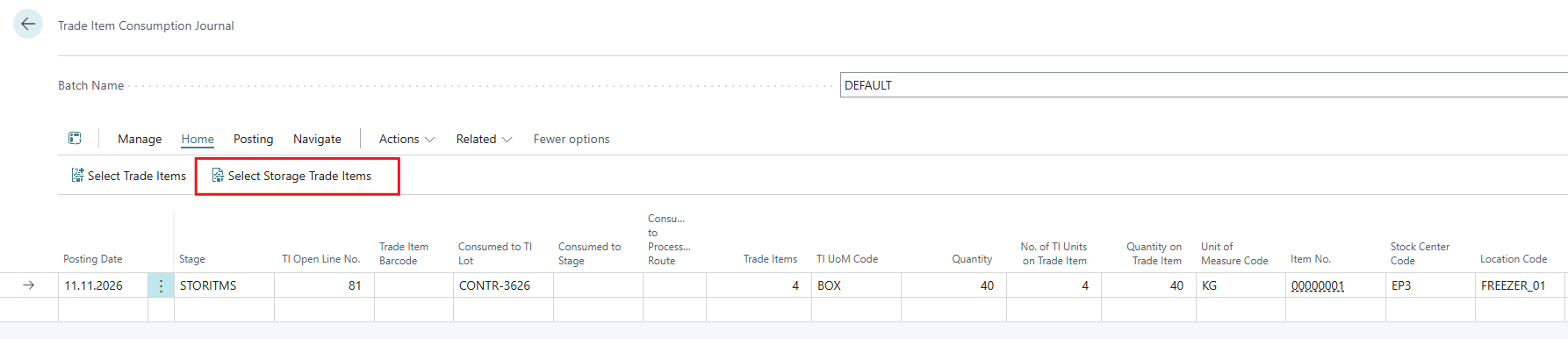
Correcting a consumption
If storage items were consumed by mistake, credit them in the Trade Item Credit Consumption Journal with Select Storage Trade Items. The trade items return to stock with their storage details. See also Crediting Consumed Trade Items in the Production manual.
How to tell what happened to a storage item
Open Trade Item Ledger Entries and filter on Storage Agent Lot or the trade item lot.
|
Status |
Closing Type |
Meaning |
|---|---|---|
|
Created |
(blank) |
In stock |
|
Out (Created In) |
Usage |
Consumed into a lot. Can be credited. |
|
Out (Created In) |
Storage |
Shipped to the owner with a Storage Shipment Agreement. Cannot be credited in the Credit Consumption Journal. |
Troubleshooting
|
Problem |
Cause |
Solution |
|---|---|---|
|
Customer Code must have a value in Stock Center when you create a Storage Receipt Agreement |
The stock center has no owner |
Enter Customer Code on the Stock Center Card |
|
The consumption cannot be posted |
Wrong lot or stock center |
Check Production Type on the lot and Stock Center Type on the stock center |
|
A storage item is not listed in the Credit Consumption Journal |
It was shipped (Closing Type Storage), not consumed |
A shipment cannot be credited in this journal |