
When a customer orders products that aren't in stock, a Production Agreement can be created directly from the Delivery Agreement. The products on the delivery agreement lines become the lines to produce on the production agreement, and the two agreements stay linked.
The action is also available on Blanket Sales Agreements and on the Delivery Agreement Line Overview.
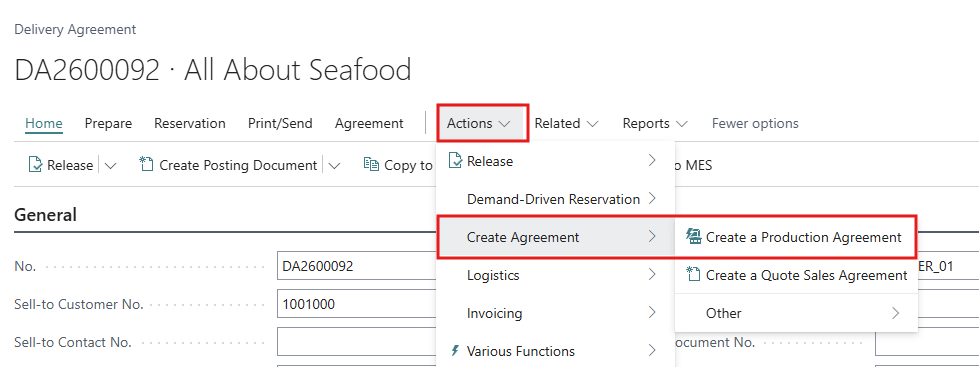
Create the Production Agreement
-
The Delivery Agreement must have status Released. From the Delivery Agreement Line Overview, the agreement is released automatically when you run the action.
-
The Delivery Agreement must have an Order Date.
-
Only items with WF Item Type WIP or Product can be added to a Production Agreement. Raw material lines can't be selected.
-
Each user's Prod. Agr. Creation Method (DA) setting in the WF User Profile (Production tab) decides how the lines are chosen. See Production User Configuration.
|
Setting |
What happens |
|---|---|
|
Full |
A production agreement is created at once with all lines from the delivery agreement. |
|
Partial or Full |
The system asks "Create a Production Agreement with all the lines from the Delivery Agreement?" Answer Yes to create it with all lines, or No to choose lines on the selection page. |
-
Open the released Delivery Agreement.
-
Click Create Agreement > Create a Production Agreement.
-
If the system asks whether to use all lines:
-
Yes: the production agreement is created and opens. Continue at step 7.
-
No: the Create Production Agreement page opens.
-
-
On the Create Production Agreement page, fill in the header:
-
Producer Code (Owner): the stock center that will produce. This field is required.
-
Processing Stage and Lot Code: optional, filled in on the new agreement.
-
Inbound Type: leave as Production.
-
-
In Lines for Selection, select the delivery agreement lines to produce and click Select line(s). The lines move to Selected lines. To undo, select a line there and click Return line(s).
-
Click Create Document.
-
The new Production Agreement opens with status Firm Planned. Check it, add any missing information, and continue as described in Working with a Production Agreement.
Each production agreement line keeps a reference to the delivery agreement line it came from. The link can be found from the sales side in the Prod. Agr. No. column of the Delivery Agreement Line Overview.
If a production agreement is Active in production, its lines can't be changed through changes to the delivery agreement. Clear Active first.