Overview
This is the API to create a new line (item, quantity, pallet etc.) for a transaction header that already exists.
This endpoint can be used in two ways
-
It is linked as a child level object for the API - MES Transactions endpoint. See example below.
-
It can also be used independently, to add a single line to a Transaction that already exists.
|
Endpoint name |
|
|
Source table |
|
|
Fixed view/defaults |
No filter, but the table only contains lines that belong to unprocessed transactions. |
|
Requests allowed |
|
|
Primary key |
The primary key of a transaction line is |
|
Record ID |
|
|
Procedures |
None |
Data
Field List
This is a list of all properties in the object.
|
Property |
Type |
Format |
Description |
|
|
|---|---|---|---|---|---|
|
1 |
|
string |
guid |
The system ID as created automatically by BC. |
record id |
|
2 |
|
integer |
|
The id of the Transaction. To create a new line, either the |
PRIMARY KEY MANDATORY * |
|
3 |
|
string |
max 20 |
To create a new line, either the |
MANDATORY * |
|
4 |
|
integer |
|
The number of this line, within the transaction. This can be given in the request, but then an error will be returned if line with that Line No. already exists. |
PRIMARY KEY OPTIONAL
|
|
5 |
|
string |
max 20 |
The item number is always mandatory. |
MANDATORY |
|
6 |
|
number |
|
Either the quantity + unit must be given - or weight. |
MANDATORY * |
|
7 |
|
string |
max 10 |
This is mandatory if Quantity is specified. |
MANDATORY * |
|
8 |
|
number |
|
When weight is used, it is assumed that it is in the standard weight unit of the system, as set up on Wisefish Base. |
MANDATORY * |
|
9 |
|
string |
max 20 |
When all the entries belong to the same Lot, this field should be populated to enable total calculations for the lot. |
optional |
|
10 |
|
string |
date |
Expiration date, to use for receipts and output. |
optional |
|
11 |
|
string |
max 20 |
To refer to trade items with a specific Stage. |
optional |
|
12 |
|
integer |
|
To refer to a single instance of a Trade Item. The primary key of a Trade Item is Stage + Line No. |
optional |
|
13 |
|
string |
max 22 |
To refer to a single instance of a Trade Item which has the Trade Item Barcode field populated. |
optional |
|
14 |
|
string |
max 20 |
To refer to a single instance of a Pallet. |
optional |
|
15 |
|
string |
max 20 |
Used mainly when |
optional |
|
16 |
|
string |
enum |
Options: blank, Open, Full |
optional |
|
17 |
|
string |
max 20 |
Only used for transaction of Type = Consumption |
optional |
|
18 |
|
number |
|
Only used for transaction of Type = Output or Receipt |
optional |
|
19 |
|
number |
|
|
optional |
|
20 |
|
string |
enum |
Used when the incoming item is supposed to be linked directly to a document. Typical usage:
Allowed values are all Document Types, but it depends on usage which values are supported. It will then be checked in the error handling phase of the processing of the transaction. |
optional |
|
21 |
|
string |
max 20 |
Used with the field above, the number of the document. |
optional |
|
22 |
|
integer |
|
Used with the field above, the number of the document line, if needed. |
optional |
|
23 |
|
string |
date-time |
The system populates this value automatically. |
non-editable |
Regarding error handling, see document MES Inbound - Error Handling & Validation
Note: There are other endpoints that are specific for certain types of transactions. These document contain information about populating data for these transaction types.
Example Object
Usage
Child level object of Transaction
The request is done on endpoint transactions , but the json will contain the array transactionLines which then can have all the properties listed here above.
Example:
POST
.../transactions?$expand=transactionLines

{
    "terminal": "PACKING",
    "externalReference": "02-659",
    "type": "Output",
    "lot": "LOT-03-01",
    "transactionLines": [
        {
            "itemNo": "70064",
            "quantity": 1,
            "unitOfMeasure": "STK",
            "weight": 2,
            "palletNo": "101-1"
        },
        {
            "itemNo": "70064",
            "quantity": 2,
            "unitOfMeasure": "STK",
            "weight": 3,
            "palletNo": "101-2"
        }
    ]
}
As usually the response will show all properties of both the header and line object.
Add a line to a transaction
When used independently the header of the transaction needs to exist beforehand.
Using Transaction Id
To add a line to a transaction with a given ID, give the property transactionId.
POST
.../transactionLines

{
    "transactionId": 113,
    "itemNo": "70064",
    "quantity": 3,
    "unitOfMeasure": "STK",
    "weight": 6,
    "palletBarcode": "00200100000000148224",
    "palletNo": "14822"
}
The response will show all fields in the table.
{
    "@odata.context": "https://containers.wisefish.com/BC/api/wisefish/base/v1.0/$metadata#companies(0c28f579-28b9-f011-af5f-6045bdacc160)/transactionLines/$entity",
    "@odata.etag": "W/\"JzIwOzEwNjU1NTgxNzI3Mjk5MTYwNzg2MTswMDsn\"",
    "systemId": "d1a8bd48-4819-f111-b02f-f89df6a2737a",
    "transactionId": 113,
    "lineNo": 3,
    "externalReference": "02-659",
    "itemNo": "70064",
    "quantity": 3,
    "unitOfMeasure": "STK",
    "weight": 6,
    "lot": "LOT-03-01",

    ...etc
}
-
The primary key of the transaction line is in 2 properties:
transactionIdandlineNo -
lineNohas value 3, which means that this was created as the 3rd line on this transaction. -
The
externalReferenceis automatically populated to show the value from the mother transaction.
Using External Reference
In the same way, a line can be added on a Transaction, by giving the externalReference .
POST
.../transactionLines

{
    "externalReference": "02-659",
    "itemNo": "70064",
    "quantity": 4,
    "unitOfMeasure": "STK",
    "weight": 8.03,
    "palletBarcode": "00200100000000148224",
    "palletNo": "14822"
}
This request created the 4th line on the transaction:
{
    "@odata.context": "https://containers.wisefish.com/BC/api/wisefish/base/v1.0/$metadata#companies(0c28f579-28b9-f011-af5f-6045bdacc160)/transactionLines/$entity",
    "@odata.etag": "W/\"JzE5OzY1MjY2NTcwMjkyODIyMjg3OTkxOzAwOyc=\"",
    "systemId": "b347370c-4919-f111-b02f-f89df6a2737a",
    "transactionId": 113,
    "lineNo": 4,
    "externalReference": "02-659",
    "itemNo": "70064",
    "quantity": 4,
    "unitOfMeasure": "STK",
    "weight": 8.03,
    "lot": "LOT-03-01",

    ...etc
}
Viewing the Data in BC
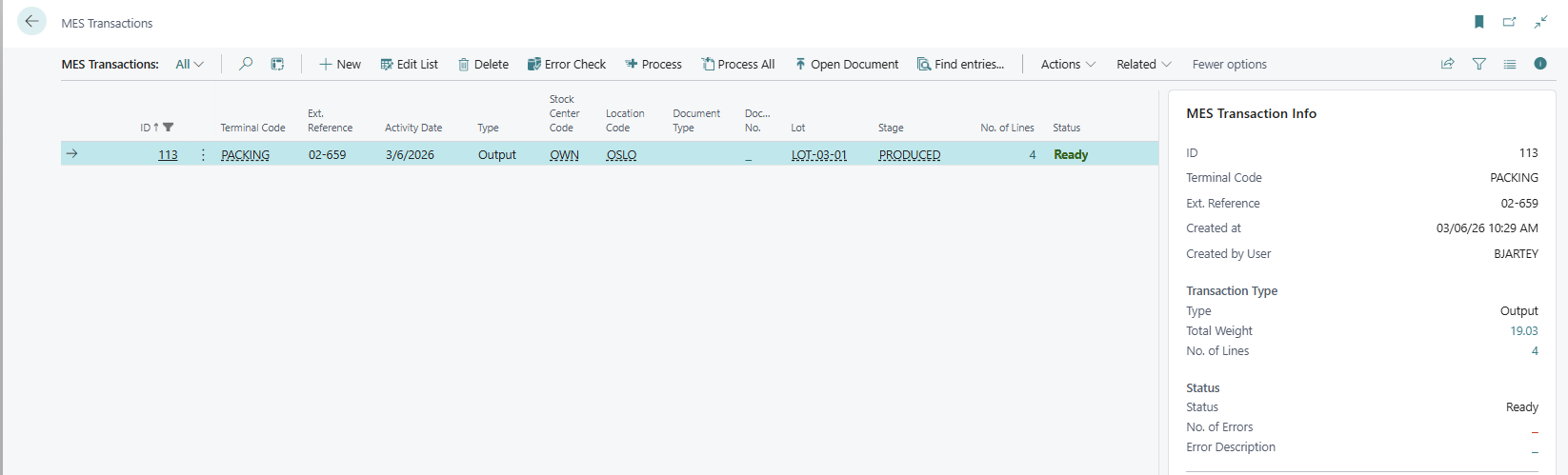
Open the page MES Transactions in BC to view the newly created transaction that is ready to be processed.
-
Field No. of Lines shows 4
-
The info box on the right shows the total weight of the 4 lines.
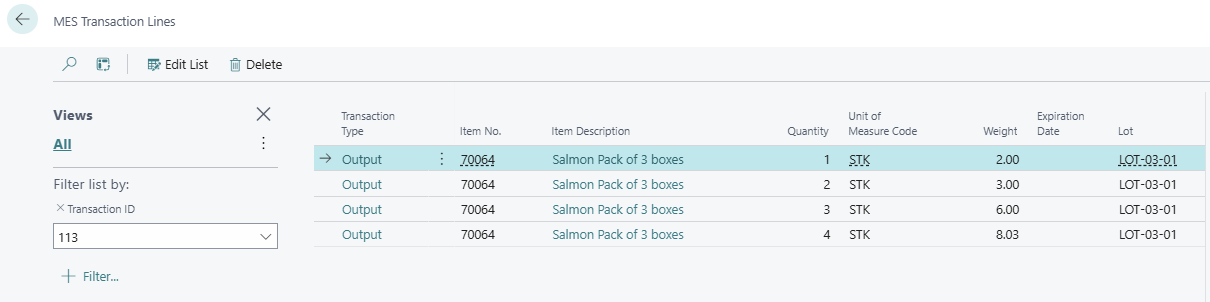
Drilling down from No. of Lines, shows the MES Transaction Lines: