
Overview
This API returns the Warehouse Receipts which are documents linked to Purchase Orders that are waiting to be received. There are also procedures to post the received items.
|
Endpoint name |
|
|
Source table |
|
|
Fixed view |
No filter |
|
Requests allowed |
GET |
|
Primary Key |
|
|
Record ID |
|
|
Procedures |
Additionally POST requests can be done on a procedure endpoints
|
Data
Field List
|
Property |
Type |
Format |
Description |
non-editable |
|
|
string |
uuid |
The system id of the record. |
|
|
|
string |
max 20 |
No. of the Warehouse Receipt. |
Record ID |
|
|
string |
max 10 |
Location Code |
|
|
|
string |
|
The type of BC document that is being received, this can be either a Purchase Order, or a Sales return |
|
|
|
number |
max 20 |
The number of the document |
|
|
|
string |
max 20 |
Sender of the receipt, this would most of the time be a Vendor number. |
|
|
|
string |
max 50 |
The name, i.e. usually a vendor name. |
|
|
|
string |
|
The status of the document, it can be Released, Partly Received |
|
|
|
string |
max 20 |
If the vendor has his own shipment reference. |
|
|
|
string |
date |
The expected receipt date, for a Purchase order, else it is blank. |
|
|
|
integer |
|
The number of lines (items) on the warehouse receipt. Usually it matches the lines on the (purchase) document. |
|
|
|
string |
date-time |
Timestamp for the Warehouse Receipt. |
|
|
|
array |
json |
The array that contains the lines of the Warehouse Receipt lines. TODO: Link to the documentation page. |
|
Example Object
Usage
Service-enabled procedures are the following, see below.
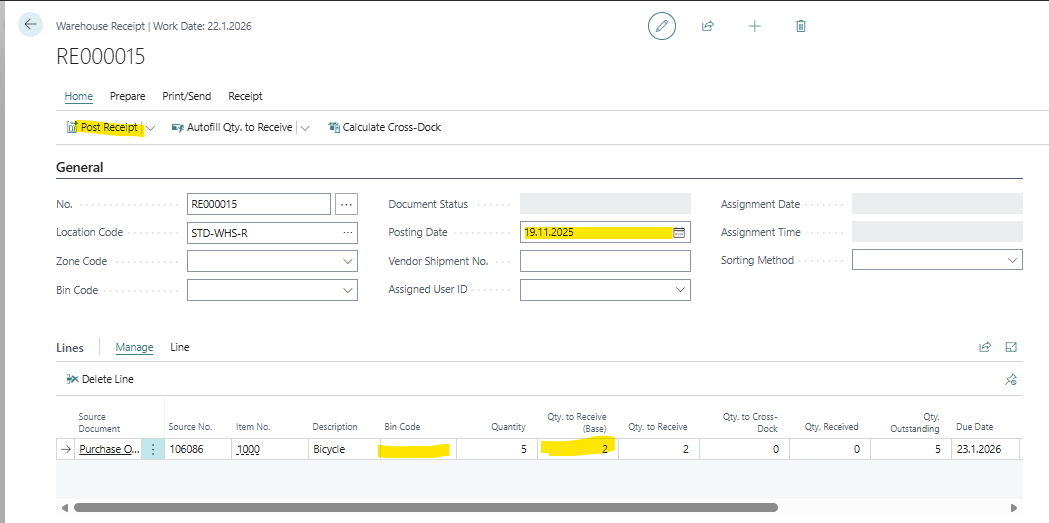
This is exactly what it does behind the scenes, just like a use would be working on the Warehouse Receipt.
-
Removes the Qty to Receive from all lines of the Warehouse Receipt
-
Then finds the line for the given item, updates the Qty to Receive there
-
Update the Bin Code, if given
-
Then posts the receipt, same method as if user would post from BC.
If there are still items to be received, the Warehouse Receipt document remains in the system. Else it will be deleted.
Receive Item
To post the receipt of an item through a Warehouse Receipt, which is usually related to a Purchase Order in Wisefish, but it could also be related to a Sales Return Order.
POST .../warehouseReceipts([number])/Microsoft.NAV.receiveItem

Body:
{
    "itemNumber": "[item number]",
    "quantity": [quantity],
    "lotNo": "[lot number]"
}
|
Parameters |
|
|---|---|
|
|
The item number. There must be a line on the Warehouse Receipt for this item. |
|
|
How many items to receive in the base unit |
|
|
May be empty if this item is not lot tracked. |
After a successful run when the receipt is for a Purchase Order, the following has happened.
-
Posted Purchase Receipt has been created, but with only line with quantity
-
One Item Ledger Entry
-
The Qty. Received is therefore updated on the Purchase Order Line
Receive Item To Bin
Same as above, but with a Bin Code. This should be used when the Location requires a Bin.
POST .../warehouseReceipts([number])/Microsoft.NAV.receiveItemToBin

Body:
{
    "itemNumber": "[item number]",
    "quantity": [quantity],
    "binCode": "[bin code]",
    "lotNo": "[lot number]"
}
|
Parameters |
|
|---|---|
|
|
The item number. There must be a line on the Warehouse Receipt for this item. |
|
|
How many items to receive in the base unit |
|
|
May be empty if this item is not lot tracked. |
|
|
Bin Code, that must exist as a Bin on the Location of the receipt line. |
Example
POST .../warehouseReceipts('RE000014')/Microsoft.NAV.ReceiveItemToBin

Body:
{
    "itemNumber": "80216-T",
    "quantity": 1,
    "binCode": "C",
    "lotNo": "25-01"
}