
This functionality applies to the Wisefish document: Delivery Agreement. (Same functionality could easily be implemented for standard Sales Orders.)
Message File
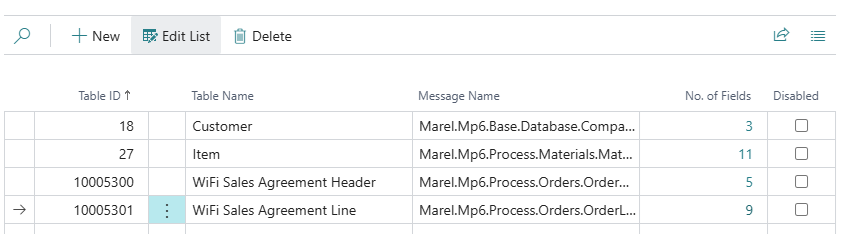
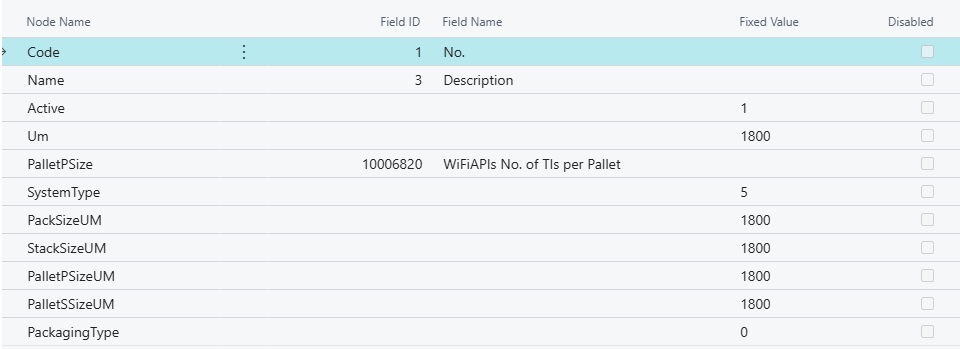
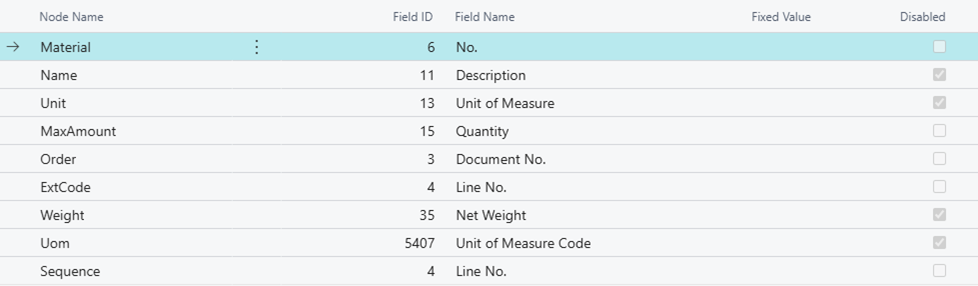
Sales Order message for a Delivery Agreement is directly linked to the “Sales Agreement Header” table which is the table behind the header. The XML file will also contain information about the Customer and Items, and therefore a External Message Setup is required for all the following tables:
-
Sales Agreement Header
-
Sales Agreement Line
-
Customer
-
Item
The structure of the XML is
-
The customer of field “Sell-to Customer No.” - with all the fields set up in the
-
The Items on every line of the document
-
The order header
-
The order line
Here is an example of af a sales order message to Innova/Axin (Marel). Click to expand.
Example of an order message to Innova


Sending the message
A released Delivery Agreement can be sent to the MES system either automatically or manually.
The field Send Sales Orders to MES will control when the messages are sent. See chapter : External Messages - Send Data from BC to MES | Wisefish APIs Base & Setup
-
XML file is created according to the setup and sent to the service bus queue for the Stock Center on the order
-
MES Status on the Delivery Agreement is changed to “Sent to MES”
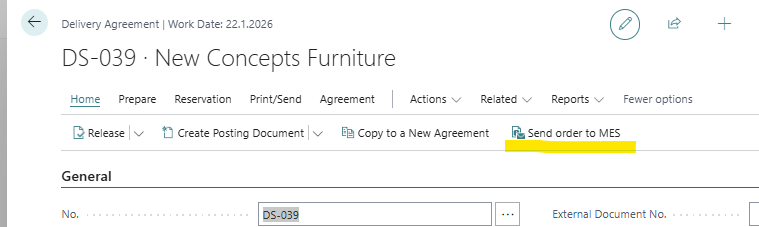
Manual Sending
Use a button on the Delivery Agreement card to send the order.
Automatic Sending at Release
If set up to …
-
send only at first release, order is status is “Unsent to MES”
-
send at every release until in process, order is sent if MES Status has not reached “in process”.
Sending when order is already in process
When MES status is “In Process” or “Finished”, the order cannot be sent. To force the sending, user will have to
-
manually change the status to “Unsent”
-
then use the button to send
Changing MES Status
Manually
The MES Status can be changed manually, if user is in a User Profile that allows changes:
With API
The preferred way would be to change the status with an API request from the MES system to BC, these are the available methods:
-
mes/salesOrder([orderNo]).productionStarted -
mes/salesOrder([orderNo]).productionFinished
The following API request are used to change the status:
POST [base url for server]/wisefish/mes/v1.0/companies(...)/salesOrder('DA-123')/productionStarted
MES Status will be changed to “In Process at MES”
If an order is still with status “Sent to MES” when first MES Transaction is processed, the status will be changed to In process at MES.
And when the production is finished, it can be changed manually, but preferably an API request should be called:
POST [base url for server]/wisefish/mes/v1.0/companies(...)/salesOrder('DA-123')/productionFinished
MES Status will be changed to “Finished at MES”
With API from EP add-on
While using the current External Production application the following requests can be called to insert an entry into Inbound From Innova:
POST [base url for server]/wisefish/EP/InnboundFromInnova

{
  "soapId": "300",  = production started
  "reserveToAgreementNo" : "DA-number"
  "MES status": "InProcess" (optional)
}


{
  "soapId": "301",  = production finished
  "reserveToAgreementNo" : "DA-number"
  "MES status": "Finished"    (optional)
}
See more details in EP API - Inbound Entries