
A token is used to authenticate against Microsoft BC and Wisefish.
The token is a long string and it has an expiration time, it expires after one hour.
When querying for a token you will get a reply like this:
{
    "token_type": "Bearer",
    "expires_in": 3599,
    "ext_expires_in": 3599,
    "access_token": "<access-token>"
}
Where the token type, expiration time and the token itself is returned.
When token has been fetched we recommend calculating the expiration time and fetching a new token if the current token is about to expire, the expires_in value is in seconds.
It is possible to request a token before every request but that generates an unnecessary overhead and is not recommended.
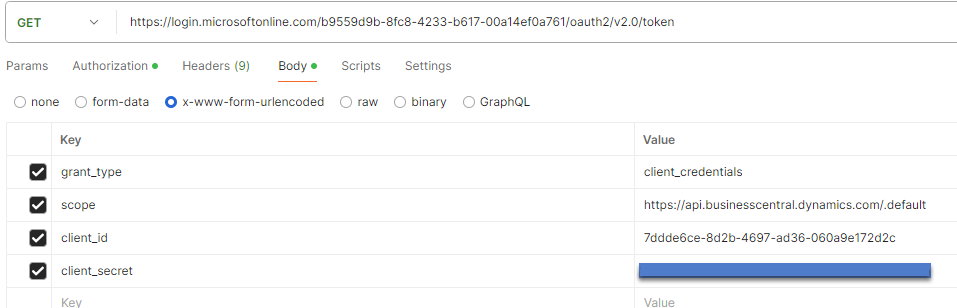
The request URL is https://login.microsoftonline.com/{TenantId}/oauth2/v2.0/token
Postman example request with parameters
C# Example request
// This example fetches a new token if the token has not been fetched or if it is expired
public static class TokenHelper
{
  private static string _bearerToken = null;
  private static DateTime _expires = new DateTime(2000,1,1);

  public static string GetToken()
  {
    if (_expires > DateTime.Now() || _bearerToken == null)
    {
      var options = new RestClientOptions("https://login.microsoftonline.com")
      {
        MaxTimeout = -1,
      };
      var client = new RestClient(options);
      var request = new RestRequest("/<tenant-id>/oauth2/v2.0/token", Method.Get); // The GUID is the TenantId
      request.AddHeader("Content-Type", "application/x-www-form-urlencoded");
      request.AddParameter("grant_type", "client_credentials");
      request.AddParameter("scope", "https://api.businesscentral.dynamics.com/.default");
      request.AddParameter("client_id", "<client-id>");
      request.AddParameter("client_secret", "the secret"); // Replace with the actual secret
      RestResponse response = await client.ExecuteAsync(request);

      _bearerToken = result["access_token"]?.ToString();
      var secs = result["expires_in"]?.ToString();
      var seconds = Convert.ToInt32(secs);
      _expires = DateTime.Now.AddSeconds(seconds);
      return _bearerToken;
    }
  }
}