
Overview
The list page that contains the data from External Item Label Selection with a filter on external party as a Customer.
Below is an Entity Relationship Diagram showing the primary key fields of the External Item Label Selection table, and how one of the fields in the primary key, is the primary key of the header table.
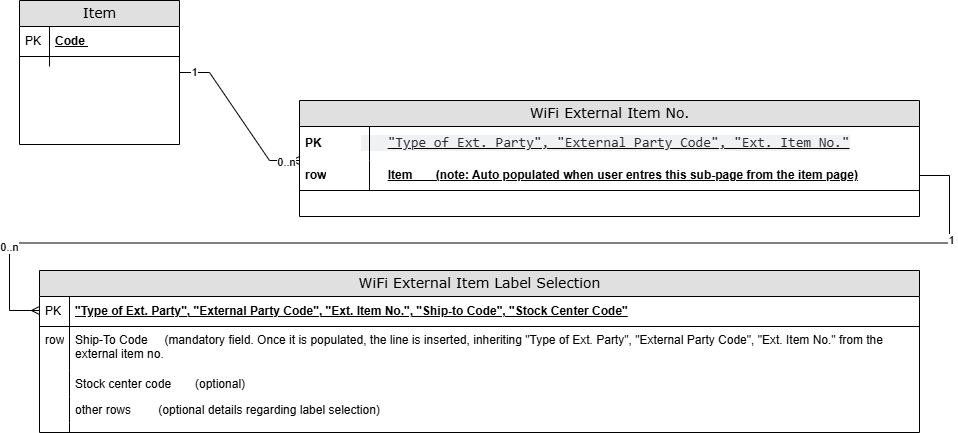
Regarding primary keys.
-
Table: Itemhasthe field Codeas Code[20]. -
Table: WifiExternalItemNo.has composite PK:
1)“Type of Ext. Party"(Option field, containingOptionMembers = "Stock Center",Customer,Vendor,Country)
2) “External party Code” [Code20]
3) “Ext. Item No.” [Code20] -
Table: WifiExternalItemLabelSelectionhas composite PK: -
1)
“Type of Ext. Party"(Option field, containingOptionMembers = "Stock Center",Customer,Vendor,Country)
2) “External party Code” [Code20]
3) “Ext. Item No.” [Code20] -
4) “Ship-to Code” [Code10]
-
5) “Stock Center Code”[Code20]
-
-
Relationship: One-to-Many (
1--0..N) from “top to bottom”, where “Item“ is the top.
|
Endpoint name |
|
|
Source table in Wisefish |
|
|
Fixed view |
Shows entries with
|
|
Editable |
No data modification possible. |
|
Procedures |
There are no procedures on this endpoint. |
|
Primary key |
|
Data
Field List
|
Property |
Type |
Table Field |
Field Type |
Note |
|
|
string |
Type of Ext. Party |
Option |
Options: Stock Center, Customer, Vendor, Country |
|
|
string |
External Party Code |
Code[20] |
|
|
|
string |
Ext. Item No. |
Code[20] |
|
|
|
string |
Ship-to Code |
Code[20] |
|
|
|
string |
Stock Center Code |
Code[20] |
|
|
|
string |
Inner Label |
Text[30] |
|
|
|
string |
Trade Item Label |
Text[30] |
|
|
|
string |
Outer Label |
Text[30] |
|
|
|
string |
Pallet Label |
Text[30] |
|
|
|
string |
GTIN |
Code[14] |
|
|
|
string |
GTIN (TI) |
Code[14] |
|
|
|
string |
GTIN (Outer) |
Code[14] |
|
|
|
string |
Production Information |
Text[500] |
|
|
|
date |
Last Date Modified |
Date |
|
|
|
string uuid |
SystemId |
GUID |
|
|
|
date-time utc |
SystemModifiedAt |
DateTime |
Note: The name of this field in business central is “systemmodifedAt” and it can be seen in page inspection in the user interface. |
Example