
Wisefish Base
Release Date: 02/10/2025
What’s New that Needs Your Attention
UI Updates Overview – Key Changes and User Workflow Improvements
With a mandate to enhance the UI and user experience, we have recently implemented several critical and impactful UI changes aimed at improving workflow and simplifying user interactions.
The major changes includes rearrangement of actions in Agreement Pages under clearly defined action categories that aligns closely with their purpose and workflow context.
In addition to this, we have removed the word (prefixes) “Wisefish”, “Wise” and “WF” from all the Business Central Standard Pages that are extended by Wisefish to better align with BC standards, followed by rearrangements of some fields between the tabs and hiding least used fields.
Further, enhancements have been made to the User Profile card to display only the most critical fields by default, reducing user overload while introducing a few important new features that improve usability and accessibility.
These changes are described in detail below:
Rearrangement of Actions and Tabs in Agreement Pages
Actions are now logically grouped (e.g., Home, Prepare, Reservation, Print/Send, Agreement) for faster and more intuitive agreement processing.
-
Users can now complete the entire agreement process using just the first three action buttons: Home, Prepare, and (for Delivery Agreements) Reservation. This simplifies navigation and reduces clicks.
-
Print/Send: All print and send actions are grouped together for easy access.
-
Agreement: Quickly view related information, entries, and statistics without risk of changing data.
-
Frequently used actions are always visible.
-
Less common or advanced actions are available under More options, keeping the interface clean.
-
Logistics and Warehouse actions are now better organized, with only the most relevant shown by default.
Wisefish cards with redefined UX according to the guidelines for agreement : Delivery Agreement, Receipt Agreement, Production Agreement, Storage Receipt Agreement, Storage Shipment Agreement
Examples:
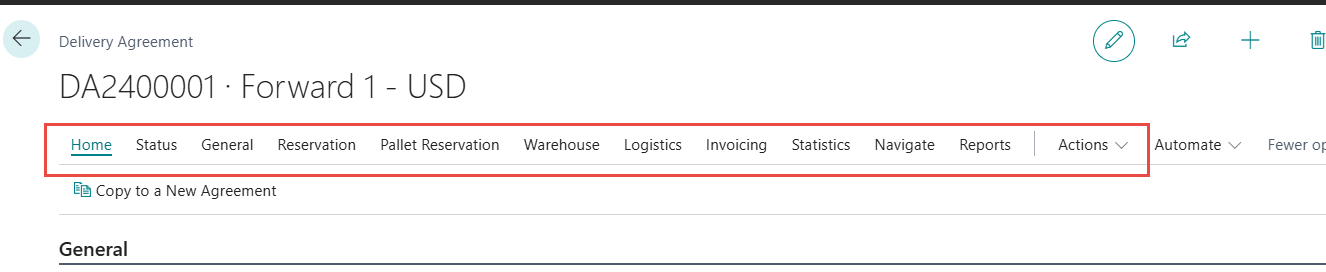

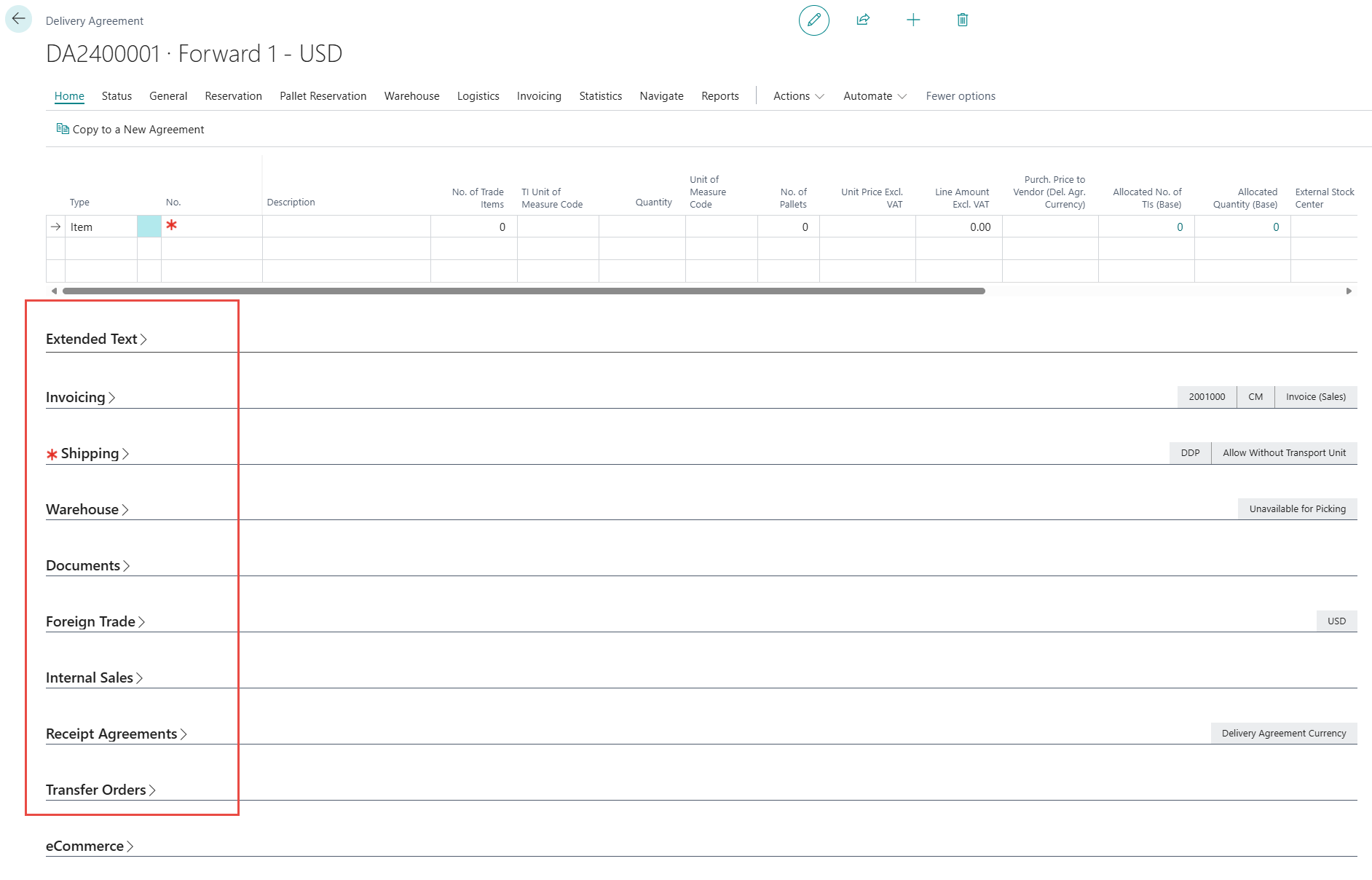

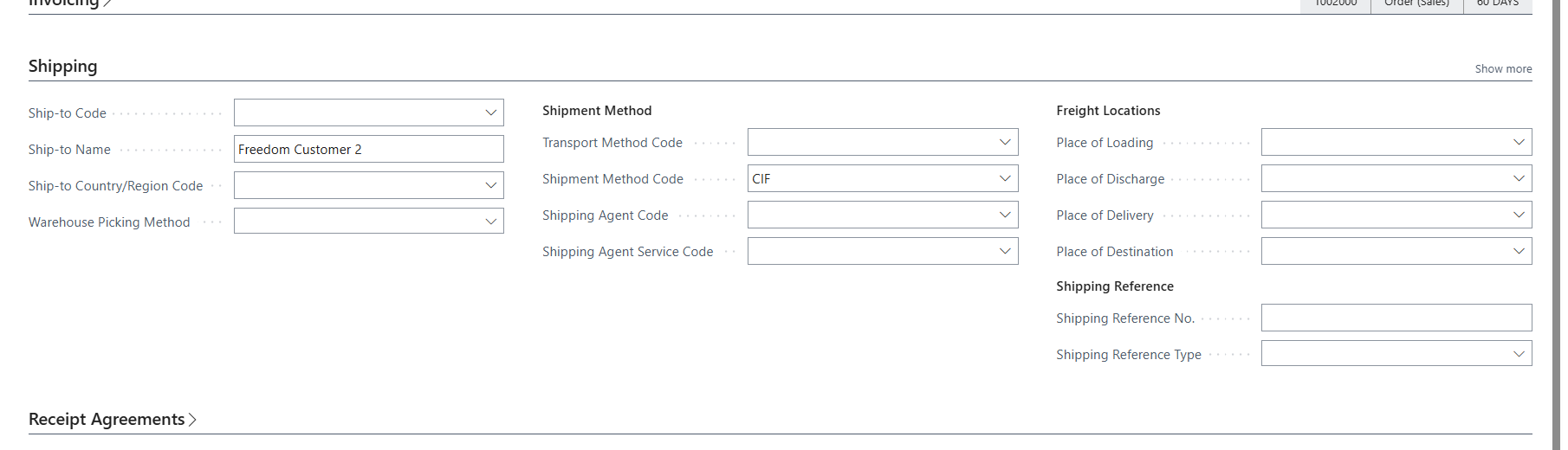
Standardizing the BC Standard Pages extended by Wisefish
To standardize the BC standard Pages that are extended by Wisefish, the word (prefixes) “Wisefish”, “Wise” and “WF” has been removed from all the Pages. In addition to these changes few more UI enhancements were done which includes rearrangement of fields in different action categories, hiding the least used fields under personalize or More fields and updating the tooltips to make it more user friendly.
Changes were done on Items, Customers, Vendors, Purchase, Sales and Transfer document, Location and Ship- to Address.
Item card
-
The number of visible tabs on the Item Card has been significantly reduced, making navigation easier and less overwhelming.
-
Tabs are now context-sensitive: only relevant tabs are shown based on the item type (e.g., Raw Material, Product, WIP).
-
Add-on-specific fields and tabs are now only visible when the corresponding add-on is in use.
-
Fields have been logically grouped and reordered for better clarity and workflow.
-
Frequently used and critical fields, such as "Trade Item Type," are now prominently placed at the top of the Item tab.
-
Rarely used fields are moved to "Show more" sections, keeping the main interface clean while retaining access to advanced options.

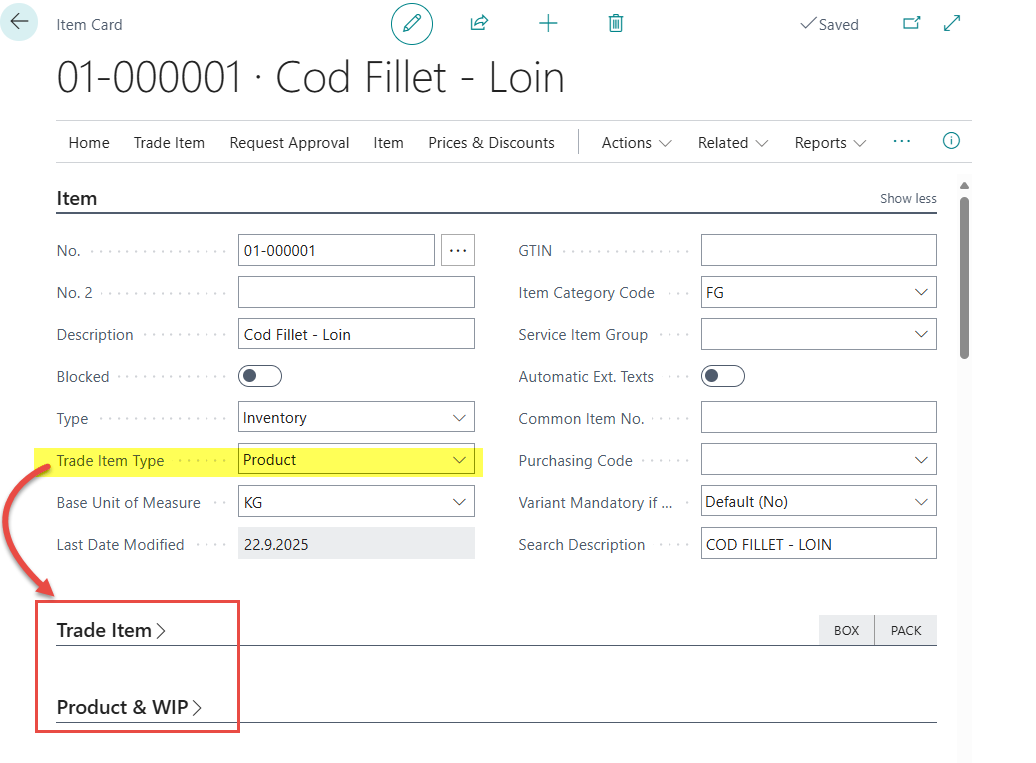
Rearrangement in User Profile
The User Profile Page has also been made more user friendly. Before the change, it displayed all available fields by default, including ones only relevant to specific addon modules, leading to unnecessary clutter. Now it only shows the most essential fields by default, while the addon module fields are only displayed when the addon module is displayed. The customized fields are hidden and can only be displayed by Show More or Personalize. In addition, a new column “No of Users” has been added, the user lists of that profile are listed when drilled down. The copy from profile feature has also been added to enable user to create a copy from profile to other.
How was it before the change?
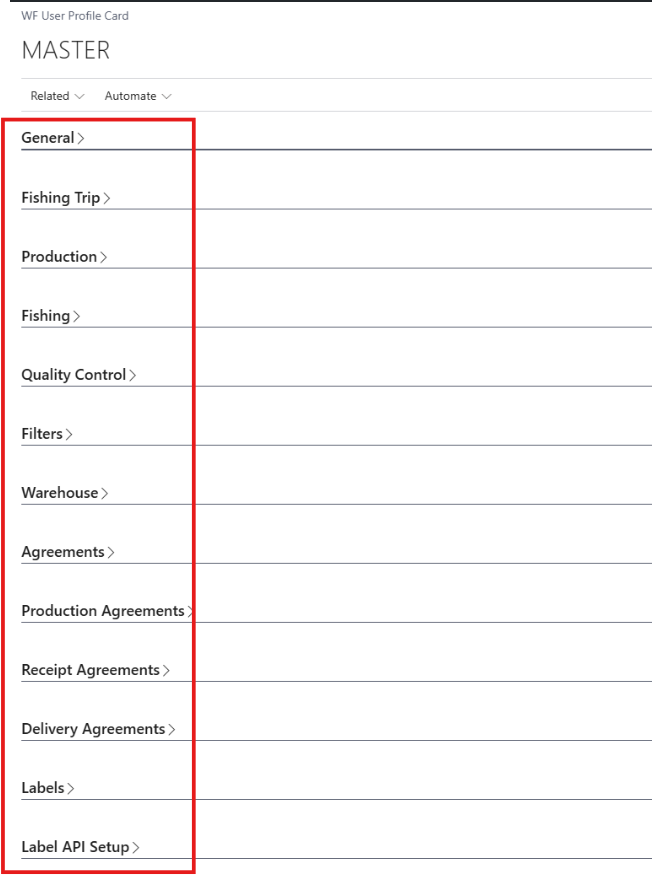
How is it after the change?

Naming of Wisefish Roles
The Wisefish Roles have been renamed. The overview of the changes are as listed in below table.
|
New Role Name |
Old Role Name |
|---|---|
|
Mobile User Wisefish |
Wise Handheld Profile |
|
Logistics Manager Wisefish |
WiseFish Logistics Management Profile |
|
Administrator Wisefish |
WiseFish Master Profile |
|
Production Manager Wisefish |
WiseFish Production Manager Profile |
|
Sales Export Manager Wisefish |
WiseFish Sales Export Profile |
|
Sales Manager Wisefish |
WiseFish Sales Manager Profile |
|
Warehouse Manager Wisefish |
WiseFish Warehouse Manager Profile |
|
Mobile User Wisefish - WMS |
WiseFish Warehouse Handheld Profile |
Please note that the Sales Export Manager Wisefish Role is hidden. It can be enabled in the Profiles (Roles) page.
Enhancements:
-
Item Charge Cost Distribution Document - Distribution Method: Number of TIs
Amendments have been made to the Item Charge Cost Distribution, to make sure that the negative sign of the Quantity(Base) is taken into account -
Improved error handling on records from Innova where production date is missing
In some edge cases, error messages could be misleading if the "production date" was missing on entries from innova. -
Improvements to Tooltips for Wisefish fields
The Wisefish Tooltips were reviewed and updated if necessary. -
Sales Invoices that have incoming VAT
Improvements to the display of the VAT in & output, to avoid the need to manually update Sales Invoices. -
Connector Setup Wifi Peripherals Flushing
A check for empty records was added to avoid errors for them in the Connector Setup -
Consume/Produce Multiple Trade Items for Production Agreement
When consuming/ producing multiple trade items, and a user can now select an entry in the fact box, the focus is moved to the respective line in the main page.
Enhancement in Reports:
-
New Report - Trade Item Inventory Turnover by Period
This report was created to make overlooking the Storage Items from week to week easier.
This report shows the In Balance, Out Balance, Intake and Outtake within the selected period.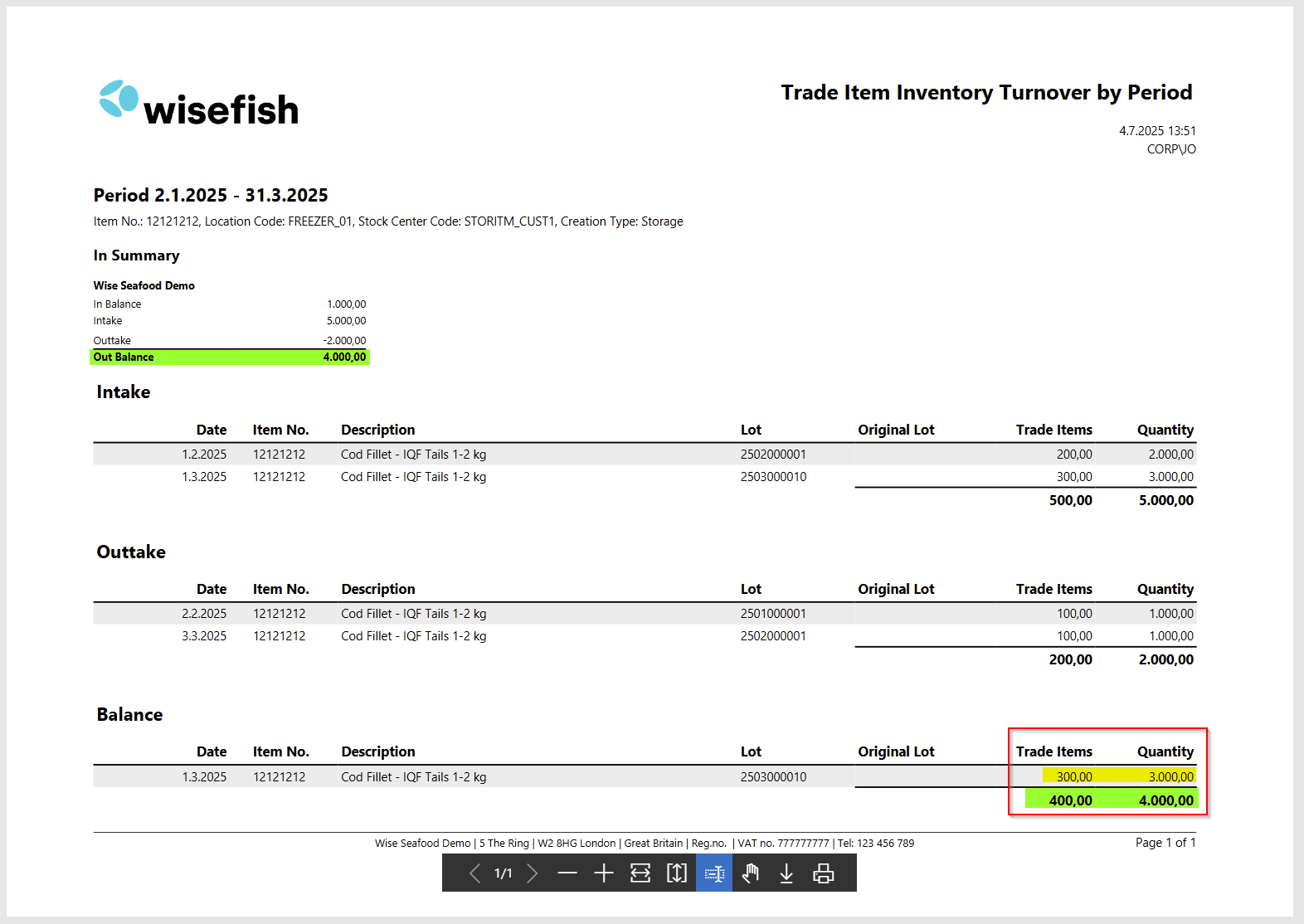
-
Report (WiFi Raw Material Purchase (10004700)) is lacking translation
Missing norwegian translations to reqest page of report "Raw Material Purchase" were added. -
Trade Item Inventory Turnover Report
The outtake date was changed to be the Loading date, not the shipment date. -
Coldstore Report 10005318 failes to run / Lot no is not showing in report
Some customers experienced problems to run this report and if it was running, the Lot number was not shown. -
Item description not shown in report 10005404 "WiFi Pknt List UnReservedLines"
The Item description did not appear on the report, it only displayed the Item Nos. Additionally, the report was shown in the system language, not the Customers language.
Resolved Issues:
-
Changed status not shown on Quote Sales Agreement
When creating / copying a Quote Sales Agreement, the status “Open” is shown in the Status field, but when changing the status, the “Status” field turned blank. -
Create New Lot: Lot card issues
When creating a new Lot, an error was thrown that the Stock Center would not exist, before any data was entered in the Lot Card. This happend when no Stock Center was set in the User Profile.
The error message has been improved to inform users that a Stock Center Code must be specified in WF User Profile and a direct link to the User Profile has been added. -
Wrong Description in DA copy action
When copying DA the dialog title says Receipt Agreement Copy Prerequisites instead of Delivery Agreement Copy Prerequisites. -
Error - Index out of bounds - more then 10 certifications on posted purchase report
The certification information was removed from the report when selecting mupliple Posted Purchase Agreements to avoid the Index out of bounds error. -
Mix from pallet - able to manipulate the pallet number
When creating a mix from pallet and filling out the manual pallet no, the system was creating a new pallet with that same number (already existing pallet number) but new barcode.
Link to Issues:
List of Issues Released October 2025
Release History: