
To ensure that indirect costs, such as overhead, labor, water or electricity are properly captured in production costing without affecting inventory valuation, Non-Inventory Items are used in the Production BOM.
A non-inventory item isn't kept in stock. When the finished product is produced, its cost is posted to the production together with the other BOM components, and can be posted to G/L.
Item Card
Create one item for each type of cost, for example Overhead and Labour.
On the item card, fill in:
|
Field |
Value |
|---|---|
|
Type |
Non-Inventory |
|
WF Item Type |
Leave blank. Items with a WF Item Type are treated as fish items and aren't consumed automatically. |
|
Base Unit of Measure |
The unit the cost is measured in, for example HOUR, L or KG. |
|
Unit Cost |
The cost per unit. This is the cost that is posted when the item is consumed through the BOM, so keep it up to date. |
|
Gen. Prod. Posting Group |
A posting group for this type of cost, for example OVERHEAD or LABOUR. |
Below is an example of a Non-Inventory Item set up for Overhead:

In the same way, Labour can be registered as a Non-Inventory Item:
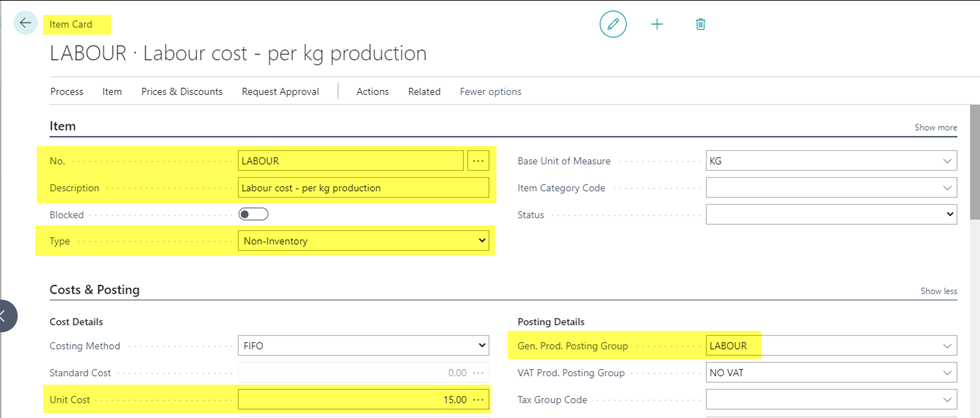
💡 Use a separate Gen. Prod. Posting Group for each type of cost. This lets you post overhead and labour to different G/L accounts.
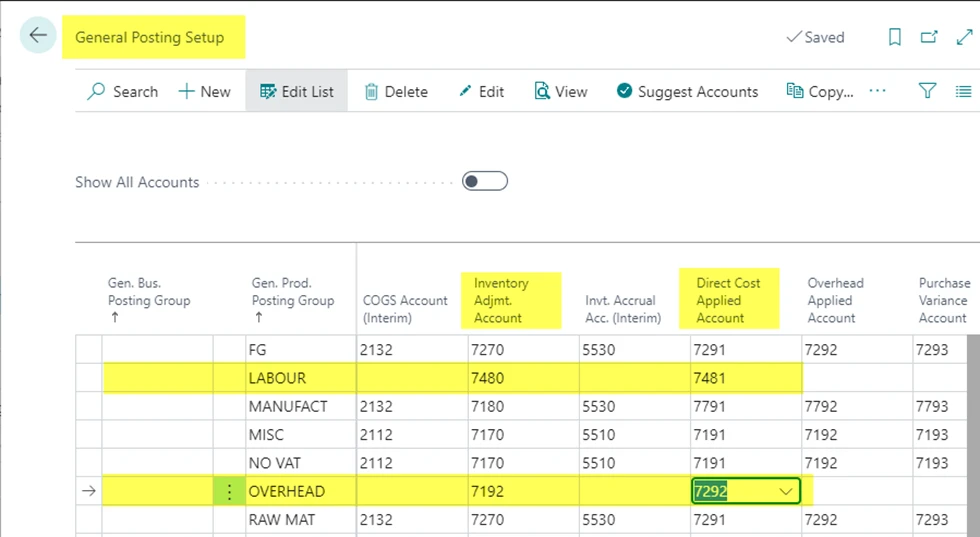
Set up the General Posting Setup
For each Gen. Prod. Posting Group used on the non-inventory items, there must be a line in the General Posting Setup with:
-
Gen. Bus. Posting Group: blank
-
Gen. Prod. Posting Group: the group from the item, for example OVERHEAD
-
Inventory Adjmt. Account: filled in
-
Direct Cost Applied Account: filled in
The system only uses the line with a blank Gen. Bus. Posting Group. If this line is missing, or one of the two accounts is empty, posting stops with an error.
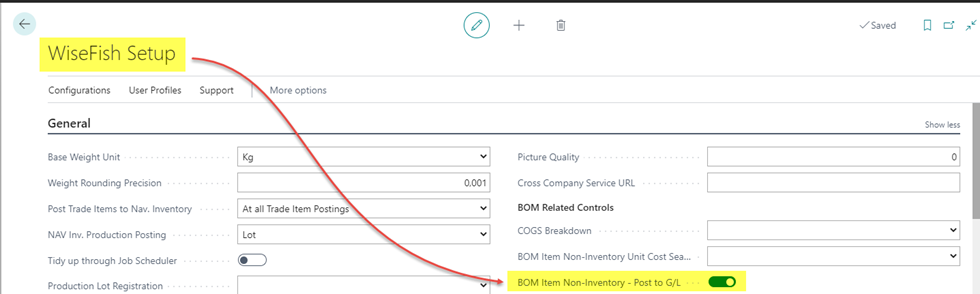
Finally, make sure that field "BOM Item Non-Inventory - Post to G/L" in "WiseFish Setup" is enabled.
Add the items to the BOM
Add the non-inventory items as lines on the BOM of the finished product, in the same way as other components:
-
Type: Item
-
No.: the non-inventory item
-
Quantity per: how much is needed to produce one base unit of the finished product
The Non-Inventory Item column on the BOM lines shows which components are non-inventory items. The BOM Line FactBox shows the unit cost and the total cost for the selected line.
Example: to produce 1 KG of Herring Fillets, 1 L of water is used. The BOM line water has Quantity per = 1. If water has a unit cost of 0.02 EUR, the BOM adds 0.02 EUR per KG produced.
See also Create and define a Wisefish Production BOM.
What happens when output is posted
When the finished product is produced, the system consumes the BOM components (immediately or later, depending on BOM Postings for Trade Items). For each non-inventory component:
-
An item ledger entry is created with the quantity from the BOM and the cost from the item's Unit Cost. No inventory is affected.
-
If BOM Item Non-Inventory – Post to G/L is enabled, a G/L entry is posted:
-
Account: Inventory Adjmt. Account
-
Balancing account: Direct Cost Applied Account
-
Amount: the cost of the component
-
Description: finished product no.: component description (component no.)
-
Dimensions: taken from the item ledger entry
-
This way, overhead and labour become part of the production cost of the lot, and are visible in G/L on the accounts you've chosen.