
Wisefish Base
Release Date: xx/xx/2026
What’s New that Needs Your Attention
Wisefish Reports Standardization
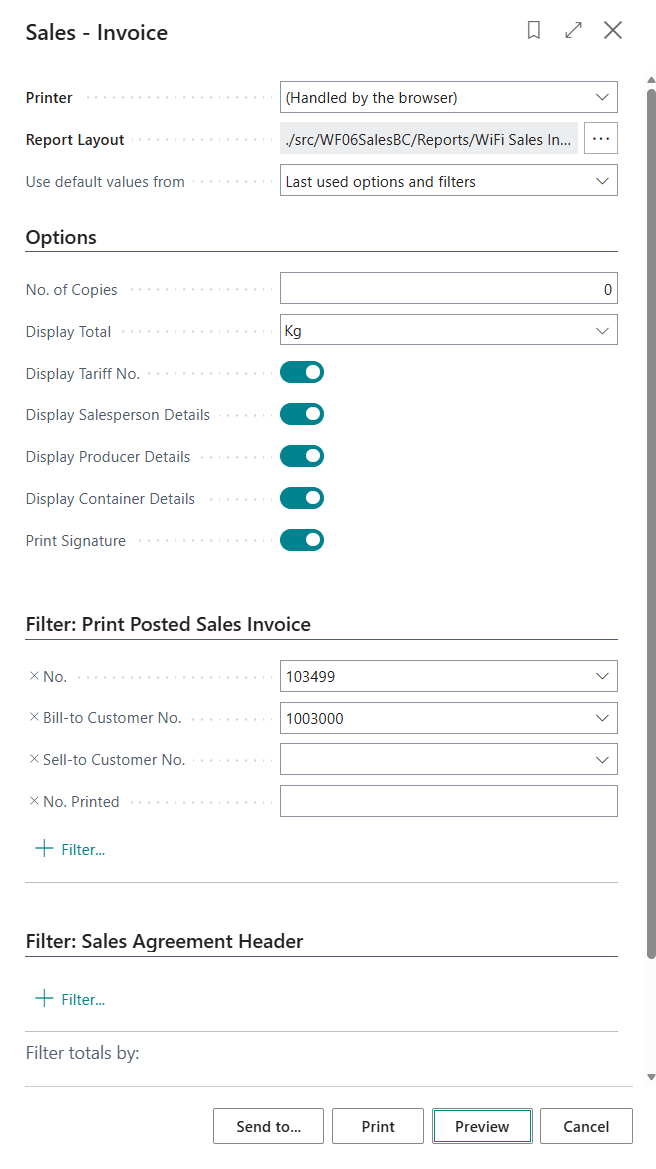
A mandate has been established to ensure all Wisefish reports adhere to consistent formats with improved quality, fewer errors, and enhanced usability. The most widely used Wisefish reports are being updated based on priority, with Sales Reports identified as the first priority for enhancement.
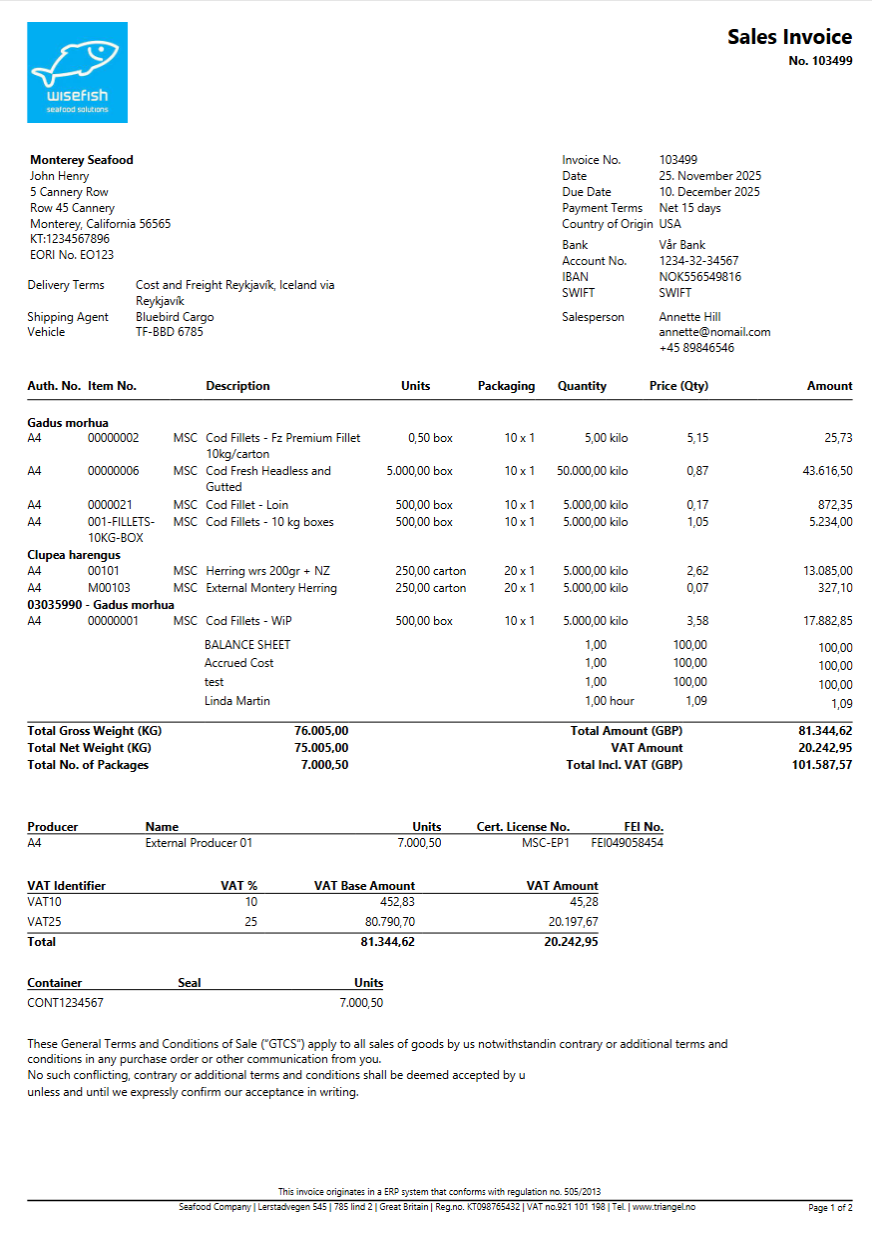
A completely new standard report layout and set of guidelines have been created for all Standard Reports. The filter dialog boxes have been cleaned up, with unused fields hidden, field names changed to make them clearer, and fields made consistent across all sales reports with similar formatting throughout.
The reports themselves have been enhanced with headers and footers that are consistent across all reports. Column names have been changed to be more meaningful and reformatted for clarity. All known issues have been resolved, and the reports have been redesigned to be more intuitive and user friendly.
Each new report has its own Report ID. The plan is to eventually phase out the old reports once all customers have switched over to the new reports.
|
Old Name |
Old Report Id |
New Name |
New Report Id |
|---|---|---|---|
|
Sales Invoice Proforma |
10004727 |
Proforma Sales Invoice |
10004731 |
|
Sales Credit Memo |
10004728 |
Sales Credit Invoice |
10004733 |
|
Delivery Agreement Grand |
10005300 / 10005310 |
Order Confirmation |
10005330 |
|
Posted Sales Invoice |
10004730 |
Sales Invoice |
10004732 |
This is an ongoing initiative, and additional reports are being enhanced for release in future versions.
Examples of New Sales Reports:
Improvements to Scheduled Trips
The existing Schedule Trip setup feature has been revised to improve usability, ensure better quality, and create a more intuitive workflow.
Following are the enhancements done:
-
The option to create new scheduled trip and delete existing scheduled trip has been added to the scheduled trip list page.
-
The Manage Transport Units for Scheduled Trip page has been changed so that it is a default page for schedule trip setup that opens when schedule trip is clicked in the Schedule Trip list page.
-
The caption “Manage Transport Units for Scheduled Trip“ has now been simplified to “Scheduled Trip Card” for the page.
-
A new option “Ignore TUs in Manage Transp. Units for Sched. Trip“ has been introduced in the Logistics setup, to hide the “Transport Units” sub-page of the Scheduled Trip Card.
-
In the Scheduled Trip Card, the “Transport Unit Status” field-group has been obsoleted.
-
The “Shipping Agent Name” field has been added to the page.
-
The “Allocated Delivery Agreements” section of the “Scheduled Trip FactBox” was made visible for all conditions.
-
The content of the “Transport Schedule” field-group has been transferred into the top-level field-group. Similar changes were also made to the "Transport Unit Card" for coherence purposes.
-
The visibility on various fields has been changed, to be shown when the “Show more” option is applied.
-
The changes has been done in behavior of the master page, such that when the “Shipping Agent Code” field and other fields like "Shipping Facility Code", "Vehicle Code (Default)" and "Location Code (Default)" is assigned, the master page and the connected sub-page with the transport units are auto refreshed.
-
The connection between the master page and other connected sub page has been strengthened such that when user navigates directly to create a transport unit without assigning anything in the master page the reference to the number of the scheduled trip on the related transport units will be preserved.
-
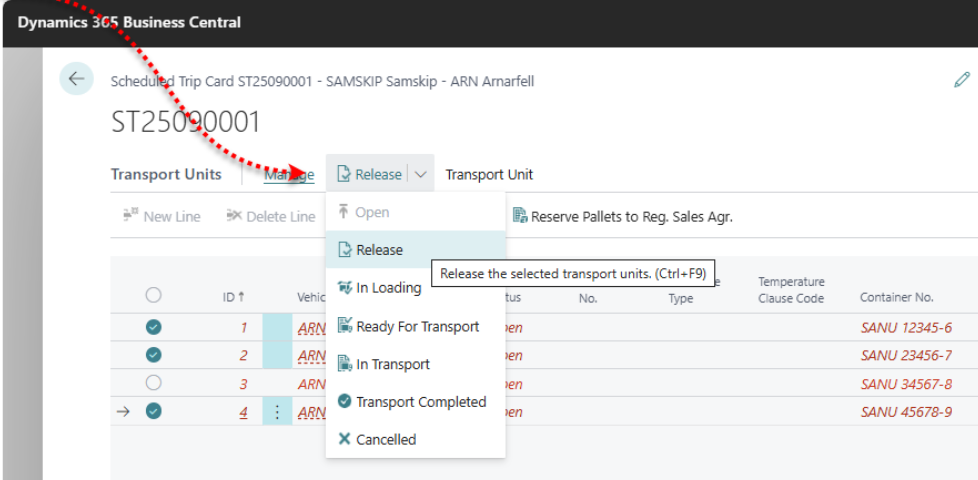
The action “Change Status…” has been made non-visible by default. New actions for the status change, without a dialog, have been introduced in a drop-down list directly from the action bar. The status change can now be applied to a selection of transport units in the lines.
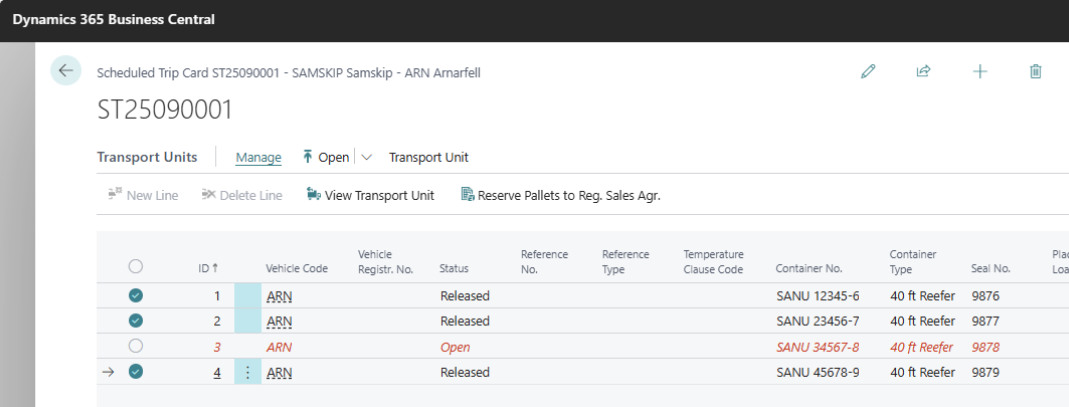
Additionally, some rearrangements of the fields were done in the page.
Enhancements:
-
Review "Help" links in Wisefish apps
The help links on Wisefish pages were updated, to refer to the latest documentation. -
Fill out default values related to vessel registration on a Receipt Agreement
When creating a Receipt Agreement and selecting a Vessel, the default landing harbor, default fishing equipment, default fishing area and default landing type of this Vessel are auto filled into the Agreement. -
Add multiple Trade Items to pallet at once
An option was added to select multiple Trade Items and add them to a pallet in one operation, instead of adding them one by one. -
Blanket Agreement lists - rearrange the navigation links
The action groups have been rearranged in the blanket sales agreement and the blanket purchase agreement list to match the navigation in Receipt and Delivery Agreements. -
Purchase to settle after sale
When posting a sales invoice, an error message has been introduced into the creation method of an entry into the “Purchase to Settle After Sales Entry“ table, if the reference to the delivery agreement line is missing. -
Trade Item Availability
The following UX improvements were made to the Trade Items Availability by Lots page.-
The least used columns were made invisible by default to simplify the view.
-
The navigations were improved so that there are fewer mouse clicks to perform an actions.
-
The buttons were rearranged to make it more user friendly and meaningful
-
The other related changes like Delivery Agreement has been changed similarly so that the action button names are consistent
-
-
Show Stock Center in Production Agreements
A field for the Stock Center has been added to General tab of Production Agreements. -
Fix issues of multiple lines caused by rounding difference
There were huge number of extra lines of value 0.1 or 0.2 displayed in the Value Entries and General Ledger Entries when contribution distribution was done. The issue was occurring because of the rounding reminder left in the end after the contribution. This issue has been fixed such that minor cost entries in the general ledger entries and value entries are added to larger entries before posting so that the records of 0.1 cent in and out are not displayed as a separate lines and the speed of cost distribution is increased significantly.
-
Create a new role for Trader / Salesperson
A new Role Center was added for Traders / Salespersons. This new role center for Trader Role is more organized, neat and meaningful and most importantly menus, actions and activities are categorized and displayed in a way that is easily accessible to end users. -
Small UX improvements
- When selecting Receipt Agreements into "Trace from Origin", only Agreements with Posting Document Type - Order or Invoice can be selected.
- The Contribution Raw Material field in the Item Card has been moved to the Trade Item tab for all Item types.
- In the Trade Item Ledger Entries page, the Units of Measure have been added to the main Item quantity columns.
- A new factbox was added to the Purchase Order - Purchase Order Information, which shows the number of Incoming Trade Items and Warehouse Receipt lines.
- Two fields were added to the Items list, showing the Inventory (number of Trade Items) and the Trade Item Unit of Measure. -
Improvements when deleting Items from Trade Item Journal lines
When deleting lines from the Trade Item Journal that have been assigned Tracking, the connected tracking lines are also deleted. -
Warping landing type in fishing trip
When the catch is marked asis-hafro type="boolean">true</is-hafro>in the XML from Fish market, the warping for the landing type has been set to 10.
This landing type overrides the default type set on the vessel. -
General Changes in Reports
-
Coldstore Report 10005318 original lot not showing and report not handling many lines
A fix was done to the original lot not showing in the report and the handling of large numbers of lines was improved. -
Packing List Detail - Agreement (10005402)
In some cases the wrong Vessel and Landing date was displayed in the Report. This issue has been fixed such the report is displaying a correct value for the respective field. -
Remove packing lists that are not in use
The WiFi Pknt list UnReserved Items (10005404), WiFi Packing Lint - Unposted (10005401) and WiFi Packing List (10005400) are no longer in use and have been marked as obsolete. -
Inventory by Location
When searching for this Report, two options were available. To clarify which of them is provided by Wisefish, the report has been renamed to Inventory by Location (Trade Items).
-
Resolved Issues:
-
Assisted Setup page - remove duplicate
The wizard for Wisefish setup appeared twice in the Assisted Setup page. The duplicate was removed. -
Change "Receipt" to "Shipment" in Storage Shipment Agreements list
In the Storage Shipment Agreements list the Shipment dropdown was wrongly named Receipt. It has been named renamed. -
Certification program not displayed when producer no. is set for stock center
When a Stock Center has a Custom Producer No. set, the reports did not display the certification program details. The issue has been fixed such that the certification programs are displayed correctly in reports if the Stocker Center has a Custom Producer defined. -
Additional Sales Cost - lines are red
The lines in the Estimated additional sales cost are displayed red only when user updates something, Quantity, Price in DA lines or something like Currency Code in DA and goes to additional cost page which is expected warning user that some changes has been done and update of cost is required. When user updates the cost the lines become black. The lines are black by default if there is no update required.
Link to Issues:
List of Issues Released January 2026